







Question: Using Visual Studio or equivalent IDE for Mac, create a website made of one HTML file and XML file named books.xml file. Here we assume
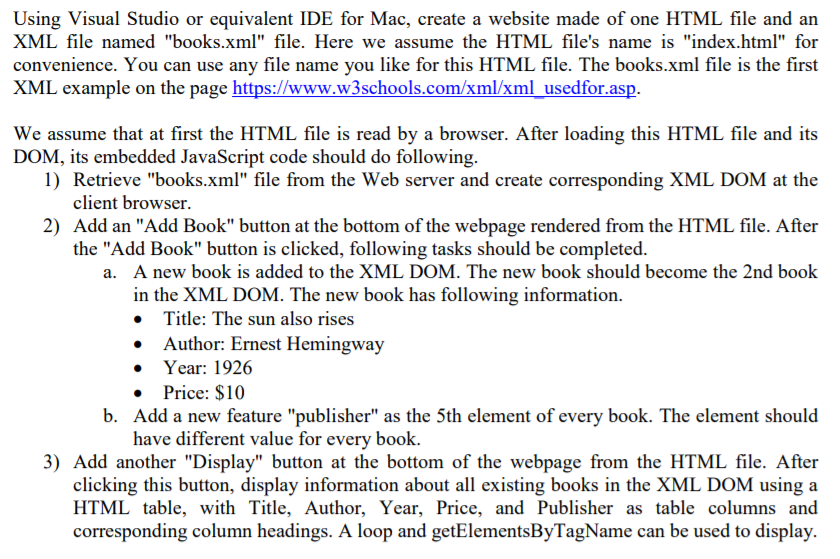
Using Visual Studio or equivalent IDE for Mac, create a website made of one HTML file and XML file named "books.xml" file. Here we assume the HTML file's name is "index.htm" for convenience. You can use any file name you like for this HTML file. The books.xml file is the first XML example on the page https://www.w3schools.com/xml/xml usedfor.asp. e assume that at first the HTML file is read by a browser. After loading this HTML file and i DOM, its embedded JavaScript code should do following. 1) Retrieve "books.xml" file from the Web server and create corresponding XML DOM at the 2) Add an "Add Book" button at the bottom of the webpage rendered from the HTML file. After a. A new book is added to the XML DOM. The new book should become the 2nd book client browser. the "Add Book" button is clicked, following tasks should be completed. become in the XML DOM. The new book has following information. new book has foowncw Title: The sun also rises Author: Ernest Hemingway Year: 1926 Price: $10 Add a new feature "publisher" as the 5th element of every book. The element should have different value for every book. 3) Add another "Display" button at the bottom of the webpage from the HTML file. After clicking this button, display information about all existing books in the XML DOM using a HTML table, with Title, Author, Year, Price, and Publisher as table columns and corresponding column headings. A loop and getElementsByTagName can be used to display. Using Visual Studio or equivalent IDE for Mac, create a website made of one HTML file and XML file named "books.xml" file. Here we assume the HTML file's name is "index.htm" for convenience. You can use any file name you like for this HTML file. The books.xml file is the first XML example on the page https://www.w3schools.com/xml/xml usedfor.asp. e assume that at first the HTML file is read by a browser. After loading this HTML file and i DOM, its embedded JavaScript code should do following. 1) Retrieve "books.xml" file from the Web server and create corresponding XML DOM at the 2) Add an "Add Book" button at the bottom of the webpage rendered from the HTML file. After a. A new book is added to the XML DOM. The new book should become the 2nd book client browser. the "Add Book" button is clicked, following tasks should be completed. become in the XML DOM. The new book has following information. new book has foowncw Title: The sun also rises Author: Ernest Hemingway Year: 1926 Price: $10 Add a new feature "publisher" as the 5th element of every book. The element should have different value for every book. 3) Add another "Display" button at the bottom of the webpage from the HTML file. After clicking this button, display information about all existing books in the XML DOM using a HTML table, with Title, Author, Year, Price, and Publisher as table columns and corresponding column headings. A loop and getElementsByTagName can be used to display
Step by Step Solution
There are 3 Steps involved in it
Based on the provided image and text below is the detailed solution to implement the requested website using HTML XML and JavaScript Files Needed indexhtml The main HTML file with embedded JavaScript ... View full answer

Get step-by-step solutions from verified subject matter experts
 Study Help