







Question: using web storm Q.4 Basic JS Unit Testing Using Mocha and Chai 1. Open UnitConverter project in Webstorm. You should see a JavaScript file named
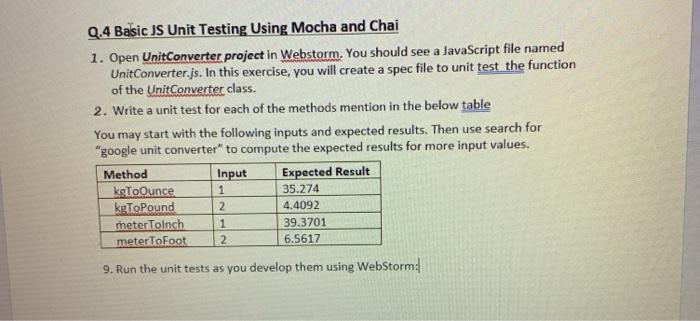
Q.4 Basic JS Unit Testing Using Mocha and Chai 1. Open UnitConverter project in Webstorm. You should see a JavaScript file named UnitConverter.js. In this exercise, you will create a spec file to unit test the function of the Unit Converter class. 2. Write a unit test for each of the methods mention in the below table You may start with the following inputs and expected results. Then use search for "google unit converter" to compute the expected results for more input values. Method Input Expected Result kgToOunce 35.274 kgToPound 4.4092 meterToInch 39.3701 metertoFoot 2 6.5617 1 2 1 9. Run the unit tests as you develop them using WebStorm: Q.4 Basic JS Unit Testing Using Mocha and Chai 1. Open UnitConverter project in Webstorm. You should see a JavaScript file named UnitConverter.js. In this exercise, you will create a spec file to unit test the function of the Unit Converter class. 2. Write a unit test for each of the methods mention in the below table You may start with the following inputs and expected results. Then use search for "google unit converter" to compute the expected results for more input values. Method Input Expected Result kgToOunce 35.274 kgToPound 4.4092 meterToInch 39.3701 metertoFoot 2 6.5617 1 2 1 9. Run the unit tests as you develop them using WebStorm
Step by Step Solution
There are 3 Steps involved in it

Get step-by-step solutions from verified subject matter experts
 Study Help