







Question: Using with c++ The program has two ccharacters battle, you choose what kind of attack to do each round, and take dammage each round. When
Using with c++
The program has two ccharacters battle, you choose what kind of attack to do each round, and take dammage each round. When one of the character his 0, the game is over.
Here are a few things to get you started:
Utility Functions: Create a set of files, Utils.hpp and Utils.cpp. Within these files you need to declare and define:
1. GetUserInput(...) Paramters: integers: min and max Return value: integer
Prompt the user for input (as an integer), and validate whether it is between the valid minimum and maximum values. Only return the user's choice once they enter a valid option.
2. GetRandom(...) Parameters: integers: min and max Return Value: integer
Randomly generate a number between minimum and maximum.
Objects:
You will write three objects for this game: Character, Enemy, and Player. Both Enemy and Player will inherit from Character, and Character will contain the generic code that both Enemy and Player can use. Player and Enemy will have special code, based on whether they're user-controlled or AI- controlled.
Remember to store each class in their own files - .hpp for declarations, and .cpp for definitions
Character:
First, in the Character.hpp file, declare an enum called AttackType. It should have two values: OFFENSIVE, 1, and DEFENSIVE, 2. This enum will be used within the Character class.
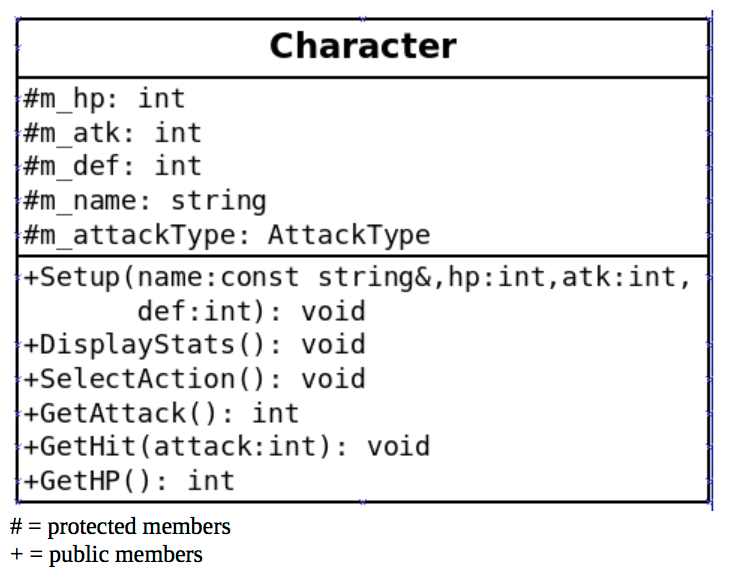
Public Members: 1. Setup(...) Parameters: const string reference: name, integer: hp, atk, def Return Value: None
This function initializes the member variables m_hp, m_atk, m_def, and m_name with the values passed in
2. DisplayStats() Paramaters: none Return Value: None
Utilize the cout to display the characters name, HP, ATK, and DEF.
3. SelectAction() Paramaters: none Return Value: None
This function will be empyt for the character class.
4. GetAttack() Paramaters: none Return Value: integer
This function will calculate how much damage the character will do, based on their attack type and their ATK stat. If the character chose an OFFENSIVE attack, add a random value (Use the GetRandom function) between 1 and 3 to the attack stat and return that value. Otherwise, just return the attack stat. You might want to output a message displaying the character's name and the type of attack or damage they're doing.
5. GetHit(...) Paramaters: int attack Return Value: void
This function will take the input of attack damage, which was generated by the opposing character's GetAttack() function. If the character is doing an OFFENSIVE attack, damage will be the attack parameter value minus the character's defense (m_def). If the character is doing a DEFENSIVE attack, damage will be the attack parameter, minus the defense stat, minus a random value between 1 and 3 (Use the GetRandom function). Make sure that the damage value is greater than or equal to zero before subtracting it from the character's HP.
6. GetHP(...) Paramaters: None Return Value: Integer
Return the value of m_hp.
Player The player class inherits from the character class. It only oerwrites the SelectAction function
1. SelectAction() Paramaters: None Return Value: None
For the Player class, this function will prompt the user to enter an option (1 for offensive, 2 for defensive). Based on their answer, the m_attackType will be set, to prepare the player for their GetAttack()/GetHit(...) functions.
Enemy The Enemy class inherits from the character class. It only overwrites the SelectAction function.
1. SelectAction() Paramaters: None Return Value: None
For the Enemy class, this function will randomly generate a choice for the enemy (1 for offensive, 2 for defensive). Based on their answer, the m_attackType will be set, to prepare the player for their GetAttack()/GetHit(...) functions.
Additional Functionality This function will be within the main.cpp file (or whatever file stores main).
1. SetupCharacters(...) Parameters: Player, a character reference - enemy, a character reference Return Value: None
For this function, it will first ask the user to enter their name. Secondly, it will display a set of three stats to choose from: 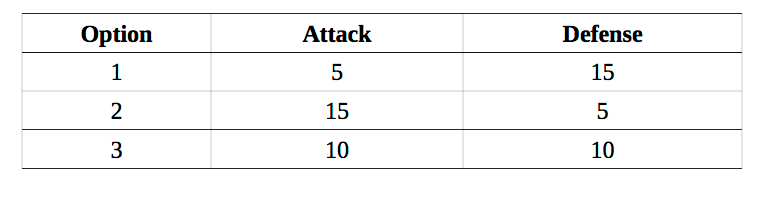 The user selects the stats for the player, and the enemy's stats are randomly selected. Use the Setup(...) function from the Character class to initialize both characters.
Main Program Flow: 1. In the main program, create a Player and Enemy object. 2. First Loop: Character Creation - Call the SetupCharacters(...) function to set up the player and enemy's beginning stats. - Afterwards, display both the player and enemy's stats (via DisplayStats() function), and ask them if this is OK. (Use a number menu, so you can use GetUserInput(...)). - Keep looping through the stat creation until the player chooses the ready option. 3. Second Loop: Gameplay Continue looping until one character's life is less than or equal to 0. - Display the round # and both the character's stats at the beginning of each round. - Display the action menu: - Offensive Attack - Defensive Attack - Call each character's SelectAction() function. - Afterwards, call both character's GetHit(...) functions, passing in the attack value (from GetAttack()) from the opposite character. 4. Outside of the loop game over - Check to see whose HP is Character #m hp: int #m atk: int #m def: int #m-name : string #m_attackType: AttackType +Setup (name: const string&,hp:int,atk:int, def:int)void +DisplayStats): void +SelectAction): void +GetAttack() int +GetHit(attack:int): void +GetHP): int protected members public members Character #m hp: int #m atk: int #m def: int #m-name : string #m_attackType: AttackType +Setup (name: const string&,hp:int,atk:int, def:int)void +DisplayStats): void +SelectAction): void +GetAttack() int +GetHit(attack:int): void +GetHP): int protected members public members
Step by Step Solution
There are 3 Steps involved in it

Get step-by-step solutions from verified subject matter experts
 Study Help