







Question: Using x86 assembly language Sample Program Here is a sample program. The player 1's input is printed in red . Player 2's input is displayed
Using x86 assembly language
Sample Program
Here is a sample program. The player 1's input is printed in red . Player 2's input is displayed in blue
.
Welcome to Mystery Word!
Player 1, enter a word: orville
Screen is cleared
Your secret word: -------
Guess a letter:l
Your secret word: ----ll-
Guess a letter:o
Your secret word: o---ll-
Guess a letter:s
Your secret word: o---ll-
Guess a letter:r
Your secret word: or--ll-
Guess a letter:v
Your secret word: orv-ll-
Guess a letter:t
Your secret word: orv-ll-
Guess a letter:e
Your secret word: orv-lle
Guess a letter:i
Your secret word: orville
Congrats! You guessed the secret word!
Reading and Storing Text
To read text from the keyboard, please read about the ScanCString subroutine in the CSC35 Library. You will need to create a buffer large enough to hold the phrase.
The example below creates a buffer (space) of 30 characters.
My Buffer:
.space 30
Requirements
1. Display the title (of your choice)
2. Read the word from the keyboard
3. Clear the screen
4. Loop until all letters are guessed
5. Print the display string (with the missing characters) each time in the loop
6. When they are correct, display message congratulating them
7. Proper formatting. Labels are not indented. All instructions are indented the same
Pseudocode
The following is the basic logic of the game in Visual Basic-like pseudocode.
Print your program's name
Scan the answer from the keyboard.
Implement a For Loop to fill a buffer for the display
string with the correct number of dashes.
Do
Input a guess letter
Loop through each letter of the answer
If the answer[n] ==guess letter
display[n] =guess letter
#This uncovers the letter
end if
end loop
Print the display string (the one with dashes) loop while no dashes exist in the display (this will require another loop)
and the sub routines are
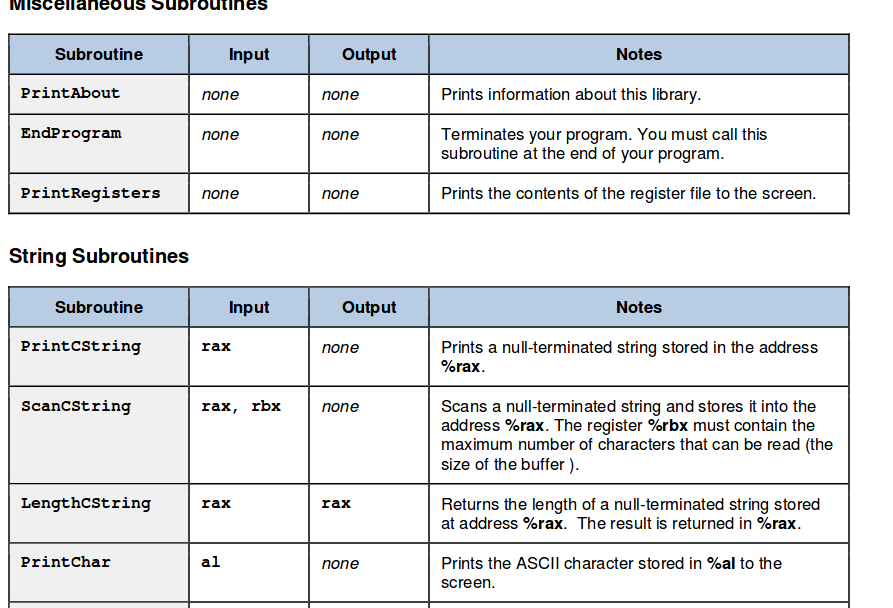
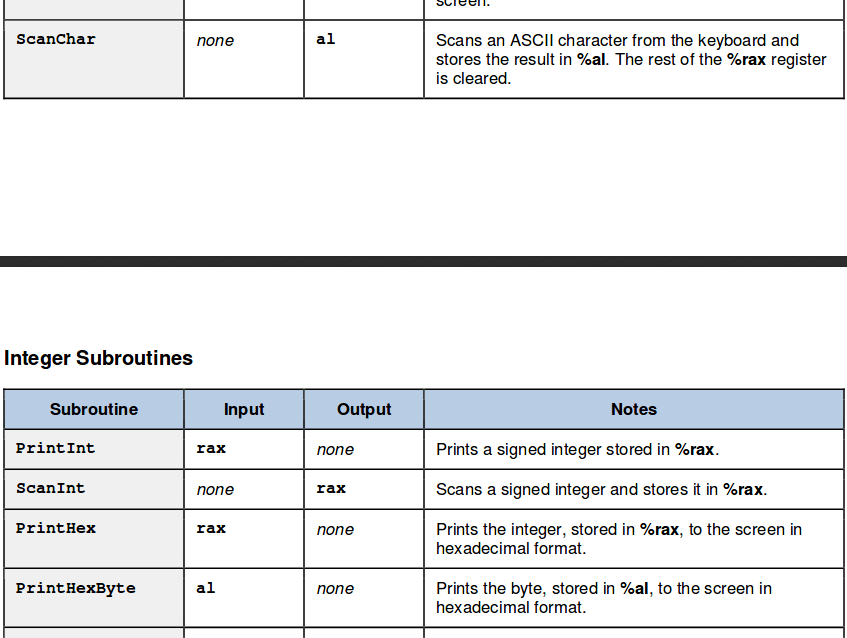
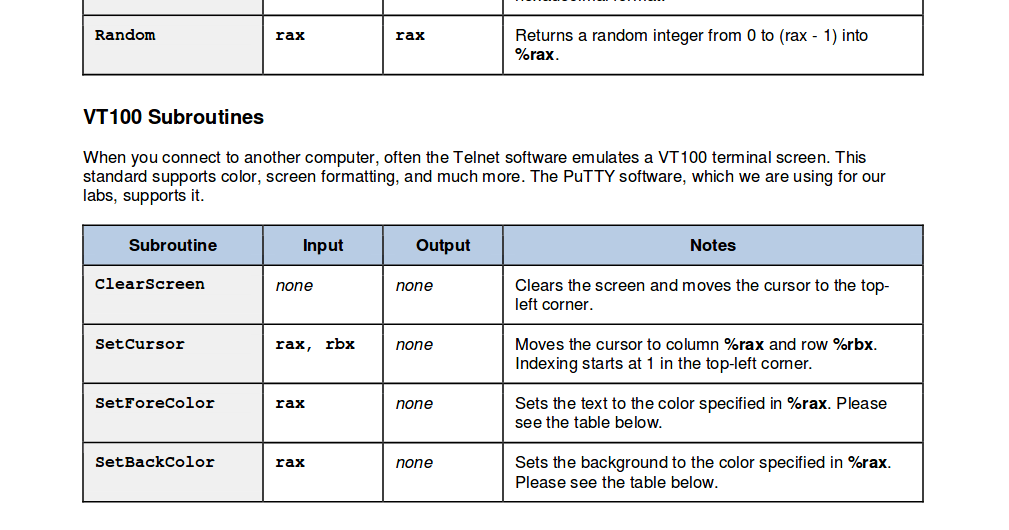
MISCellaneouS Subroutines Subroutine Input Output Notes PrintAbout none none Prints information about this library EndProgram Terminates your program. You must call this subroutine at the end of your program none none PrintRegisters none none Prints the contents of the register file to the screen String Subroutines Subroutine Input Output Notes PrintcString rax none Prints a null-terminated string stored in the address Scancstring Scans a null-terminated string and stores it into the address %rax. The register %rbx must contain the maximum number of characters that can be read (the size of the buffer) rax, rbx none LengthCstring Returns the length of a null-terminated string stored at address %rax. The result is returned in %rax rax rax PrintChar Prints the ASCII character stored in %al to the screen none
Step by Step Solution
There are 3 Steps involved in it

Get step-by-step solutions from verified subject matter experts
 Study Help