







Question: Using your populated star schema, create DML select statements for the following requirements. 1) Return the total bid dollar amount by customer zip code. 2)
Using your populated star schema, create DML select statements for the following requirements.
1) Return the total bid dollar amount by customer zip code.
2) Return the avg bid dollar amount by customer state.
3) Return the total bid dollar amount by month.
4) Return the total bid dollar amount by customer zip code having a total bid dollar amount greater than $100.
Star Schema:
-- Create the date dimension
IF OBJECT_ID(N'dbo.DimBidDate', N'U') IS NOT NULL
DROP TABLE [dbo].[DimBidDate];
go
create table DimBidDate (
bid_date_key int primary key,
bid_month varchar(10),
bid_year varchar(10))
go
-- Insert data into the date dimension
insert into DimBidDate
values (1, 'January', '2022')
insert into DimBidDate
values (2, 'February', '2022')
insert into DimBidDate
values (3, 'March', '2022')
insert into DimBidDate
values (4, 'April', '2022')
insert into DimBidDate
values (5, 'May', '2022')
insert into DimBidDate
values (6, 'June', '2022')
insert into DimBidDate
values (7, 'July', '2022')
insert into DimBidDate
values (8, 'August', '2022')
insert into DimBidDate
values (9, 'September', '2022')
insert into DimBidDate
values (10, 'October', '2022')
insert into DimBidDate
values (11, 'November', '2022')
insert into DimBidDate
values (12, 'December', '2022')
-- Create the customer dimension
IF OBJECT_ID(N'dbo.DimCustomer', N'U') IS NOT NULL
DROP TABLE [dbo].[DimCustomer];
go
create table DimCustomer (
customer_id int primary key,
customer_name varchar(30),
zip_code varchar(12),
state varchar(30))
go
-- Insert data into the customer dimension
insert into DimCustomer
values (1, 'ABC Company', '12345', 'CA')
insert into DimCustomer
values (2, 'XYZ Corporation', '67890', 'NY')
insert into DimCustomer
values (3, 'PQR Enterprises', '23456', 'TX')
insert into DimCustomer
values (4, 'LMN Industries', '78901', 'CA')
insert into DimCustomer
values (5, 'EFG Corporation', '34567', 'NY')
-- Create the fact table
IF OBJECT_ID(N'dbo.FactBids', N'U') IS NOT NULL
DROP TABLE [dbo].[FactBids];
go
create table FactBids (
bid_date_key int,
customer_id int,
bid_dollar_amount money,
primary key (bid_date_key, customer_id),
foreign key (bid_date_key) REFERENCES DimBidDate(bid_date_key),
foreign key (customer_id) REFERENCES DimCustomer(customer_id))
go
-- Insert data into the fact table
insert into FactBids
values(1, 1, 5000.00)
insert into FactBids
values(2, 3, 7500.00)
insert into FactBids
values(3, 2, 6000.00)
insert into FactBids
values(4, 4, 8500.00)
-- Query to measure bid dollar amount by customer zip code, customer state, bid month, and bid year
SELECT
d.State,
d.Zip_Code,
b.bid_dollar_amount,
bd.bid_month,
bd.bid_year
FROM
FactBids b
JOIN DimCustomer d ON b.customer_id = d.customer_id
JOIN DimBidDate bd ON b.bid_date_key = bd.bid_date_key;
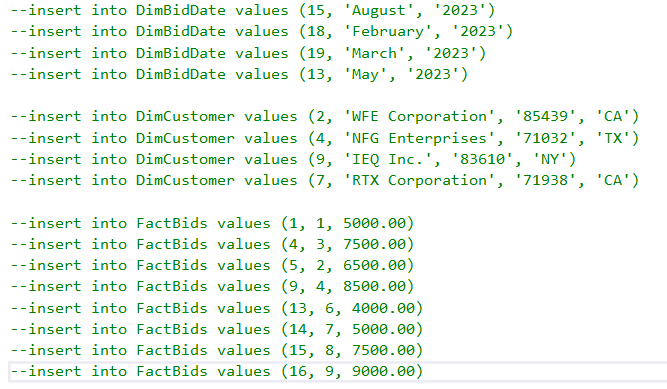
Star Schema Population:
**NOTE: ANSWER IN MICROSOFT SQL PLEASE
--insert into DimBidDate values (15, 'August', '2023') --insert into DimBidDate values (18, 'February', '2023') --insert into DimBidDate values (19, 'March', '2023') --insert into DimBidDate values (13, 'May', '2023') --insert into DimCustomer values (2, 'WFE Corporation', '85439', 'CA') --insert into DimCustomer values (4, 'NFG Enterprises', '71032', 'TX') --insert into DimCustomer values (9, 'IEQ Inc.', '83610', 'NY') --insert into DimCustomer values (7, 'RTX Corporation', '71938', 'CA') --insert into FactBids values (1, 1, 5000.00) --insert into FactBids values (4, 3, 7500.00) --insert into FactBids values (5,2,6500.00) --insert into FactBids values (9,4,8500.00) --insert into FactBids values (13,6,4000.00) --insert into FactBids values (14,7,5000.00) --insert into FactBids values (15,8,7500.00) --insert into FactBids values (16,9,9000.00)
Step by Step Solution
There are 3 Steps involved in it

Get step-by-step solutions from verified subject matter experts
 Study Help