



Question: Using your results from Macheys Cameros with Quantity Discounts - templote.xisx as a base, create a copy of your Excel file and name it 'Inventory
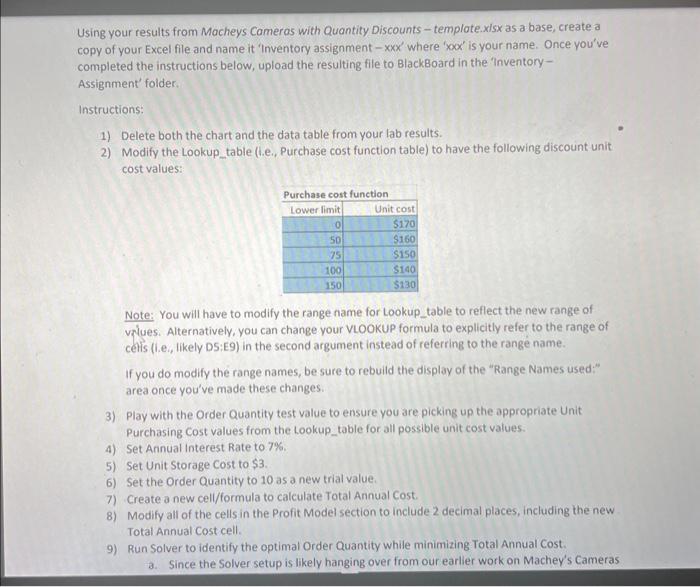
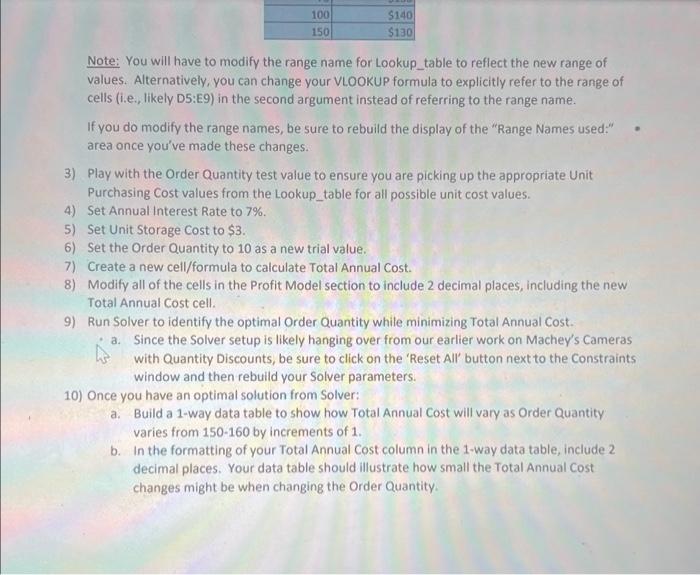
Using your results from Macheys Cameros with Quantity Discounts - templote.xisx as a base, create a copy of your Excel file and name it 'Inventory assignment - xxx ' where ' x ' x ' Is your name. Once you've completed the instructions below, upload the resulting file to BlackBoard in the Inventory Assignment' folder. Instructions: 1) Delete both the chart and the data table from your lab results. 2) Modify the Lookup_table (i.e., Purchase cost function table) to have the following discount unit cost values: Note: You will have to modify the range name for Lookup_table to reflect the new range of values. Alternatively, you can change your VLoOKUP formula to explicitly refer to the range of cells (I.e, tikety DS:E9) in the second argument instead of referring to the range name. If you do modify the range names, be sure to rebuild the display of the "Range Names used:" area once you've made these changes. 3) Play with the Order Quantity test value to ensure you are picking up the appropriate Unit purchasing Cost values from the Lookup_table for all possible unit cost values. 4) Set Annual Interest Rate to 7%. 5) Set Unit Storage Cost to $3. 6) Set the Order Quantity to 10 as a new trial value. 7) Create a new cell/formula to calculate Total Annual cost. 8) Modify all of the cells in the Profit Model section to include 2 decimal places, including the new Total Annual cost cell. 9) Run Solver to identify the optimal Order Quantity while minimizing Total Annual Cost. a. Since the Solver setup is likely hanging over from our earlier work on Machey's Cameras Note: You will have to modify the range name for Lookup_table to reflect the new range of values. Alternatively, you can change your VLOOKUP formula to explicitly refer to the range of cells (i.e., likely D5:E9) in the second argument instead of referring to the range name. If you do modify the range names, be sure to rebuild the display of the "Range Names used:" area once you've made these changes. 3). Play with the Order Quantity test value to ensure you are picking up the appropriate Unit Purchasing Cost values from the Lookup_table for all possible unit cost values. 4) Set Annual Interest Rate to 7%. 5) Set Unit Storage cost to $3. 6) Set the Order Quantity to 10 as a new trial value. 7) Create a new cell/formula to calculate Total Annual cost. 8) Modify all of the cells in the Profit Model section to include 2 decimal places, including the new Total Annual cost cell. 9) Run Solver to identify the optimal Order Quantity while minimizing Total Annual cost. a. Since the Solver setup is likely hanging over from our earlier work on Machey's Cameras with Quantity Discounts, be sure to click on the 'Reset All' button next to the Constraints window and then rebuild your Solver parameters. 10) Once you have an optimal solution from Solver: a. Build a 1-way data table to show how Total Annual Cost will vary as Order Quantity varies from 150160 by increments of 1 . b. In the formatting of your Total Annual Cost column in the 1-way data table, include 2 decimal places. Your data table should illustrate how small the Total Annual cost changes might be when changing the Order Quantity
Step by Step Solution
There are 3 Steps involved in it

Get step-by-step solutions from verified subject matter experts