







Question: Ust be use e. Your Name PART-A: INSTALLATION 1. Install a VM using Centos or Oracle Linux Installation with the following specifications a. Language :
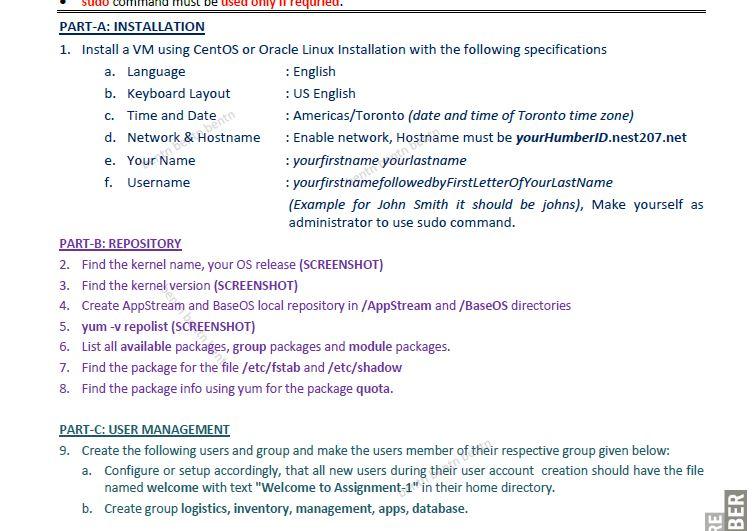
Ust be use e. Your Name PART-A: INSTALLATION 1. Install a VM using Centos or Oracle Linux Installation with the following specifications a. Language : English b. Keyboard Layout : US English C. Time and Date : Americas/Toronto (date and time of Toronto time zone) d. Network & Hostname Enable network, Hostname must be yourHumberid.nest207.net :yourfirstname yourlastname f. Username :yourfirstnamefollowedbyFirstLetterOfYourLastName (Example for John Smith it should be johns), Make yourself as administrator to use sudo command. PART-B: REPOSITORY 2. Find the kernel name, your Os release (SCREENSHOT) 3. Find the kernel version (SCREENSHOT) 4. Create AppStream and Base OS local repository in /AppStream and /BaseOs directories 5. yum -v repolist (SCREENSHOT) 6. List all available packages, group packages and module packages. 7. Find the package for the file /etc/fstab and /etc/shadow 8. Find the package info using yum for the package quota. PART-C: USER MANAGEMENT 9. Create the following users and group and make the users member of their respective group given below: a. Configure or setup accordingly, that all new users during their user account creation should have the file named welcome with text "Welcome to Assignment-1" in their home directory. b. Create group logistics, inventory, management, apps, database. BER RE
Step by Step Solution
There are 3 Steps involved in it

Get step-by-step solutions from verified subject matter experts
 Study Help