







Question: Usuing Visual Studio, I need help with these Labs. Would appreciate the most answers possible. Thanks. Lab 8-1 : Swapping Values In this lab, you
Usuing Visual Studio, I need help with these Labs. Would appreciate the most answers possible. Thanks.
Lab 8-1: Swapping Values
In this lab, you complete a C++ program that swaps values stored in three int variables and determines maximum and minimum values. The C++ file provided for this lab contains the necessary variable declarations, as well as the input and output statements. You want to end up with the smallest value stored in the variable named first and the largest value stored in the variable named third. You need to write the statements that compare the values and swap them if appropriate. Comments included in the code tell you where to write your statements.
1. Open the source code file named Swap.cpp using the text editor of your choice.
2. Write the statements that test the first two integers, and swap them if necessary.
3. Write the statements that test the second and third integer, and swap them if necessary.
4. Write the statements that test the first and second integers again, and swap them if necessary.
5. Save this source code file in a directory of your choice, and then make that directory your working directory.
6. Compile the source code file Swap.cpp.
7. Execute the program using the following sets of input values, and record the output:
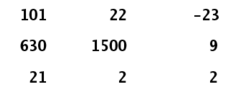
Here is the Swap.cpp file information:
// Swap.cpp - This program determines the minimum and maximum of three values input by // the user and performs necessary swaps. // Input: Three int values. // Output: The numbers in numerical order. #includeusing namespace std; int main() { // Declare variables int first = 0; // First number int second = 0; // Second number int third = 0; // Third number int temp; // Used to swap numbers // Get user input cout > first; cout > second; cout > third; // Test to see if the first number is greater than the second number // Test to see if the second number is greater than the third number // Test to see if the first number is greater than the second number again // Print numbers in numerical order cout
SECOND LAB:
Lab 9-1: Writing Functions with No Parameters
In this lab, you complete a partially prewritten C++ program that includes functions with no parameters. The program asks the user if he or she has preregistered for tickets to an art show. If the user has preregistered, the program should call a function named discount() that displays the message, "You are preregistered and qualify for a 5 percent discount." If the user has not preregistered, the program should call a function named noDiscount() that displays the message, "Sorry, you did not preregister and do not qualify for a 5 percent discount." The source code file provided for this lab includes the necessary variable declarations and the input statement. Comments are included in the file to help you write the remainder of the program.
1. Open the source code file named ArtShowDiscount.cpp using Notepad or the text editor of your choice.
2. Write the C++ statements as indicated by the comments.
3. Save this source code file in a directory of your choice, and then make that directory your working directory.
4. Compile the source code file, ArtShowDiscount.cpp.
5. Execute the program.
Here is the ArtShowDiscount.cpp file information:
// ArtShowDiscount.cpp - This program determines if an art show attendee gets a 5% discount for preregistering. // Input: Interactive // Output: A statement telling the user if they get a discount or no discount. #include#include using namespace std; void discount(); void noDiscount(); int main() { string registerString; cout > registerString; // Test here. If = Y, call discount(), else call noDiscount(). return 0; } // End of main function // Write discount function here // Write noDiscount function here
101 630 21 -23 1500
Step by Step Solution
There are 3 Steps involved in it

Get step-by-step solutions from verified subject matter experts
 Study Help