







Question: Utilizing cell references and formulas, use the data in the Excel file provided to prepare 1. Payback period calculation. Textbook page 384 has example. You
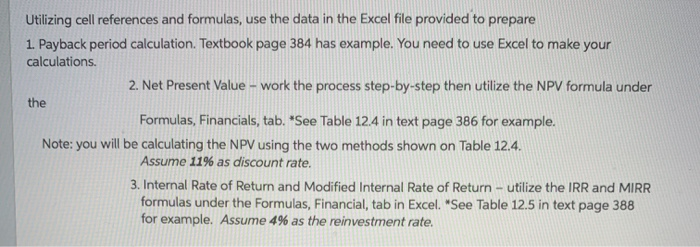
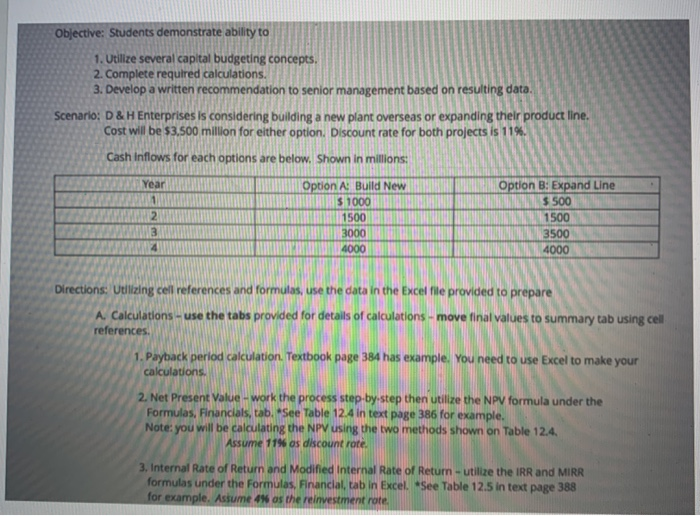
Utilizing cell references and formulas, use the data in the Excel file provided to prepare 1. Payback period calculation. Textbook page 384 has example. You need to use Excel to make your calculations. 2. Net Present Value - work the process step-by-step then utilize the NPV formula under the Formulas, Financials, tab. See Table 124 in text page 386 for example. Note: you will be calculating the NPV using the two methods shown on Table 12.4. Assume 11% as discount rate. 3. Internal Rate of Retum and Modified Internal Rate of Return - utilize the IRR and MIRR formulas under the Formulas, Financial, tab in Excel. "See Table 12.5 in text page 388 for example. Assume 4% as the reinvestment rate. Objective: Students demonstrate ability to 1. Utilize several capital budgeting concepts. 2. Complete required calculations. 3. Develop a written recommendation to senior management based on resulting data. Scenario: D & Enterprises is considering building a new plant overseas or expanding their product Cost will be 53,500 million for either option. Discount rate for both projects is 11% Cash inflows for each options are below. Shown in millions Option A: Build New TRINIS 1000 MALIN 1500 3000 4000 Option : 500 1500 3500 4000 3000 Directions: Utilizing cell references and formulas, use the data in the Excel file prov A. Calculations - use the tabs provided for details of calculations - move final alues to summary tab using cell references. 1. Payback period calculation. Textbook page 384 has example. You need to use Excel to make your calculations. calculations. TA N NIN rore 2. Net Present Value - work the process step-by-step then utilize the NPV formula under the Formulas, Financials, tab. See Table 124 in text page 386 for example, Note: you will be calculating the NPV using the two methods shown on Table 12.4. ssume 114 as die Assume 11% os discount rate. 3. Internal Rate of Return and Mod nternal Rate of Return - utilize the IRR and MIRR formulas under the Formulas tab in Excel. *See Table 12.5 in text page 388 for example, Astume os the reinvestment rate Utilizing cell references and formulas, use the data in the Excel file provided to prepare 1. Payback period calculation. Textbook page 384 has example. You need to use Excel to make your calculations. 2. Net Present Value - work the process step-by-step then utilize the NPV formula under the Formulas, Financials, tab. See Table 124 in text page 386 for example. Note: you will be calculating the NPV using the two methods shown on Table 12.4. Assume 11% as discount rate. 3. Internal Rate of Retum and Modified Internal Rate of Return - utilize the IRR and MIRR formulas under the Formulas, Financial, tab in Excel. "See Table 12.5 in text page 388 for example. Assume 4% as the reinvestment rate. Objective: Students demonstrate ability to 1. Utilize several capital budgeting concepts. 2. Complete required calculations. 3. Develop a written recommendation to senior management based on resulting data. Scenario: D & Enterprises is considering building a new plant overseas or expanding their product Cost will be 53,500 million for either option. Discount rate for both projects is 11% Cash inflows for each options are below. Shown in millions Option A: Build New TRINIS 1000 MALIN 1500 3000 4000 Option : 500 1500 3500 4000 3000 Directions: Utilizing cell references and formulas, use the data in the Excel file prov A. Calculations - use the tabs provided for details of calculations - move final alues to summary tab using cell references. 1. Payback period calculation. Textbook page 384 has example. You need to use Excel to make your calculations. calculations. TA N NIN rore 2. Net Present Value - work the process step-by-step then utilize the NPV formula under the Formulas, Financials, tab. See Table 124 in text page 386 for example, Note: you will be calculating the NPV using the two methods shown on Table 12.4. ssume 114 as die Assume 11% os discount rate. 3. Internal Rate of Return and Mod nternal Rate of Return - utilize the IRR and MIRR formulas under the Formulas tab in Excel. *See Table 12.5 in text page 388 for example, Astume os the reinvestment rate
Step by Step Solution
There are 3 Steps involved in it

Get step-by-step solutions from verified subject matter experts
 Study Help