







Question: Utilizing your data gathered in Question #1 above, conduct a further investigation into the Job Code with the largest positive total gross pay difference between
Utilizing your data gathered in Question #1 above, conduct a further investigation into the Job Code with the largest positive total gross pay difference between 2016 and 2015, which should be Job Code 006.
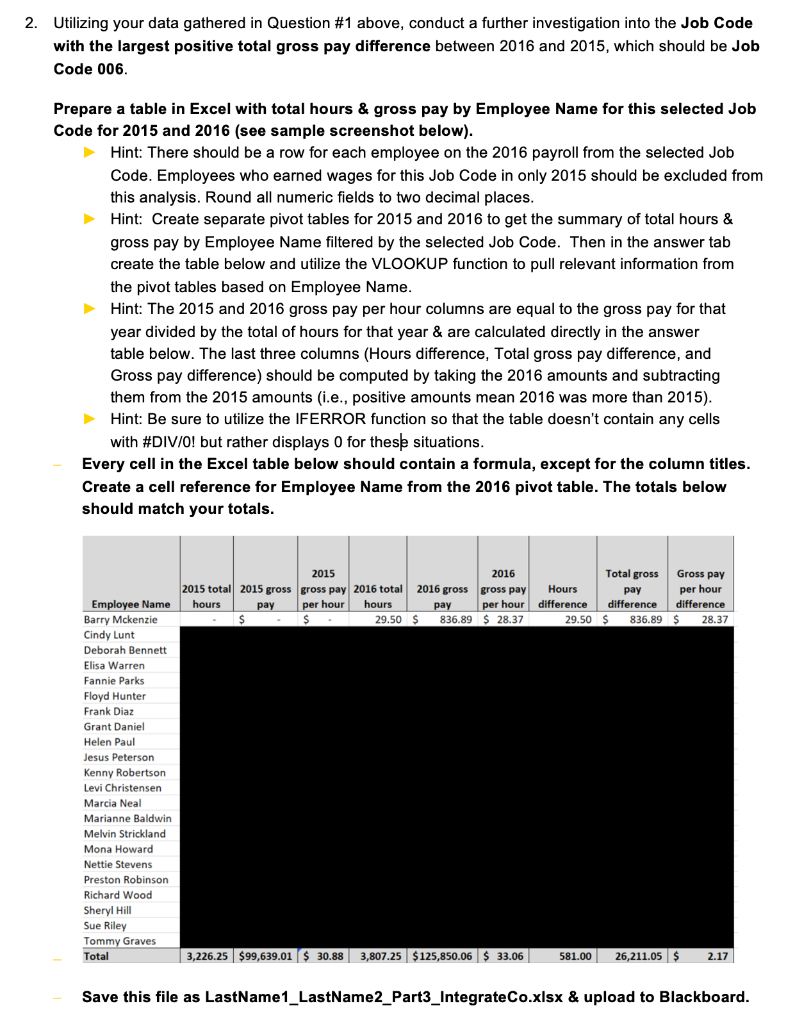
Prepare a table in Excel with total hours & gross pay by Employee Name for this selected Job Code for 2015 and 2016 (see sample screenshot below).
Hint: There should be a row for each employee on the 2016 payroll from the selected Job Code. Employees who earned wages for this Job Code in only 2015 should be excluded from this analysis. Round all numeric fields to two decimal places.
Hint: Create separate pivot tables for 2015 and 2016 to get the summary of total hours & gross pay by Employee Name filtered by the selected Job Code. Then in the answer tab create the table below and utilize the VLOOKUP function to pull relevant information from the pivot tables based on Employee Name.
Hint: The 2015 and 2016 gross pay per hour columns are equal to the gross pay for that year divided by the total of hours for that year & are calculated directly in the answer table below. The last three columns (Hours difference, Total gross pay difference, and Gross pay difference) should be computed by taking the 2016 amounts and subtracting them from the 2015 amounts (i.e., positive amounts mean 2016 was more than 2015).
Hint: Be sure to utilize the IFERROR function so that the table doesnt contain any cells with #DIV/0! but rather displays 0 for these situations.
Every cell in the Excel table below should contain a formula, except for the column titles. Create a cell reference for Employee Name from the 2016 pivot table. The totals below should match your totals.
Utilizing your data gathered in Question #1 above, conduct a further investigation into the Job Code with the largest positive total gross pay difference between 2016 and 2015, which should be Job Code 006. Prepare a table in Excel with total hours \& gross pay by Employee Name for this selected Job Code for 2015 and 2016 (see sample screenshot below). Hint: There should be a row for each employee on the 2016 payroll from the selected Job Code. Employees who earned wages for this Job Code in only 2015 should be excluded from this analysis. Round all numeric fields to two decimal places. Hint: Create separate pivot tables for 2015 and 2016 to get the summary of total hours \& gross pay by Employee Name filtered by the selected Job Code. Then in the answer tab create the table below and utilize the VLOOKUP function to pull relevant information from the pivot tables based on Employee Name. Hint: The 2015 and 2016 gross pay per hour columns are equal to the gross pay for that year divided by the total of hours for that year \& are calculated directly in the answer table below. The last three columns (Hours difference, Total gross pay difference, and Gross pay difference) should be computed by taking the 2016 amounts and subtracting them from the 2015 amounts (i.e., positive amounts mean 2016 was more than 2015). Hint: Be sure to utilize the IFERROR function so that the table doesn't contain any cells with #DIV/O! but rather displays 0 for these situations. Every cell in the Excel table below should contain a formula, except for the column titles. Create a cell reference for Employee Name from the 2016 pivot table. The totals below should match your totals. Save this file as LastName1_LastName2_Part3_IntegrateCo.xlsx \& upload to Blackboard. Utilizing your data gathered in Question #1 above, conduct a further investigation into the Job Code with the largest positive total gross pay difference between 2016 and 2015, which should be Job Code 006. Prepare a table in Excel with total hours \& gross pay by Employee Name for this selected Job Code for 2015 and 2016 (see sample screenshot below). Hint: There should be a row for each employee on the 2016 payroll from the selected Job Code. Employees who earned wages for this Job Code in only 2015 should be excluded from this analysis. Round all numeric fields to two decimal places. Hint: Create separate pivot tables for 2015 and 2016 to get the summary of total hours \& gross pay by Employee Name filtered by the selected Job Code. Then in the answer tab create the table below and utilize the VLOOKUP function to pull relevant information from the pivot tables based on Employee Name. Hint: The 2015 and 2016 gross pay per hour columns are equal to the gross pay for that year divided by the total of hours for that year \& are calculated directly in the answer table below. The last three columns (Hours difference, Total gross pay difference, and Gross pay difference) should be computed by taking the 2016 amounts and subtracting them from the 2015 amounts (i.e., positive amounts mean 2016 was more than 2015). Hint: Be sure to utilize the IFERROR function so that the table doesn't contain any cells with #DIV/O! but rather displays 0 for these situations. Every cell in the Excel table below should contain a formula, except for the column titles. Create a cell reference for Employee Name from the 2016 pivot table. The totals below should match your totals. Save this file as LastName1_LastName2_Part3_IntegrateCo.xlsx \& upload to Blackboard
Step by Step Solution
There are 3 Steps involved in it

Get step-by-step solutions from verified subject matter experts
 Study Help