



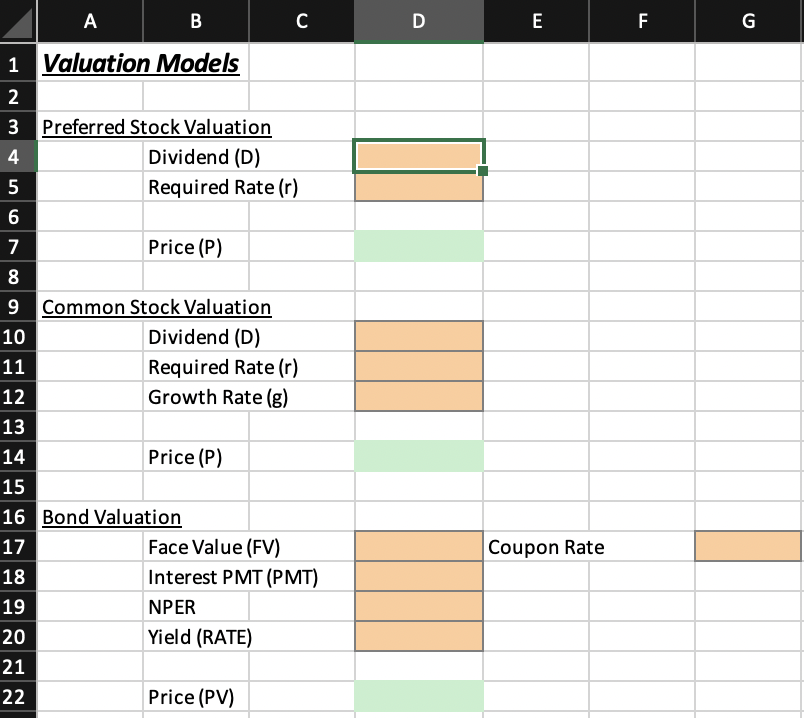
Question: Valuation Create an Excel model that computes the value of preferred stock, common stock, and bonds. Note that on the template, this model is found
Valuation
Create an Excel model that computes the value of preferred stock, common stock, and bonds. Note that on the template, this model is found under its own tab. Keep it this way. Please account for the following:
Note: For input fields, enter the values given here. For calculation fields, YOU set up the spreadsheet to complete the correct calculation
Preferred Stock Value Calculation:
DividendD: input fieldPlease enter the value $
Required Rate of Returnr: input field Please enter the value
PriceP: calculation fieldPlease use the formula: P Dr
Common Stock Value Calculation:
DividendD: input fieldPlease enter the value $
Required Rate of Returnr: input field Please enter the value
Growth Rateg: input field Please enter the value
PriceP: calculation fieldPlease use the formula: P Drg
Bond Value Calculation:
Face ValueFV: input fieldPlease enter the value $
Coupon Rate: input field Please enter the value
Number of Periods NPER: input field Please enter the value years
YieldRATE: input fieldPlease enter the value
Interest PaymentPMT: calculation fieldPlease use the formula: PMT Coupon Rate Face Value
PricePV: calculation fieldPlease use the PV function. Variable to use: FV PMT the coupon interest payment, NPER, RATE the yieldbegintabularllllllll
hline & A & B & C & D & E & F & G
hline & & Valuation Models & & & & &
hline & & & & & & &
hline & multicolumnlPreferred Stock Valuation & & &
hline & multicolumncDividend D & & & &
hline & multicolumncRequired Rate r & & & &
hline & & & & & & &
hline & & Price P & & & & &
hline & & & & & & &
hline & multicolumnlCommon Stock Valuation & & & &
hline & multicolumncDividend D & & & &
hline & multicolumncRequired Rate r & & & &
hline & multicolumncGrowth Rate g & & & &
hline & multicolumnc & & & &
hline & multicolumncPrice P & & & &
hline & multicolumnc & & & &
hline & multicolumnlBond Valuation & & & &
hline & multicolumncFace Value FV & & multicolumnlCoupon Rate &
hline & multicolumnrInterest PMT PMT & & & &
hline & multicolumncNPER & & & &
hline & multicolumncYield RATE & & & &
hline & & & & & & &
hline & & Price PV & & & & &
hline
endtabular
Step by Step Solution
There are 3 Steps involved in it
1 Expert Approved Answer
Step: 1 Unlock

Question Has Been Solved by an Expert!
Get step-by-step solutions from verified subject matter experts
Step: 2 Unlock
Step: 3 Unlock