







Question: VB Auto Center Chapter 4 Visual Basic Create a project that determines the total amount due for the purchase of a vehicle. Include text boxes
VB Auto Center Chapter 4 Visual Basic
Create a project that determines the total amount due for the purchase of a vehicle. Include text boxes for the base price and the trade-in allowance. Check boxes will indicate if the buyer wants additional accessories: stereo system, leather interior, and/or computer navigation. A group box for the exterior finish will contain radio buttons for Standard, Pearlized, or Customized detailing.
Have the trade-in amount default to zero; that is, if the user does not enter a trade-in amount, use zero in your calculation. Validate the values from the text boxes, displaying a message box if necessary.
To calculate, add the price of selected accessories and exterior finish to the base price and display the result in a control called Subtotal. Calculate the sales tax on the subtotal and display the result in a Total control. Then subtract any trade-in amount from the total and display the result in an Amount Due control.
Include buttons for Calculate, Clear, and Exit. The Calculatebutton must display the total amount due after trade-in.
Hint: Recall that you can make an ampersand appear in the Text property of a control by including two ampersands.
| Item | Price |
| Stereo System | 425.76 |
| Leather Interior | 987.41 |
| Computer Navigation | 1,741.23 |
| Standard | No additional charge |
| Pearlized | 345.72 |
| Customized Detailing | 599.99 |
| Tax Rate | 8% |
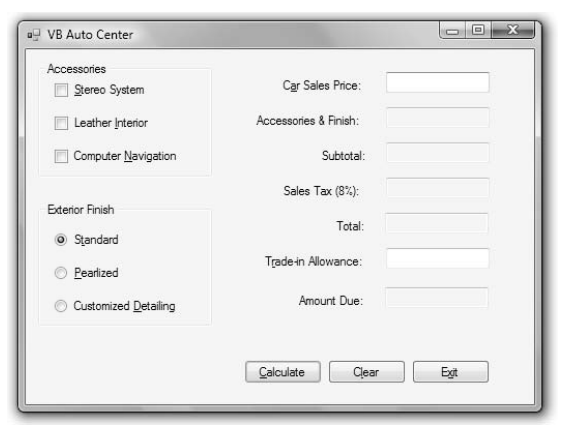
VB Auto Center Accessories Car Sales Price: Accessories & Finish: Subtotal 1-1 Stereo System Leather Interior Computer Navigation Sales Tax (8%): Exterior Finish Total: o Standard Trade-n Allowance: Pearlized Amount Due: Customized Detailing Calculate Clear
Step by Step Solution
There are 3 Steps involved in it

Get step-by-step solutions from verified subject matter experts
 Study Help