







Question: VBA Application Write two VBA functions: 1. Function called 'bearing2azimuth(bearing) to take a bearing string in the form N45d15'12W and output the corresponding azimuth in
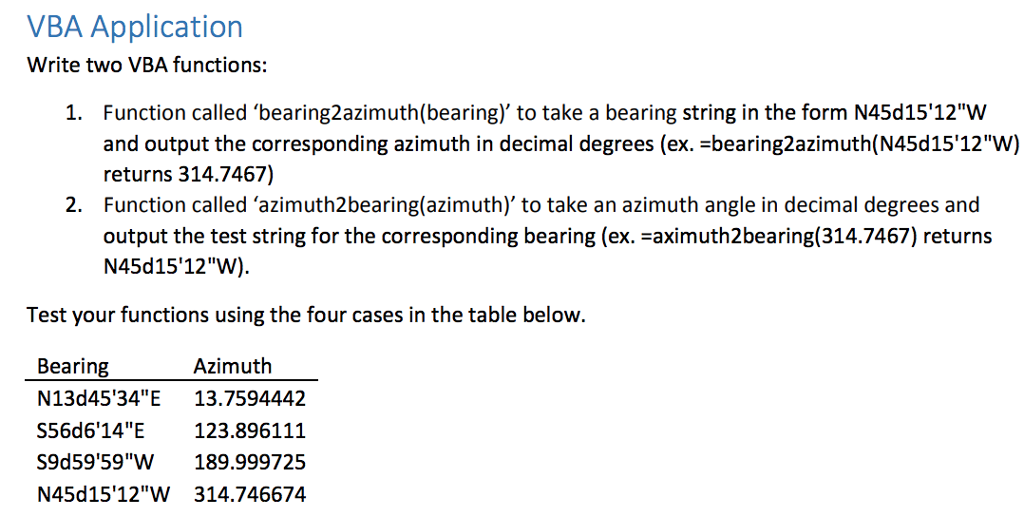
VBA Application Write two VBA functions: 1. Function called 'bearing2azimuth(bearing) to take a bearing string in the form N45d15'12"W and output the corresponding azimuth in decimal degrees (ex. -bearing2azimuth(N45d15'12"W) returns 314.7467) Function called 'azimuth2bearing(azimuth)' to take an azimuth angle in decimal degrees and output the test string for the corresponding bearing (ex. -aximuth2bearing(314.7467) returns N45d15'12"W) 2. Test your functions using the four cases in the table below. Bearing N13d45 34"E 13.7594442 S56d6'14" ? 123.896111 S9d59'59"W 189.999725 N45d15'12"W 314.746674 Azimuth VBA Application Write two VBA functions: 1. Function called 'bearing2azimuth(bearing) to take a bearing string in the form N45d15'12"W and output the corresponding azimuth in decimal degrees (ex. -bearing2azimuth(N45d15'12"W) returns 314.7467) Function called 'azimuth2bearing(azimuth)' to take an azimuth angle in decimal degrees and output the test string for the corresponding bearing (ex. -aximuth2bearing(314.7467) returns N45d15'12"W) 2. Test your functions using the four cases in the table below. Bearing N13d45 34"E 13.7594442 S56d6'14" ? 123.896111 S9d59'59"W 189.999725 N45d15'12"W 314.746674 Azimuth
Step by Step Solution
There are 3 Steps involved in it

Get step-by-step solutions from verified subject matter experts
 Study Help