







Question: VBA in Excel 1. Using the provided data, assign the people new salaries. Each person has a current salary and a performance rating. Higher performance
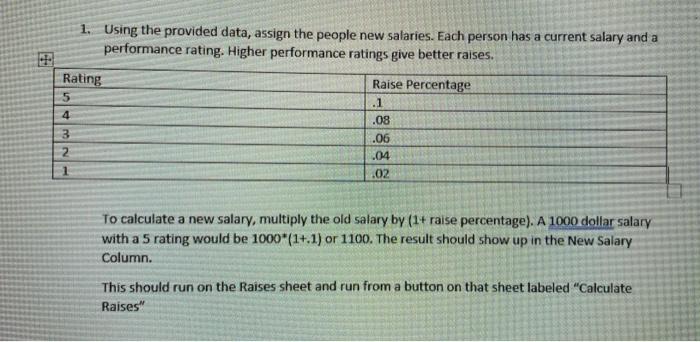
1. Using the provided data, assign the people new salaries. Each person has a current salary and a performance rating. Higher performance ratings give better raises. Rating Raise Percentage 5 .1 .08 .06 2 .04 1 .02 4 3 To calculate a new salary, multiply the old salary by (1+ raise percentage). A 1000 dollar salary with a 5 rating would be 1000*(1+.1) or 1100. The result should show up in the New Salary Column. This should run on the Raises sheet and run from a button on that sheet labeled "Calculate Raises
Step by Step Solution
There are 3 Steps involved in it
To implement the solution in VBA for calculating new salaries based on performance ratings follow these refined steps Step 1 Open the Visual Basic for ... View full answer

Get step-by-step solutions from verified subject matter experts
 Study Help