







Question: VBA Question. Please include comments so I can follow along and learn. 1. Create a VBA array function called ShiftVector(rng,n) with arguments for a range
VBA Question. Please include comments so I can follow along and learn.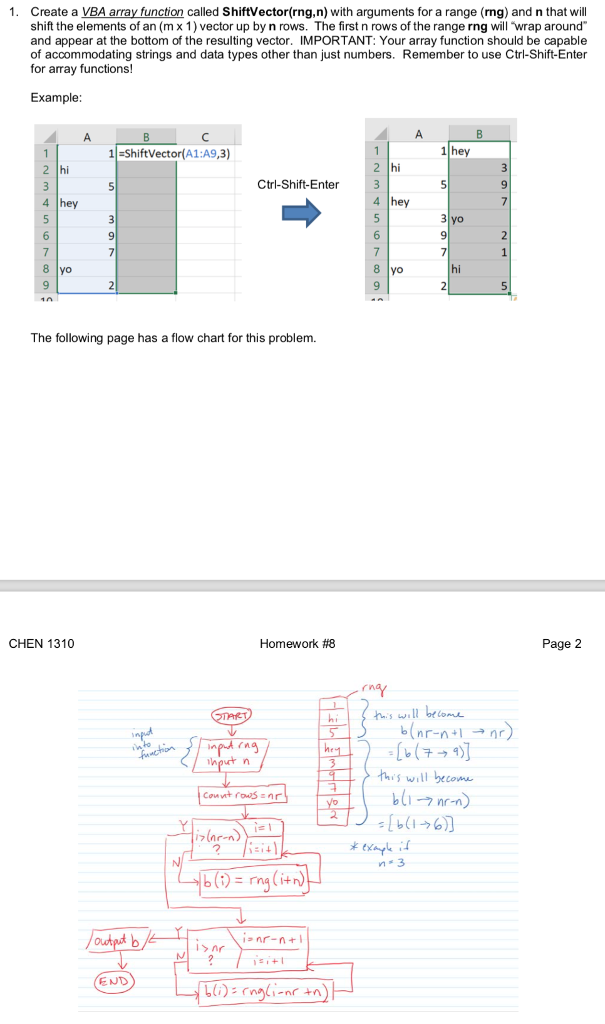
1. Create a VBA array function called ShiftVector(rng,n) with arguments for a range (rng) and n that will shift the elements of an (m x 1) vector up by n rows. The first n rows of the range rng will wrap around and appear at the bottom of the resulting vector. IMPORTANT: Your array function should be capable of accommodating strings and data types other than just numbers. Remember to use Ctrl-Shift-Enter for array functions! Example 1-ShiftVector(A1:A9,3) 1 hey Ctrl-Shift-Enter 9 7 4 hey hey 31yo 8 yo 8 yo hi The following page has a flow chart for this problem. CHEN 1310 Homework #8 Page 2 nr-nr 4) his will becom b-nrn ihto hput n Ouotpat b END 1. Create a VBA array function called ShiftVector(rng,n) with arguments for a range (rng) and n that will shift the elements of an (m x 1) vector up by n rows. The first n rows of the range rng will wrap around and appear at the bottom of the resulting vector. IMPORTANT: Your array function should be capable of accommodating strings and data types other than just numbers. Remember to use Ctrl-Shift-Enter for array functions! Example 1-ShiftVector(A1:A9,3) 1 hey Ctrl-Shift-Enter 9 7 4 hey hey 31yo 8 yo 8 yo hi The following page has a flow chart for this problem. CHEN 1310 Homework #8 Page 2 nr-nr 4) his will becom b-nrn ihto hput n Ouotpat b END
Step by Step Solution
There are 3 Steps involved in it

Get step-by-step solutions from verified subject matter experts
 Study Help