







Question: vb.net Please help The form and all controls should be named using VB standards. Within the code, using meaningful variable names that meet the VB
vb.net
Please help The form and all controls should be named using VB standards.
Within the code, using meaningful variable names that meet the VB standards and appropriate data types.
Your comments are encouraged.
Form 1: Spring Festival Snackbar Calculator Project:
This project will calculate the total price that a customer needs to pay for the snacks that they want to purchase at this years Spring Festival. Four items are offered for sale at this snack bar:
Hamburgers - $3.00 eachFries - $1.00 eachCandy - $1.00 eachDrinks - $.50 each
For each customer order, a unique order Id will be generated. This will be comprised of the first initial of the first name followed by the first initial of the last name and then a sequential number starting at 1000 and increasing by 1 for each order placed; for example If the first customer is Daniel Young, his order Id will be DY1000.
FYI: We wont store the order number, so each time you run the program, the order Id will start over at 1000.
Add three subprocedures: GetInput, CalculateCosts, DisplayOutput.
When coding the following subs, pay close attention to how the variables are passed (ByVal or ByRef). You must use the appropriate choice for every parameter.
GetInput Sub: Once you have validated that the user's input is correct and created the local variables that will be used by the button
click event, the next step is to read in the input values into variables from the form. This will include the name and the quantity of each of the food items that the user wants to purchase. (Remember: to place an order, the user enters the number of each item that they wish to buy.)
Since we dont want to require the users to type in 0 for items that they dont want to order (but simply leave these textboxes blank), your program needs to set the qty ordered to 0 for any of the four items that are blank within the GetInput sub.
CalculateCosts Sub: This sub should calculate the cost for each of the four food items that could be purchased; burger cost, fries cost, candy cost, and drink cost. To do this, the number of items order must be multiplied by the cost for the indicated item (the individual cost can be coded as a literal value in the math equation).
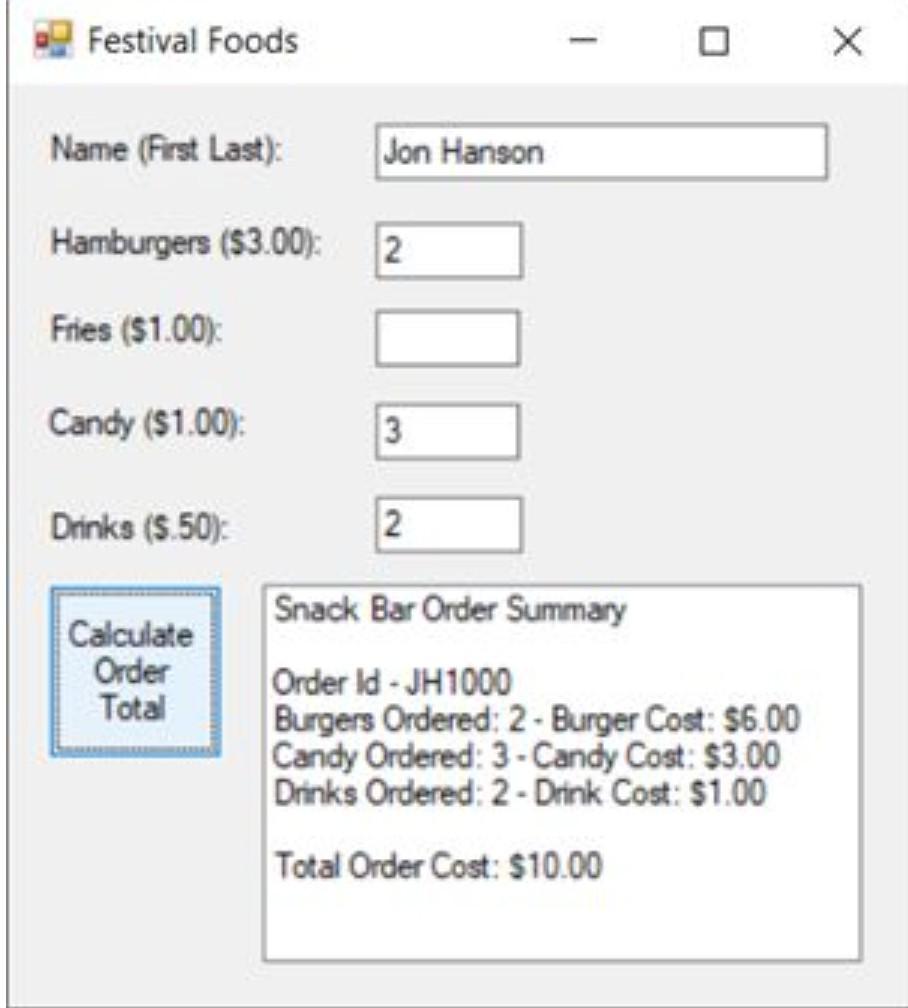
DisplayOutput Sub: The final sub is the longest and the one that will display the output. As sample form is shown below with sample output in the listbox. If the quantity purchased for any of the food item is 0, then no output line should be displayed for that item.
Festival Foods 1 Name (First Last): Jon Hanson Hamburgers ($3.00): 2 Fries ($1.00): Candy ($1.00): 3 Drinks (S.50): 2 Snack Bar Order Summary Calculate Order Total Order ld - JH1000 Burgers Ordered: 2 - Burger Cost: $6.00 Candy Ordered: 3 - Candy Cost: $3.00 Drinks Ordered: 2 - Drink Cost: $1.00 Total Order Cost: $10.00
Step by Step Solution
There are 3 Steps involved in it

Get step-by-step solutions from verified subject matter experts
 Study Help