







Question: Vector3D.java contains the following code: public class Vector3D { // define instance variables here /** * Creates the vector (0.0, 0.0, 0.0) . * This
Vector3D.java contains the following code: public class Vector3D { // define instance variables here /** * Creates the vector (0.0, 0.0, 0.0). * This is the default constructor. */ public Vector3D() { } /** * Creates the vector (x, y, z). * @param x is the x-component of the vector * @param y is the y-component of the vector * @param z is the z-component of the vector */ public Vector3D(double x, double y, double z) { } /** * Creates a vector with the same components as another vector. * This is the copy constructor. * @param other * a vector to copy the components from */ public Vector3D(Vector3D other) { } /** * Returns the x component of the vector. * @return the x component of the vector. */ public double getX() { // insert your code here and change the return statement return 0; } /** * Sets the x component of the vector. * @param x the new value of the x component. */ public void setX(double x) { // insert your code here } /** * Returns the y component of the vector. * @return the y component of the vector. */ public double getY() { // insert your code here and change the return statement return 0; }
/** * Sets the y component of the vector. * @param y the new value of the y component. */ public void setY(double y) { } /** * Returns the z component of the vector. * @return the z component of the vector. */ public double getZ() { // insert your code here and change the return statement return 0; } /** * Sets the z component of the vector. * @param z the new value of the z component. */ public void setZ(double z) { } /** * Adds a vector to this vector and changes the components of this vector. * To add, the counterpart components are added together. * @param other is the vector that is added to this vector. * @return this Vector3D object */ public Vector3D add(Vector3D other) { // insert your code here and change the return statement return new Vector3D(); } /** * Subtracts a vector from this vector and changes the components of this vector. * To subtract, the counterpart components are subtracted. * @param other is the vector that is subtracted from this vector. * @return this Vector3D object */ public Vector3D subtract(Vector3D other) { // insert your code here and change the return statement return new Vector3D(); } /** * Multiplies this vector by a scalar. * @param scalar is the scalar that is multiplied by this vector * @return this vector after multiplication */ public Vector3D scalarMultiplication(double scalar) { // insert your code here and change the return statement return new Vector3D(); } /**
* computes the DOT product of this vector and the given vector * @param other is the given vector, whose DOT product with this vector is given * @return the DOT product of this and the other vector. */ public double dotProduct(Vector3D other) { // insert your code here and change the return statement return 0; } /** * Returns the magnitude of this vector. * @return the magnitude of this vector. */ public double magnitude() { // insert your code here and change the return statement return 0; }
/** * Returns a string representation of the vector as [x, y, z], * where x, y and z are teh components of teh vector. * @return a string representation of the vector */ @Override public String toString() { // insert your code here and change the return statement return ""; } /** * Determines if the difference between the magnitude of this vector and the other vector * is smaller than the given threshold. * @param other the other vector that is compared with this vector * @param threshold a positive double, which shows the accepted magnitude difference between the two vectors * @return true if the difference between magnitude of the * two vectors is less than threshold and false otherwise */ public boolean equalTo(Vector3D other, double threshold) { // insert your code here and change the return statement return true; } }
TESTER
package Lab3;
import static org.junit.jupiter.api.Assertions.*;
import org.junit.jupiter.api.Test;
class Vector3DTester {
private double rand() { return (int) ((Math.random() * 100.0)*10)/10.0; }
private double negRand() { return (int) ((Math.random() * 100.0)*10)/-10.0; }
@Test void testCnstr1() { double r = Math.random(); double x = 0; double y = 0; double z = 0; if (r
Vector3D vect = new Vector3D(x, y, z); testGetX(x, vect); testGetY(y, vect); testGetZ(z, vect); } private void testGetX(double x, Vector3D vect) { boolean equal = Math.abs(x - vect.getX())
private void testGetY(double y, Vector3D vect) { boolean equal = Math.abs(y - vect.getY())
vect1.add(vect1); testGetX(0, new Vector3D()); testGetY(0, new Vector3D()); testGetZ(0, new Vector3D()); }
@Test void testSubtract() { Vector3D vect1 = new Vector3D(); vect1.subtract(vect1);
testGetX(0, new Vector3D()); testGetY(0, new Vector3D()); testGetZ(0, new Vector3D()); } @Test void testScalarMultiplication() { Vector3D vect1 = new Vector3D(); vect1.scalarMultiplication(1);
testGetX(0, new Vector3D()); testGetY(0, new Vector3D()); testGetZ(0, new Vector3D()); } @Test void testDotProduct() { Vector3D vect1 = new Vector3D(); vect1.dotProduct(vect1);
testGetX(0, new Vector3D());
testGetY(0, new Vector3D()); testGetZ(0, new Vector3D());
} @Test void testMagnitude() { Vector3D vect1 = new Vector3D(); vect1.magnitude();
testGetX(0, new Vector3D()); testGetY(0, new Vector3D()); testGetZ(0, new Vector3D()); } @Test void testToString() { Vector3D vect1 = new Vector3D(); vect1.toString();
testGetX(0, new Vector3D()); testGetY(0, new Vector3D()); testGetZ(0, new Vector3D()); } @Test void testEqual2() { Vector3D vect1 = new Vector3D(); vect1.equalTo(vect1, 0);
testGetX(0, new Vector3D()); testGetY(0, new Vector3D()); testGetZ(0, new Vector3D());
}
}
Please do both, JAVA and TESTER
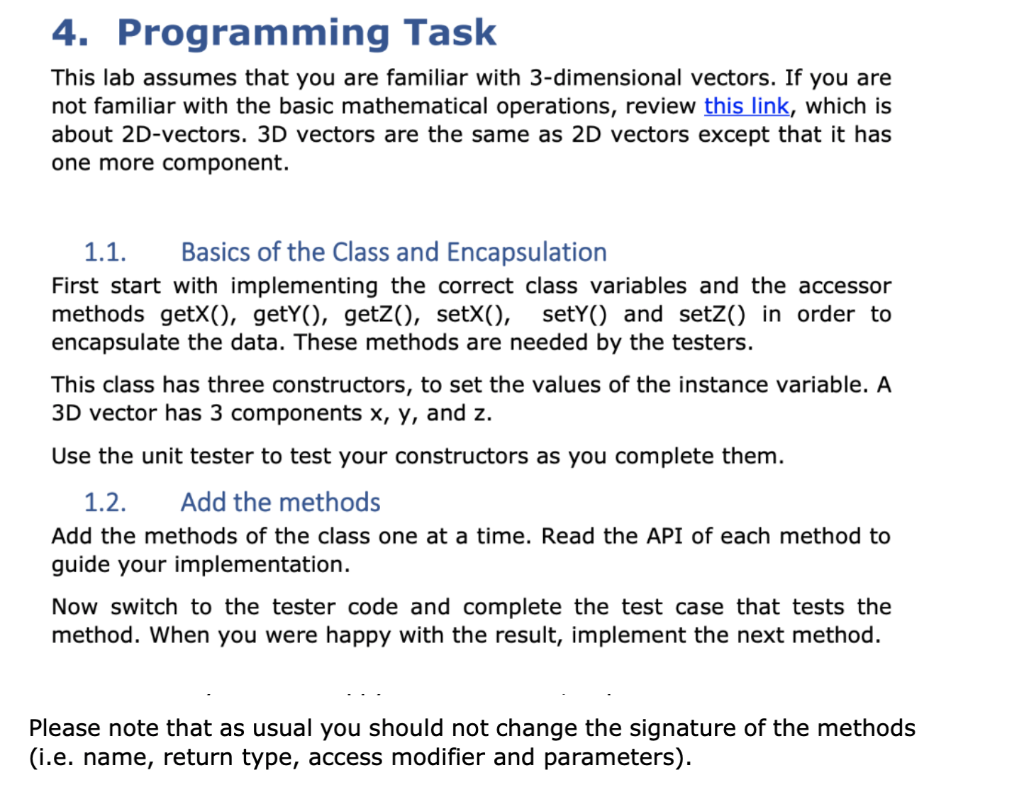
4. Programming Task This lab assumes that you are familiar with 3-dimensional vectors. If you are not familiar with the basic mathematical operations, review this link, which is about 2D-vectors. 3D vectors are the same as 2D vectors except that it has one more component. 1.1. Basics of the Class and Encapsulation First start with implementing the correct class variables and the accessor methods getX(), getY(), getz(), setX(), setY() and setz() in order to encapsulate the data. These methods are needed by the testers. This class has three constructors, to set the values of the instance variable. A 3D vector has 3 components x, y, and z. Use the unit tester to test your constructors as you complete them. 1.2. Add the methods Add the methods of the class one at a time. Read the API of each method to guide your implementation. Now switch to the tester code and complete the test case that tests the method. When you were happy with the result, implement the next method. Please note that as usual you should not change the signature of the methods (i.e. name, return type, access modifier and parameters)
Step by Step Solution
There are 3 Steps involved in it

Get step-by-step solutions from verified subject matter experts
 Study Help