



Question: vehicle list import javax.swing.JOptionPane; /** * @author a * Date: 09 December 2021 * Description: class to maintain record and keep in a list. *
vehicle list
import javax.swing.JOptionPane;
/** * @author a * Date: 09 December 2021 * Description: class to maintain record and keep in a list. * */ public class VehicleList { /** * Instance data */ private VehicleRecord list[]; private int maxSize; //maximum number of records that can exist in the list private int size; //actual usable size at any point /** * default constructor */ public VehicleList() { // init. the data this.maxSize = 10; this.list = new VehicleRecord [maxSize]; this.size = 0;
}
/** * method to insert a record in the list */ public boolean insert (VehicleRecord record) { if (size
/** * Method to increase the max size of the vehicle list to accommodate more records * @param oriList */ public boolean maxSizeIncrease(int MaxSize) {
if(MaxSize > this.maxSize) {
VehicleRecord tList[] = new VehicleRecord [MaxSize];
//for loop to go through the list one by one for(int i = 0; i
//store all values from new list to the old one this.list = tList; this.maxSize = MaxSize; return true; } return false;
}
/** * Method to "delete" a record from the list. * */ public boolean delete(VehicleRecord record) { //loop through the valid list for (int i = 0; i
/** * @return the size */ public int getSize() { return size; }
/** * create a toString method */ public String toString() { String theList = ""; //an output variable which is empty //loop through the valid elements of the list for (int i = 0; i
//infinite loop while(true) { char command; command = JOptionPane.showInputDialog(null, "i - insert " + "q -quit " + "c-change " + "p -print " + "s - increase max size "+ "d- delete ", "i").charAt(0);
if(command == 'q') { break; //breaks out of the while loop } switch(command) { case'i':{//insert //prompt for the record String record = JOptionPane.showInputDialog(null, "Enter
} case'd':{ //prompt for the record String record = JOptionPane.showInputDialog(null, "Enter
//prompt for new record String newRecord = JOptionPane.showInputDialog(null, "Enter
if(vehicle.change(oldInfo, newInfo)) { JOptionPane.showMessageDialog(null, "record changed"); } else { JOptionPane.showMessageDialog(null, "change failed"); } break; }
//max size increase case's': { //prompt int newSize = Integer.parseInt(JOptionPane.showInputDialog(null, "Enter the new maximum size:", "15"));
//check if size is possible to increase if(vehicle.maxSizeIncrease(newSize)) { JOptionPane.showMessageDialog(null, "size increased to " + newSize); } else { JOptionPane.showMessageDialog(null, "Error"); } break; } case 'p':{ JOptionPane.showMessageDialog(null, vehicle.toString()); break;
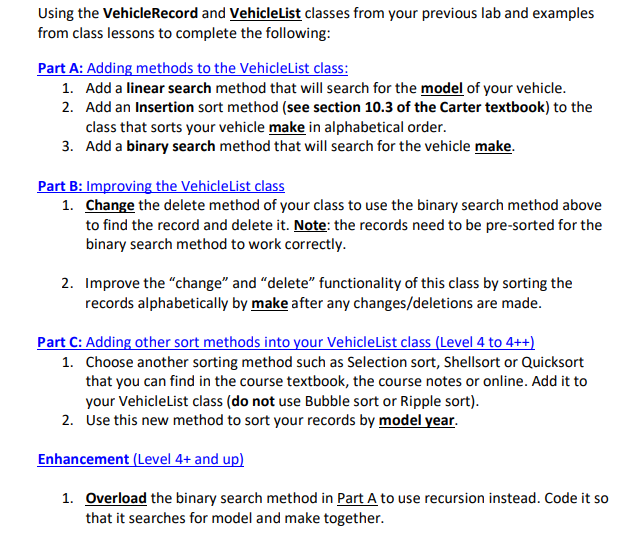
Using the VehicleRecord and vehicleList classes from your previous lab and examples from class lessons to complete the following: Part A: Adding methods to the VehicleList class: 1. Add a linear search method that will search for the model of your vehicle. 2. Add an Insertion sort method (see section 10.3 of the Carter textbook) to the class that sorts your vehicle make in alphabetical order. 3. Add a binary search method that will search for the vehicle make. Part B: Improving the Vehiclelist class 1. Change the delete method of your class to use the binary search method above to find the record and delete it. Note: the records need to be pre-sorted for the binary search method to work correctly. 2. Improve the "change" and "delete functionality of this class by sorting the records alphabetically by make after any changes/deletions are made. Part C: Adding other sort methods into your VehicleList class (Level 4 to 4++) 1. Choose another sorting method such as Selection sort, Shellsort or Quicksort that you can find in the course textbook, the course notes or online. Add it to your VehicleList class (do not use Bubble sort or Ripple sort). 2. Use this new method to sort your records by model year. Enhancement (Level 4+ and up) 1. Overload the binary search method in Part A to use recursion instead. Code it so that it searches for model and make together
Step by Step Solution
There are 3 Steps involved in it

Get step-by-step solutions from verified subject matter experts