







Question: Verilog program help. Based on the verilog module above. Use the following Test cases. Calculate Output values for Cout and S_8. Then write a test
Verilog program help.
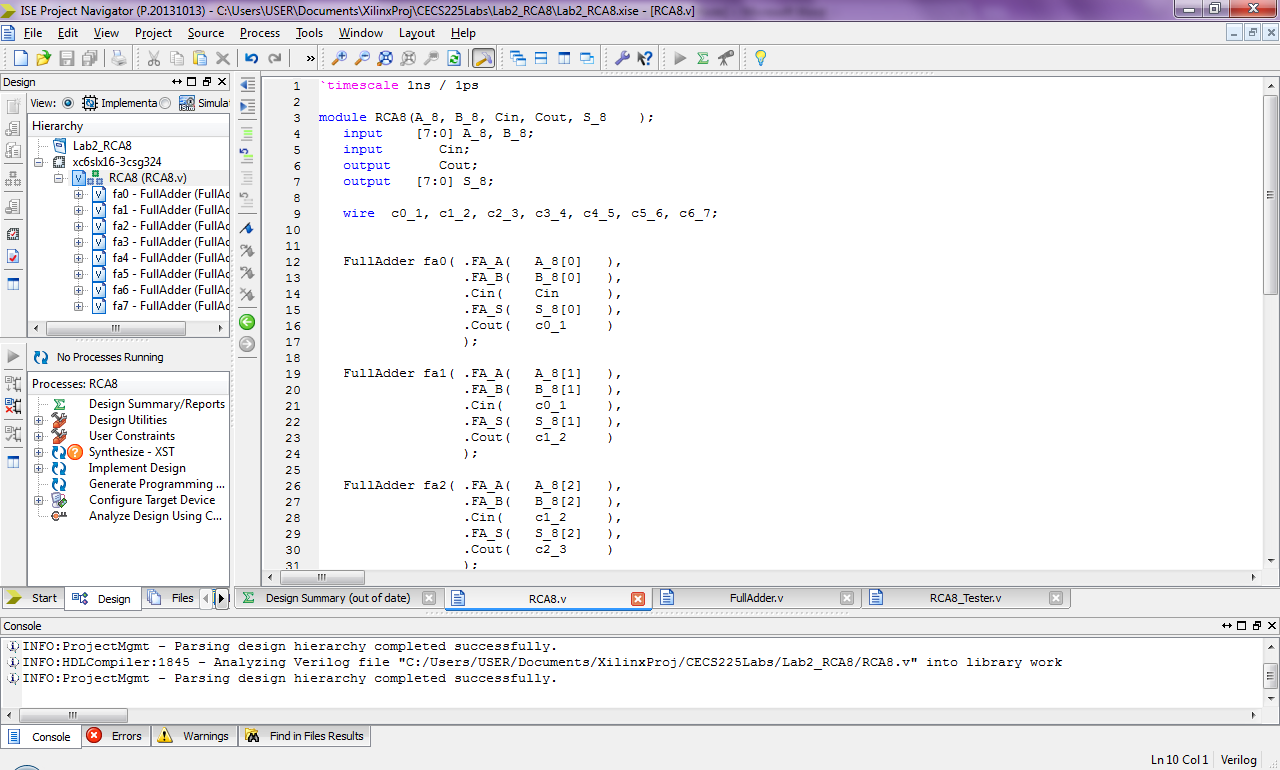
Based on the verilog module above. Use the following Test cases. Calculate Output values for Cout and S_8. Then write a test script and see if the values you have calculated match your simulation results:
| Inputs | Outputs | ||||
| Test Case | Cin | A_8 | B_8 | Cout | S_8 |
| 0 | 0 | 12 | 34 | ||
| 1 | 0 | 55 | AA | ||
| 2 | 0 | 72 | 27 | ||
| 3 | 0 | 80 | 08 | ||
| 4 | 1 | 12 | 34 | ||
| 5 | 1 | 55 | AA | ||
| 6 | 1 | 72 | 27 | ||
| 7 | 1 | 80 | 08 | ||
When interpreting the simulation results it is more convenient work with hexadecimal for evaluating multi-bit quantities. Initially test results are shown in binary
ISE Project Navigator (P.20131013) _ CAUsers\USERDocumentsXilinxPrjCECS225Labs\Lab2-RCA8Lab2-RCA8xse-RCA8.v] File Edit View Project Source Process Tools Window Layout Help ? | Design 1 ?time 3 cale Ins / 1p3 Simula E 3 module RCA8 (A 8, B 8, Cin, Cout, S 8 Hierarc input 17:0] A 8, B_8: input output output [7:0] S 8: Cin; Cout 7 fa0 FullAdder (FullAd fal FullAdder (FullAd wire co 1, c1 2, c2 3, c3 4, c4 5, c5 6, c6 7: ?Dfa2 _ FullAdder (FullAd? 10 fa3 - FullAdder (FulIA fa4 - FullAdder (FulIA fa5 - FullAdder (FullAd fa6- FullAdder (FullAd 14 fa7 - FullAdder (FullAd FullAdder fao .FA A(A 8[O], 12 13 15 16 .CinCin .FA S S80] .Cout CO1 No Processes Running 18 19 20 21 FullAdder fal( .FA A(A 8[1], Processes: RCA8 .FA B B 81, .Cin ( .FA S S 81 , .Cout cl 2 RA ? Design Summary/Reports Design Utilities User Constraints co 1 23 2 4 25 2 6 27 28 29 30 Synthesize - XST Implement Design Generate Programming. Configure Target Device ? FullAdder fa2( .FA A(A 8[2]), .FA BB 8 2 ), .Cin ( .FA S S8[2] .Cout C23 CAalyze Design Using C.. c1 2 StartDesign Files ? Design Summary (out of date) RCA8.v FullAdder.v RCA8 Tester.v Console INFO: ProjectMgmt - Parsing design hierarchy completed successfully x) INFO : HDLCompiler: 1845 Analyzing Verilog file "c:/Users/USER/Documents/XilinxProj /CECS225Labs/Lab2_RCA8/RCA8.r" into library work - INFO: ProjectMgmt - Parsing design hierarchy completed successfully. ConsoleErrorsWarningsFind in Files Results Ln 10 Col 1 Verilog
Step by Step Solution
There are 3 Steps involved in it

Get step-by-step solutions from verified subject matter experts
 Study Help