







Question: Video you must watch: https://youtu.be/Y42RZU_o-4I Tests to assure code works: largest = ! largest: Returns max(A0, A1) L0 - A0 A1 JMP+ L0 a0 RTN
Video you must watch: https://youtu.be/Y42RZU_o-4I
Tests to assure code works:
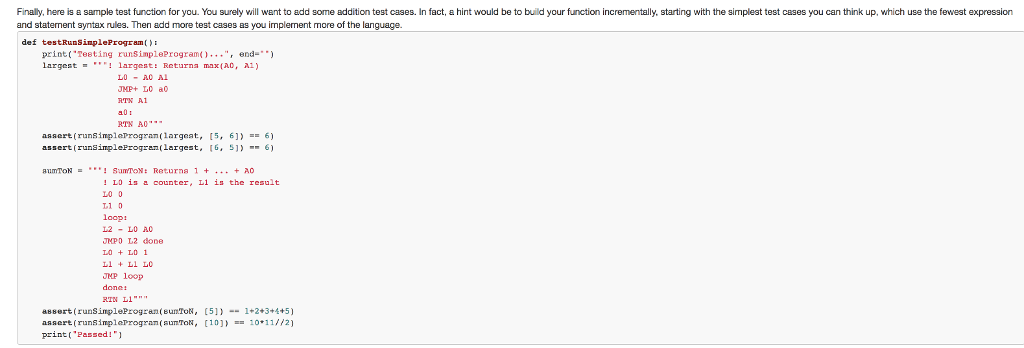
largest = """! largest: Returns max(A0, A1) L0 - A0 A1 JMP+ L0 a0 RTN A1 a0: RTN A0""" assert(runSimpleProgram(largest, [5, 6]) == 6) assert(runSimpleProgram(largest, [6, 5]) == 6) sumToN = """! SumToN: Returns 1 + ... + A0 ! L0 is a counter, L1 is the result L0 0 L1 0 loop: L2 - L0 A0 JMP0 L2 done L0 + L0 1 L1 + L1 L0 JMP loop done: RTN L1""" assert(runSimpleProgram(sumToN, [5]) == 1+2+3+4+5) assert(runSimpleProgram(sumToN, [10]) == 10*11//2)
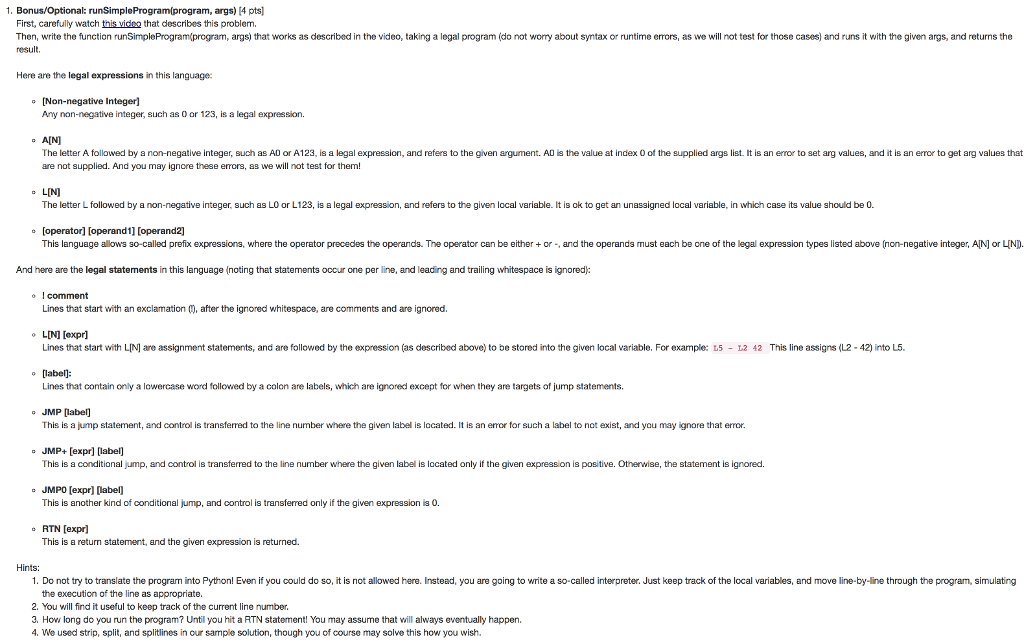
1. Bonus/Optional: runSimpleProgram(program, args) [4 pts First, carefully watch this vicea that describes this problem. Then, write the function runSimpleProgramkprogram, args) that works as described in the video, taking a legal program (do not worry about syntax or runtime errors, as we will not test for those cases) and runs it with the given args, and returns the result. Here are the legal expressions in this language: [Non-negative Integer] Any non-negative integer, such as O or 123, is a legal expression. A[N The letter A followed by a non-negative integer, such as AD or A123, is a legal expression, and refers to the given argument. AD is the value at index O of the supplied args list. It is an eror to set arg values, and it is an error to get arg values that are not supplied. And you may ignore these erors, as we will not test for them! LIN The letter L followed by a non-negative integer, such as LO or L123, is a legal expression, and refers to the given local variable. It is ok to get an unassigned local variable, in which case its value should be 0 e [operator] [operand1] [operand2] This language alows so-called prefix expressions, where the operator precedes the operands. The operator can be either or - and the operands must each be one of the legal expression types listed above non-negative integer, AIN or LIND And here are the legal statements in this language (noting that statements occur one per line, and leading and trailing whitespace is ignored o I comment Lines that start with an exclamation, after the ignored whitespace, are comments and are ignored. o L[N] [expr] Lines that start with LIN are assignment statements, and are followed by the expression (as described above) to be stored into the given local variable. For example: L5 L2 42 This line assigns (L2- 42) into L5. o [label: Lines that contain only a lowercase word followed by a colon are labels, which are ignored except for when they are targets of jump statements. o JMP label] This is a jump statement, and control is transferred to the line number where the given label is located. It is an error for such a label to nct exist, and you may ignore that error o JMP+ [expr] [label) This is a conditional jump, and control is transferred to the line number where the given label is located only if the given expression is positive. Otherwise, the statement is ignored o JMPO [expr] label] This is another kind of conditional jump, and control is transferred only if the given expression is 0. RTN [expr) This is a return statement, and the given expression is returned. Hints: 1. Do not try to translate the program into Python! Even if you could do so, it is not allowed here. Instead, you are going to write a so-called interpreter. Just keep track of the local variables, and move line-by-line through the program, simulating the execution of the line as appropriate. 2. You will find it useful to keep track of the current line number 3. Ho long do you run the program? Until you hit a RTN statement! You may assume that will always eventually happen. 4. We used strip, split, and splitlines in cur sample solution, though you of course may solve this how you wish
Step by Step Solution
There are 3 Steps involved in it

Get step-by-step solutions from verified subject matter experts
 Study Help