







Question: View the following C# Script carefully. Assume that the Script is enabled, is attached to an active GameObject, and addresses the appropriate namespaces first.
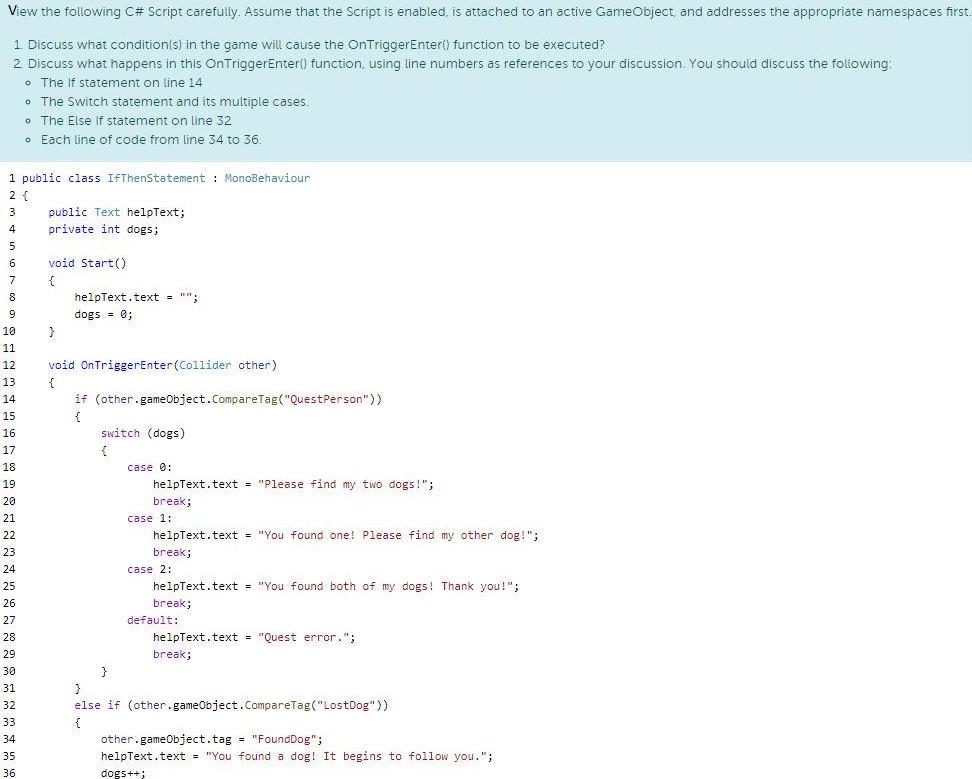
View the following C# Script carefully. Assume that the Script is enabled, is attached to an active GameObject, and addresses the appropriate namespaces first. 1. Discuss what condition(s) in the game will cause the OnTriggerEnter() function to be executed? 2 Discuss what happens in this OnTriggerEnter() function, using line numbers as references to your discussion. You should discuss the following: The If statement on line 14 o The Switch statement and its multiple cases. The Else If statement on line 32 o Each line of code from line 34 to 36. 1 public class IfThenStatement : MonoBehaviour 2 { 3 public Text helpText; 4 private int dogs; 6 void Start() 7 8 helpText.text = "": 9 dogs = 0; 10 11 12 void OnTriggerEnter (Collider other) 13 { 14 if (other.gameObject.CompareTag("QuestPerson")) 15 { 16 switch (dogs) 17 18 case 0: 19 helpText.text = "Please find my two dogs!"; 20 break; 21 case 1: 22 helpText.text = "You found one! Please find my other dog!"; 23 break; 24 case 2: 25 helpText.text = "You found both of my dogs! Thank you!"; 26 break; 27 default: 28 helpText.text - "Quest error."; 29 break; 30 } 31 32 else if (other.gameobject.CompareTag("LostDog")) 33 { 34 other.gameObject.tag "FoundDog"; 35 helpText.text = "You found a dog! It begins to follow you."; 36 dogs++;
Step by Step Solution
3.41 Rating (148 Votes )
There are 3 Steps involved in it
From the given image it can be inferred that this part of the code deals with a quest ingame which n... View full answer

Get step-by-step solutions from verified subject matter experts
 Study Help