Question: VISUAL BASIC CODE Please Extra 14-1 Create a State Maintenance application Show transcribed image text Expert Answer anonymous answered this Was this answer helpful? 0
VISUAL BASIC CODE Please Extra 14-1 Create a State Maintenance application
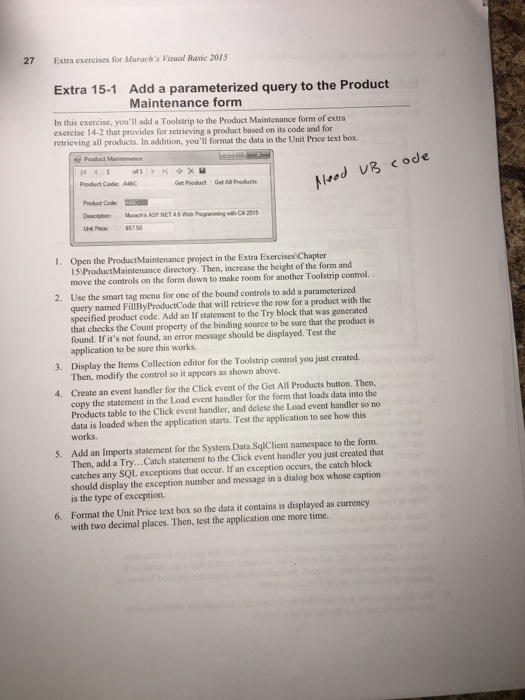
Show transcribed image text
Expert Answer
 anonymous answered this
Was this answer helpful?
0
1
2,173 answers
//Program.cs using System; using System.Collections.Generic; using System.Linq; using System.Threading.Tasks; using System.Windows.Forms;
namespace ProductMaintenance { static class Program { /// /// The main entry point for the application. /// [STAThread] static void Main() { Application.EnableVisualStyles(); Application.SetCompatibleTextRenderingDefault(false); Application.Run(new formMain()); } } } -------------------------------------------------------------------------------------------- //formMain.cs using System; using System.Collections.Generic; using System.ComponentModel; using System.Data; using System.Drawing; using System.Linq; using System.Text; using System.Threading.Tasks; using System.Windows.Forms; using System.Data.SqlClient;
namespace ProductMaintenance { public partial class formMain : Form { public formMain() { InitializeComponent(); }
private void productsBindingNavigatorSaveItem_Click(object sender, EventArgs e) { this.Validate(); this.productsBindingSource.EndEdit(); this.tableAdapterManager.UpdateAll(this.mMABooksDataSet);
}
private void fillByProductCodeToolStripButton_Click(object sender, EventArgs e) { try { this.productsTableAdapter.FillByProductCode(this.mMABooksDataSet.Products, productCodeToolStripTextBox.Text); } catch (System.Exception ex) { MessageBox.Show(ex.Message); }
}
private void toolStripButtonGetAllProduct_Click(object sender, EventArgs e) { try { this.productsTableAdapter.Fill(this.mMABooksDataSet.Products); } catch(SqlException ex) { MessageBox.Show(ex.Message.ToString()); } }
private void productCodeTextBox_TextChanged(object sender, EventArgs e) {
} } } ------------------------------------------------------------------------------------------------------------- //formMain.Designer.cs namespace ProductMaintenance { partial class formMain { /// /// Required designer variable. /// private System.ComponentModel.IContainer components = null;
/// /// Clean up any resources being used. /// /// true if managed resources should be disposed; otherwise, false. protected override void Dispose(bool disposing) { if (disposing && (components != null)) { components.Dispose(); } base.Dispose(disposing); }
#region Windows Form Designer generated code
/// /// Required method for Designer support - do not modify /// the contents of this method with the code editor. /// private void InitializeComponent() { this.components = new System.ComponentModel.Container(); System.Windows.Forms.Label productCodeLabel; System.Windows.Forms.Label descriptionLabel; System.Windows.Forms.Label unitPriceLabel; System.ComponentModel.ComponentResourceManager resources = new System.ComponentModel.ComponentResourceManager(typeof(formMain)); this.productsBindingNavigator = new System.Windows.Forms.BindingNavigator(this.components); this.bindingNavigatorAddNewItem = new System.Windows.Forms.ToolStripButton(); this.productsBindingSource = new System.Windows.Forms.BindingSource(this.components); this.mMABooksDataSet = new ProductMaintenance.MMABooksDataSet(); this.bindingNavigatorCountItem = new System.Windows.Forms.ToolStripLabel(); this.bindingNavigatorDeleteItem = new System.Windows.Forms.ToolStripButton(); this.bindingNavigatorMoveFirstItem = new System.Windows.Forms.ToolStripButton(); this.bindingNavigatorMovePreviousItem = new System.Windows.Forms.ToolStripButton(); this.bindingNavigatorSeparator = new System.Windows.Forms.ToolStripSeparator(); this.bindingNavigatorPositionItem = new System.Windows.Forms.ToolStripTextBox(); this.bindingNavigatorSeparator1 = new System.Windows.Forms.ToolStripSeparator(); this.bindingNavigatorMoveNextItem = new System.Windows.Forms.ToolStripButton(); this.bindingNavigatorMoveLastItem = new System.Windows.Forms.ToolStripButton(); this.bindingNavigatorSeparator2 = new System.Windows.Forms.ToolStripSeparator(); this.productsBindingNavigatorSaveItem = new System.Windows.Forms.ToolStripButton(); this.productCodeTextBox = new System.Windows.Forms.TextBox(); this.descriptionTextBox = new System.Windows.Forms.TextBox(); this.unitPriceTextBox = new System.Windows.Forms.TextBox(); this.fillByProductCodeToolStrip = new System.Windows.Forms.ToolStrip(); this.productCodeToolStripLabel = new System.Windows.Forms.ToolStripLabel(); this.productCodeToolStripTextBox = new System.Windows.Forms.ToolStripTextBox(); this.fillByProductCodeToolStripButton = new System.Windows.Forms.ToolStripButton(); this.toolStripSeparator1 = new System.Windows.Forms.ToolStripSeparator(); this.toolStripButtonGetAllProduct = new System.Windows.Forms.ToolStripButton(); this.productsTableAdapter = new ProductMaintenance.MMABooksDataSetTableAdapters.ProductsTableAdapter(); this.tableAdapterManager = new ProductMaintenance.MMABooksDataSetTableAdapters.TableAdapterManager(); productCodeLabel = new System.Windows.Forms.Label(); descriptionLabel = new System.Windows.Forms.Label(); unitPriceLabel = new System.Windows.Forms.Label(); ((System.ComponentModel.ISupportInitialize)(this.productsBindingNavigator)).BeginInit(); this.productsBindingNavigator.SuspendLayout(); ((System.ComponentModel.ISupportInitialize)(this.productsBindingSource)).BeginInit(); ((System.ComponentModel.ISupportInitialize)(this.mMABooksDataSet)).BeginInit(); this.fillByProductCodeToolStrip.SuspendLayout(); this.SuspendLayout(); // // productCodeLabel // productCodeLabel.AutoSize = true; productCodeLabel.Location = new System.Drawing.Point(23, 66); productCodeLabel.Name = "productCodeLabel"; productCodeLabel.Size = new System.Drawing.Size(75, 13); productCodeLabel.TabIndex = 1; productCodeLabel.Text = "Product Code:"; // // descriptionLabel // descriptionLabel.AutoSize = true; descriptionLabel.Location = new System.Drawing.Point(23, 92); descriptionLabel.Name = "descriptionLabel"; descriptionLabel.Size = new System.Drawing.Size(63, 13); descriptionLabel.TabIndex = 3; descriptionLabel.Text = "Description:"; // // unitPriceLabel // unitPriceLabel.AutoSize = true; unitPriceLabel.Location = new System.Drawing.Point(23, 118); unitPriceLabel.Name = "unitPriceLabel"; unitPriceLabel.Size = new System.Drawing.Size(56, 13); unitPriceLabel.TabIndex = 5; unitPriceLabel.Text = "Unit Price:"; // // productsBindingNavigator // this.productsBindingNavigator.AddNewItem = this.bindingNavigatorAddNewItem; this.productsBindingNavigator.BindingSource = this.productsBindingSource; this.productsBindingNavigator.CountItem = this.bindingNavigatorCountItem; this.productsBindingNavigator.DeleteItem = this.bindingNavigatorDeleteItem; this.productsBindingNavigator.Items.AddRange(new System.Windows.Forms.ToolStripItem[] { this.bindingNavigatorMoveFirstItem, this.bindingNavigatorMovePreviousItem, this.bindingNavigatorSeparator, this.bindingNavigatorPositionItem, this.bindingNavigatorCountItem, this.bindingNavigatorSeparator1, this.bindingNavigatorMoveNextItem, this.bindingNavigatorMoveLastItem, this.bindingNavigatorSeparator2, this.bindingNavigatorAddNewItem, this.bindingNavigatorDeleteItem, this.productsBindingNavigatorSaveItem}); this.productsBindingNavigator.Location = new System.Drawing.Point(0, 0); this.productsBindingNavigator.MoveFirstItem = this.bindingNavigatorMoveFirstItem; this.productsBindingNavigator.MoveLastItem = this.bindingNavigatorMoveLastItem; this.productsBindingNavigator.MoveNextItem = this.bindingNavigatorMoveNextItem; this.productsBindingNavigator.MovePreviousItem = this.bindingNavigatorMovePreviousItem; this.productsBindingNavigator.Name = "productsBindingNavigator"; this.productsBindingNavigator.PositionItem = this.bindingNavigatorPositionItem; this.productsBindingNavigator.Size = new System.Drawing.Size(426, 25); this.productsBindingNavigator.TabIndex = 0; this.productsBindingNavigator.Text = "bindingNavigator1"; // // bindingNavigatorAddNewItem // this.bindingNavigatorAddNewItem.DisplayStyle = System.Windows.Forms.ToolStripItemDisplayStyle.Image; this.bindingNavigatorAddNewItem.Image = ((System.Drawing.Image)(resources.GetObject("bindingNavigatorAddNewItem.Image"))); this.bindingNavigatorAddNewItem.Name = "bindingNavigatorAddNewItem"; this.bindingNavigatorAddNewItem.RightToLeftAutoMirrorImage = true; this.bindingNavigatorAddNewItem.Size = new System.Drawing.Size(23, 22); this.bindingNavigatorAddNewItem.Text = "Add new"; // // productsBindingSource // this.productsBindingSource.DataMember = "Products"; this.productsBindingSource.DataSource = this.mMABooksDataSet; // // mMABooksDataSet // this.mMABooksDataSet.DataSetName = "MMABooksDataSet"; this.mMABooksDataSet.SchemaSerializationMode = System.Data.SchemaSerializationMode.IncludeSchema; // // bindingNavigatorCountItem // this.bindingNavigatorCountItem.Name = "bindingNavigatorCountItem"; this.bindingNavigatorCountItem.Size = new System.Drawing.Size(35, 22); this.bindingNavigatorCountItem.Text = "of {0}"; this.bindingNavigatorCountItem.ToolTipText = "Total number of items"; // // bindingNavigatorDeleteItem // this.bindingNavigatorDeleteItem.DisplayStyle = System.Windows.Forms.ToolStripItemDisplayStyle.Image; this.bindingNavigatorDeleteItem.Image = ((System.Drawing.Image)(resources.GetObject("bindingNavigatorDeleteItem.Image"))); this.bindingNavigatorDeleteItem.Name = "bindingNavigatorDeleteItem"; this.bindingNavigatorDeleteItem.RightToLeftAutoMirrorImage = true; this.bindingNavigatorDeleteItem.Size = new System.Drawing.Size(23, 22); this.bindingNavigatorDeleteItem.Text = "Delete"; // // bindingNavigatorMoveFirstItem // this.bindingNavigatorMoveFirstItem.DisplayStyle = System.Windows.Forms.ToolStripItemDisplayStyle.Image; this.bindingNavigatorMoveFirstItem.Image = ((System.Drawing.Image)(resources.GetObject("bindingNavigatorMoveFirstItem.Image"))); this.bindingNavigatorMoveFirstItem.Name = "bindingNavigatorMoveFirstItem"; this.bindingNavigatorMoveFirstItem.RightToLeftAutoMirrorImage = true; this.bindingNavigatorMoveFirstItem.Size = new System.Drawing.Size(23, 22); this.bindingNavigatorMoveFirstItem.Text = "Move first"; // // bindingNavigatorMovePreviousItem // this.bindingNavigatorMovePreviousItem.DisplayStyle = System.Windows.Forms.ToolStripItemDisplayStyle.Image; this.bindingNavigatorMovePreviousItem.Image = ((System.Drawing.Image)(resources.GetObject("bindingNavigatorMovePreviousItem.Image"))); this.bindingNavigatorMovePreviousItem.Name = "bindingNavigatorMovePreviousItem"; this.bindingNavigatorMovePreviousItem.RightToLeftAutoMirrorImage = true; this.bindingNavigatorMovePreviousItem.Size = new System.Drawing.Size(23, 22); this.bindingNavigatorMovePreviousItem.Text = "Move previous"; // // bindingNavigatorSeparator // this.bindingNavigatorSeparator.Name = "bindingNavigatorSeparator"; this.bindingNavigatorSeparator.Size = new System.Drawing.Size(6, 25); // // bindingNavigatorPositionItem // this.bindingNavigatorPositionItem.AccessibleName = "Position"; this.bindingNavigatorPositionItem.AutoSize = false; this.bindingNavigatorPositionItem.Name = "bindingNavigatorPositionItem"; this.bindingNavigatorPositionItem.Size = new System.Drawing.Size(50, 23); this.bindingNavigatorPositionItem.Text = "0"; this.bindingNavigatorPositionItem.ToolTipText = "Current position"; // // bindingNavigatorSeparator1 // this.bindingNavigatorSeparator1.Name = "bindingNavigatorSeparator1"; this.bindingNavigatorSeparator1.Size = new System.Drawing.Size(6, 25); // // bindingNavigatorMoveNextItem // this.bindingNavigatorMoveNextItem.DisplayStyle = System.Windows.Forms.ToolStripItemDisplayStyle.Image; this.bindingNavigatorMoveNextItem.Image = ((System.Drawing.Image)(resources.GetObject("bindingNavigatorMoveNextItem.Image"))); this.bindingNavigatorMoveNextItem.Name = "bindingNavigatorMoveNextItem"; this.bindingNavigatorMoveNextItem.RightToLeftAutoMirrorImage = true; this.bindingNavigatorMoveNextItem.Size = new System.Drawing.Size(23, 22); this.bindingNavigatorMoveNextItem.Text = "Move next"; // // bindingNavigatorMoveLastItem // this.bindingNavigatorMoveLastItem.DisplayStyle = System.Windows.Forms.ToolStripItemDisplayStyle.Image; this.bindingNavigatorMoveLastItem.Image = ((System.Drawing.Image)(resources.GetObject("bindingNavigatorMoveLastItem.Image"))); this.bindingNavigatorMoveLastItem.Name = "bindingNavigatorMoveLastItem"; this.bindingNavigatorMoveLastItem.RightToLeftAutoMirrorImage = true; this.bindingNavigatorMoveLastItem.Size = new System.Drawing.Size(23, 22); this.bindingNavigatorMoveLastItem.Text = "Move last"; // // bindingNavigatorSeparator2 // this.bindingNavigatorSeparator2.Name = "bindingNavigatorSeparator2"; this.bindingNavigatorSeparator2.Size = new System.Drawing.Size(6, 25); // // productsBindingNavigatorSaveItem // this.productsBindingNavigatorSaveItem.DisplayStyle = System.Windows.Forms.ToolStripItemDisplayStyle.Image; this.productsBindingNavigatorSaveItem.Image = ((System.Drawing.Image)(resources.GetObject("productsBindingNavigatorSaveItem.Image"))); this.productsBindingNavigatorSaveItem.Name = "productsBindingNavigatorSaveItem"; this.productsBindingNavigatorSaveItem.Size = new System.Drawing.Size(23, 22); this.productsBindingNavigatorSaveItem.Text = "Save Data"; this.productsBindingNavigatorSaveItem.Click += new System.EventHandler(this.productsBindingNavigatorSaveItem_Click); // // productCodeTextBox // this.productCodeTextBox.DataBindings.Add(new System.Windows.Forms.Binding("Text", this.productsBindingSource, "ProductCode", true)); this.productCodeTextBox.Location = new System.Drawing.Point(104, 63); this.productCodeTextBox.Name = "productCodeTextBox"; this.productCodeTextBox.Size = new System.Drawing.Size(100, 20); this.productCodeTextBox.TabIndex = 2; this.productCodeTextBox.TextChanged += new System.EventHandler(this.productCodeTextBox_TextChanged); // // descriptionTextBox // this.descriptionTextBox.DataBindings.Add(new System.Windows.Forms.Binding("Text", this.productsBindingSource, "Description", true)); this.descriptionTextBox.Location = new System.Drawing.Point(104, 89); this.descriptionTextBox.Name = "descriptionTextBox"; this.descriptionTextBox.Size = new System.Drawing.Size(275, 20); this.descriptionTextBox.TabIndex = 4; // // unitPriceTextBox // this.unitPriceTextBox.DataBindings.Add(new System.Windows.Forms.Binding("Text", this.productsBindingSource, "UnitPrice", true, System.Windows.Forms.DataSourceUpdateMode.OnValidation, null, "C2")); this.unitPriceTextBox.Location = new System.Drawing.Point(104, 118); this.unitPriceTextBox.Name = "unitPriceTextBox"; this.unitPriceTextBox.Size = new System.Drawing.Size(100, 20); this.unitPriceTextBox.TabIndex = 6; // // fillByProductCodeToolStrip // this.fillByProductCodeToolStrip.Items.AddRange(new System.Windows.Forms.ToolStripItem[] { this.productCodeToolStripLabel, this.productCodeToolStripTextBox, this.fillByProductCodeToolStripButton, this.toolStripSeparator1, this.toolStripButtonGetAllProduct}); this.fillByProductCodeToolStrip.Location = new System.Drawing.Point(0, 25); this.fillByProductCodeToolStrip.Name = "fillByProductCodeToolStrip"; this.fillByProductCodeToolStrip.Size = new System.Drawing.Size(426, 25); this.fillByProductCodeToolStrip.TabIndex = 7; this.fillByProductCodeToolStrip.Text = "fillByProductCodeToolStrip"; // // productCodeToolStripLabel // this.productCodeToolStripLabel.Name = "productCodeToolStripLabel"; this.productCodeToolStripLabel.Size = new System.Drawing.Size(80, 22); this.productCodeToolStripLabel.Text = "ProductCode:"; // // productCodeToolStripTextBox // this.productCodeToolStripTextBox.Name = "productCodeToolStripTextBox"; this.productCodeToolStripTextBox.Size = new System.Drawing.Size(100, 25); // // fillByProductCodeToolStripButton // this.fillByProductCodeToolStripButton.DisplayStyle = System.Windows.Forms.ToolStripItemDisplayStyle.Text; this.fillByProductCodeToolStripButton.Name = "fillByProductCodeToolStripButton"; this.fillByProductCodeToolStripButton.Size = new System.Drawing.Size(77, 22); this.fillByProductCodeToolStripButton.Text = " Get Product"; this.fillByProductCodeToolStripButton.Click += new System.EventHandler(this.fillByProductCodeToolStripButton_Click); // // toolStripSeparator1 // this.toolStripSeparator1.Name = "toolStripSeparator1"; this.toolStripSeparator1.Size = new System.Drawing.Size(6, 25); // // toolStripButtonGetAllProduct // this.toolStripButtonGetAllProduct.DisplayStyle = System.Windows.Forms.ToolStripItemDisplayStyle.Text; this.toolStripButtonGetAllProduct.Image = ((System.Drawing.Image)(resources.GetObject("toolStripButtonGetAllProduct.Image"))); this.toolStripButtonGetAllProduct.ImageTransparentColor = System.Drawing.Color.Magenta; this.toolStripButtonGetAllProduct.Name = "toolStripButtonGetAllProduct"; this.toolStripButtonGetAllProduct.Size = new System.Drawing.Size(96, 22); this.toolStripButtonGetAllProduct.Text = "Get All Products"; this.toolStripButtonGetAllProduct.Click += new System.EventHandler(this.toolStripButtonGetAllProduct_Click); // // productsTableAdapter // this.productsTableAdapter.ClearBeforeFill = true; // // tableAdapterManager // this.tableAdapterManager.BackupDataSetBeforeUpdate = false; this.tableAdapterManager.ProductsTableAdapter = this.productsTableAdapter; this.tableAdapterManager.UpdateOrder = ProductMaintenance.MMABooksDataSetTableAdapters.TableAdapterManager.UpdateOrderOption.InsertUpdateDelete; // // formMain // this.AutoScaleDimensions = new System.Drawing.SizeF(6F, 13F); this.AutoScaleMode = System.Windows.Forms.AutoScaleMode.Font; this.ClientSize = new System.Drawing.Size(426, 163); this.Controls.Add(this.fillByProductCodeToolStrip); this.Controls.Add(productCodeLabel); this.Controls.Add(this.productCodeTextBox); this.Controls.Add(descriptionLabel); this.Controls.Add(this.descriptionTextBox); this.Controls.Add(unitPriceLabel); this.Controls.Add(this.unitPriceTextBox); this.Controls.Add(this.productsBindingNavigator); this.FormBorderStyle = System.Windows.Forms.FormBorderStyle.FixedSingle; this.Name = "formMain"; this.StartPosition = System.Windows.Forms.FormStartPosition.CenterScreen; this.Text = "Product Maintenance"; ((System.ComponentModel.ISupportInitialize)(this.productsBindingNavigator)).EndInit(); this.productsBindingNavigator.ResumeLayout(false); this.productsBindingNavigator.PerformLayout(); ((System.ComponentModel.ISupportInitialize)(this.productsBindingSource)).EndInit(); ((System.ComponentModel.ISupportInitialize)(this.mMABooksDataSet)).EndInit(); this.fillByProductCodeToolStrip.ResumeLayout(false); this.fillByProductCodeToolStrip.PerformLayout(); this.ResumeLayout(false); this.PerformLayout();
}
#endregion
private MMABooksDataSet mMABooksDataSet; private System.Windows.Forms.BindingSource productsBindingSource; private MMABooksDataSetTableAdapters.ProductsTableAdapter productsTableAdapter; private MMABooksDataSetTableAdapters.TableAdapterManager tableAdapterManager; private System.Windows.Forms.BindingNavigator productsBindingNavigator; private System.Windows.Forms.ToolStripButton bindingNavigatorAddNewItem; private System.Windows.Forms.ToolStripLabel bindingNavigatorCountItem; private System.Windows.Forms.ToolStripButton bindingNavigatorDeleteItem; private System.Windows.Forms.ToolStripButton bindingNavigatorMoveFirstItem; private System.Windows.Forms.ToolStripButton bindingNavigatorMovePreviousItem; private System.Windows.Forms.ToolStripSeparator bindingNavigatorSeparator; private System.Windows.Forms.ToolStripTextBox bindingNavigatorPositionItem; private System.Windows.Forms.ToolStripSeparator bindingNavigatorSeparator1; private System.Windows.Forms.ToolStripButton bindingNavigatorMoveNextItem; private System.Windows.Forms.ToolStripButton bindingNavigatorMoveLastItem; private System.Windows.Forms.ToolStripSeparator bindingNavigatorSeparator2; private System.Windows.Forms.ToolStripButton productsBindingNavigatorSaveItem; private System.Windows.Forms.TextBox productCodeTextBox; private System.Windows.Forms.TextBox descriptionTextBox; private System.Windows.Forms.TextBox unitPriceTextBox; private System.Windows.Forms.ToolStrip fillByProductCodeToolStrip; private System.Windows.Forms.ToolStripLabel productCodeToolStripLabel; private System.Windows.Forms.ToolStripTextBox productCodeToolStripTextBox; private System.Windows.Forms.ToolStripButton fillByProductCodeToolStripButton; private System.Windows.Forms.ToolStripSeparator toolStripSeparator1; private System.Windows.Forms.ToolStripButton toolStripButtonGetAllProduct; } }
Extra exercises for furach's Visual Basic 201 5 Extra 15-1 In this exercise, you'l add a Toolstrip to the Product Maintenance form of extra 27 Add a parameterized query to the Product Maintenance form exercise 14-2 that provides for retrieving a product based on its code and for retrieving all products. In addition, you'll format the data in the Unit Price text box. leed B code Get Product Get All Products Poduct Code: ? 1. Open the ProductMaintenance project in the Extra Exercises Chapter S ProductMaintenance directory. Then, increase the height of the form and move the controls on the form down to make room for another Toolstrip control. Use the smart tag menu for one of the bound controls to add a parameterized query named FillByProductCode that will retrieve the row for a product with the specified product code. Add an If statement to the Try block that was generated that checks the Count property of the binding source to be sure that the product is found. If it's not found, an error message should be displayed. Test the application to be sure this works. 2. 3. Display the Items Collection editor for the Toolstrip control you just created Then, modify the control so it appears as shown above. Create an event handler for the Click event of the Get All Products button. Then, copy the statement in the Load event handler for the form that loads data into the 4. Products table to the Click event handler, and delete the Load event handler so no data is loaded when the application starts. Test the application to see how this works. 5. Add an Imports statement for the System. Data.SqlClient namespace to the form. Then, add a Try...Catch statement to the Click event handler you just created that catches any SQL exceptions that occur. If an exception occurs, the catch block should display the exception number and message in a dialog box whose caption is the type of exception. Format the Unit Price text box so the data it contains is displayed as currency with two decimal places. Then, test the application one more time. 6. Extra exercises for furach's Visual Basic 201 5 Extra 15-1 In this exercise, you'l add a Toolstrip to the Product Maintenance form of extra 27 Add a parameterized query to the Product Maintenance form exercise 14-2 that provides for retrieving a product based on its code and for retrieving all products. In addition, you'll format the data in the Unit Price text box. leed B code Get Product Get All Products Poduct Code: ? 1. Open the ProductMaintenance project in the Extra Exercises Chapter S ProductMaintenance directory. Then, increase the height of the form and move the controls on the form down to make room for another Toolstrip control. Use the smart tag menu for one of the bound controls to add a parameterized query named FillByProductCode that will retrieve the row for a product with the specified product code. Add an If statement to the Try block that was generated that checks the Count property of the binding source to be sure that the product is found. If it's not found, an error message should be displayed. Test the application to be sure this works. 2. 3. Display the Items Collection editor for the Toolstrip control you just created Then, modify the control so it appears as shown above. Create an event handler for the Click event of the Get All Products button. Then, copy the statement in the Load event handler for the form that loads data into the 4. Products table to the Click event handler, and delete the Load event handler so no data is loaded when the application starts. Test the application to see how this works. 5. Add an Imports statement for the System. Data.SqlClient namespace to the form. Then, add a Try...Catch statement to the Click event handler you just created that catches any SQL exceptions that occur. If an exception occurs, the catch block should display the exception number and message in a dialog box whose caption is the type of exception. Format the Unit Price text box so the data it contains is displayed as currency with two decimal places. Then, test the application one more time. 6









 Study Help