







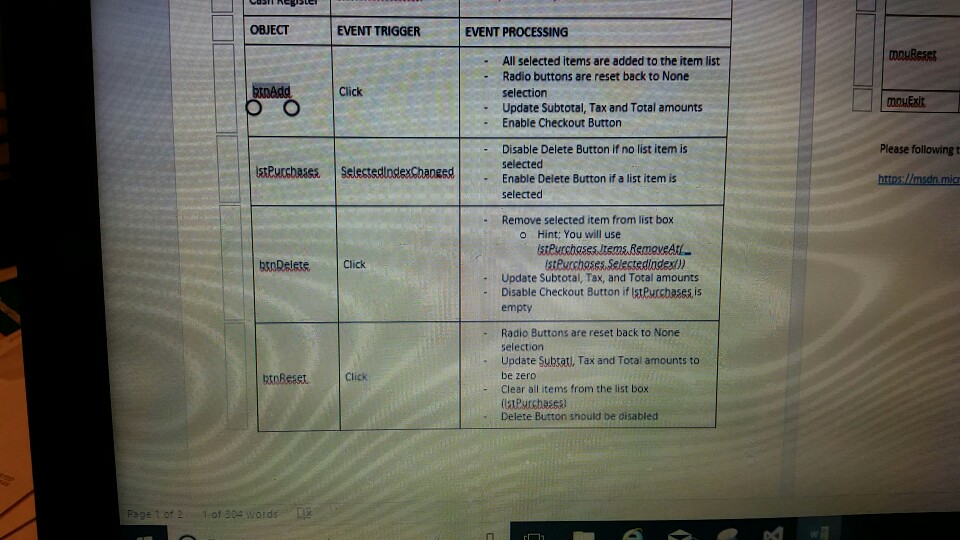
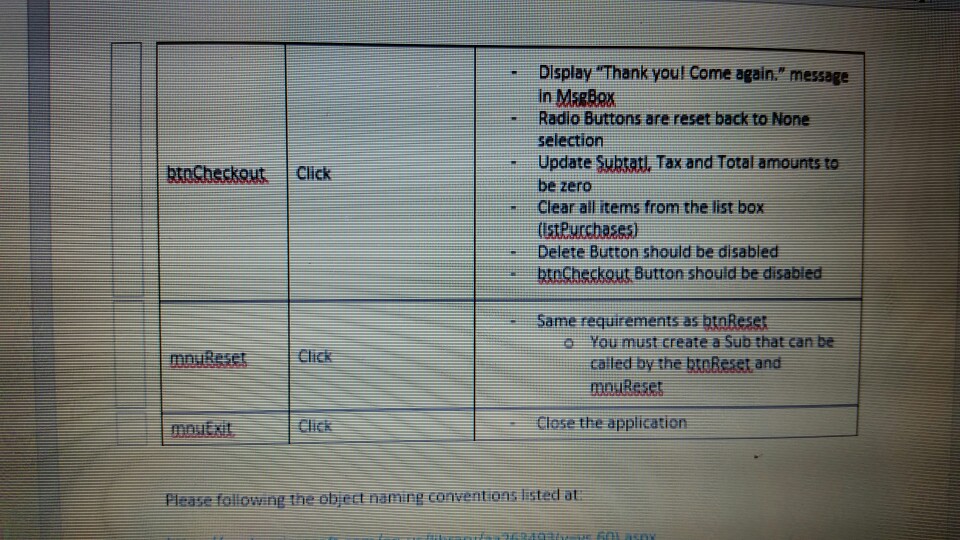
Question: Visual Basic Program I need a basic design and code for the listed items. OBJECT EVENT TRIGGER EVENT PROCESSING -All selected items are added to
Visual Basic Program
I need a basic design and code for the listed items.
OBJECT EVENT TRIGGER EVENT PROCESSING -All selected items are added to the item list mDuBese Radio buttons are reset back to None selection Click mouEsit - Update Subtotal, Tax and Total amounts - Enable Checkout Button Please following t Disable Delete Button if no list item is selected Enable Delete Button if a list item is selected Purchases. | SelectedIndexChanged Remove selected item from list box - o Hint: You will use btoRelete. Click Update Subtotal, Tax, and Total amounts Disable Checkout Button if IstPurcbases is empty Radio Buttons are reset back to None selection Update Subtatl, Tax and Total amounts to be zero Clear all items from the list box tnReastClick Delete Button should be disabled 2 OBJECT EVENT TRIGGER EVENT PROCESSING -All selected items are added to the item list mDuBese Radio buttons are reset back to None selection Click mouEsit - Update Subtotal, Tax and Total amounts - Enable Checkout Button Please following t Disable Delete Button if no list item is selected Enable Delete Button if a list item is selected Purchases. | SelectedIndexChanged Remove selected item from list box - o Hint: You will use btoRelete. Click Update Subtotal, Tax, and Total amounts Disable Checkout Button if IstPurcbases is empty Radio Buttons are reset back to None selection Update Subtatl, Tax and Total amounts to be zero Clear all items from the list box tnReastClick Delete Button should be disabled 2
Step by Step Solution
There are 3 Steps involved in it

Get step-by-step solutions from verified subject matter experts
 Study Help