







Question: Visual basic Programming I need help. I tried everything and its not working properly. Cell Solutions, a cell phone provider, sells the following packages: Customers
Visual basic Programming I need help. I tried everything and its not working properly.
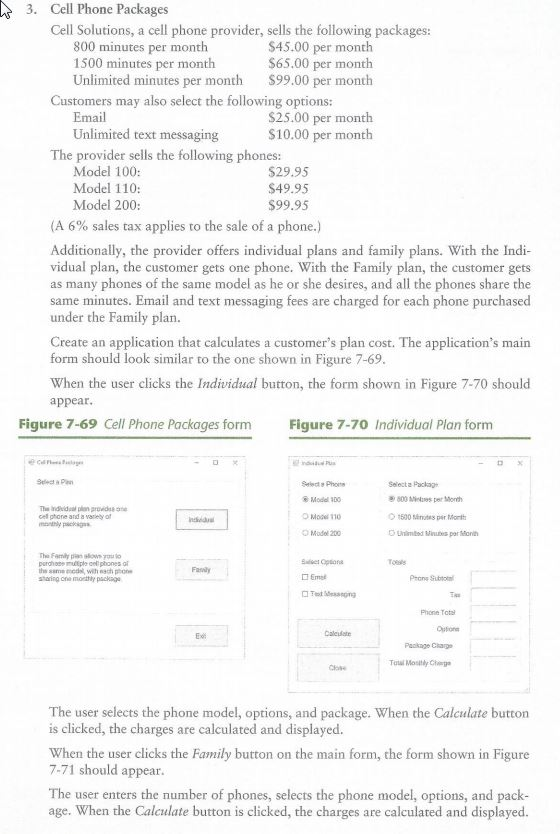
Cell Solutions, a cell phone provider, sells the following packages: Customers may also select the following options: The provider sells the following phones: (A 6% sales tax applies to the sale of a phone.) Additionally, the provider offers individual plans and family plans. With the Individual plan, the customer gets one phone. With the Family plan, the customer gets as many phones of the same model as he or she desires, and all the phones share the same minutes. Email and text messaging fees are charged for each phone purchased under the Family plan. Create an application that calculates a customer's plan cost. The application's main form should look similar to the one shown in Figure 7-69. When the user clicks the Individual button, the form shown in Figure 7-70 should appear. The user selects the phone model, options, and package. When the Calculate button is clicked, the charges are calculated and displayed. When the user clicks the Family button on the main form, the form shown in Figure 7-71 should appear. The user enters the number of phones, selects the phone model, options, and package. When the Calculate button is clicked, the charges are calculated and displayed. Cell Solutions, a cell phone provider, sells the following packages: Customers may also select the following options: The provider sells the following phones: (A 6% sales tax applies to the sale of a phone.) Additionally, the provider offers individual plans and family plans. With the Individual plan, the customer gets one phone. With the Family plan, the customer gets as many phones of the same model as he or she desires, and all the phones share the same minutes. Email and text messaging fees are charged for each phone purchased under the Family plan. Create an application that calculates a customer's plan cost. The application's main form should look similar to the one shown in Figure 7-69. When the user clicks the Individual button, the form shown in Figure 7-70 should appear. The user selects the phone model, options, and package. When the Calculate button is clicked, the charges are calculated and displayed. When the user clicks the Family button on the main form, the form shown in Figure 7-71 should appear. The user enters the number of phones, selects the phone model, options, and package. When the Calculate button is clicked, the charges are calculated and displayed
Step by Step Solution
There are 3 Steps involved in it

Get step-by-step solutions from verified subject matter experts
 Study Help