







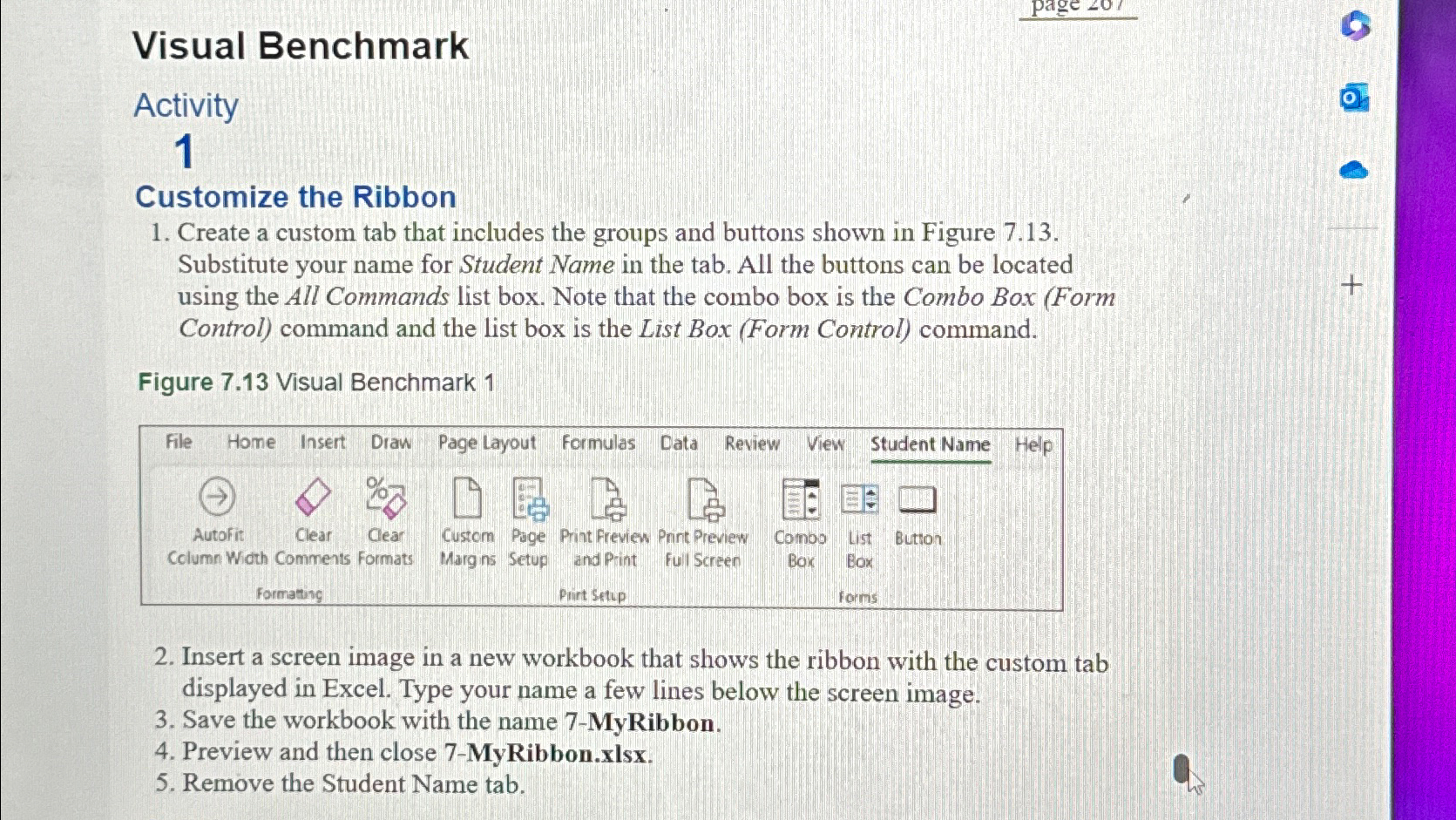
Question: Visual Benchmark Activity 1 Customize the Ribbon Create a custom tab that includes the groups and buttons shown in Figure 7 . 1 3 .
Visual Benchmark
Activity
Customize the Ribbon
Create a custom tab that includes the groups and buttons shown in Figure Substitute your name for Student Name in the tab. All the buttons can be located using the All Commands list box. Note that the combo box is the Combo Box Form Control command and the list box is the List Box Form Control command.
Figure Visual Benchmark
Insert a screen image in a new workbook that shows the ribbon with the custom tab displayed in Excel. Type your name a few lines below the screen image.
Save the workbook with the name MyRibbon.
Preview and then close MyRibbon.xlsx
Remove the Student Name tab.
Please show how to do each step, thabk you!
Step by Step Solution
There are 3 Steps involved in it
1 Expert Approved Answer
Step: 1 Unlock

Question Has Been Solved by an Expert!
Get step-by-step solutions from verified subject matter experts
Step: 2 Unlock
Step: 3 Unlock
 Study Help