







Question: Visual Studio 2019 This project will have you analyze a previous a program and create a new one using a form Take the code from
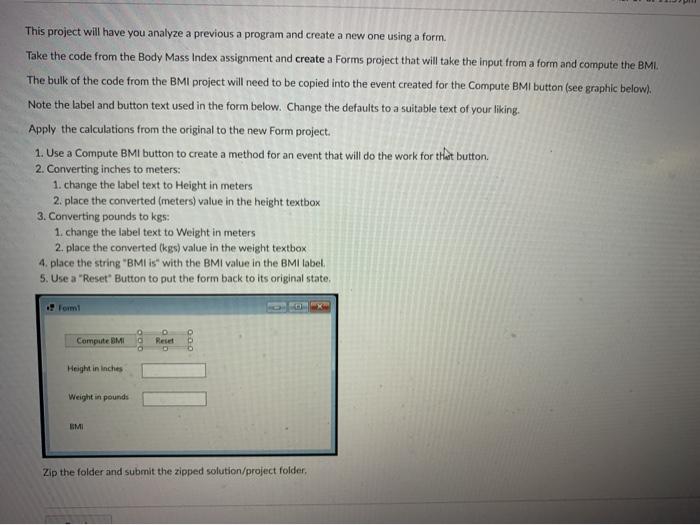
This project will have you analyze a previous a program and create a new one using a form Take the code from the Body Mass Index assignment and create a Forms project that will take the input from a form and compute the BMI The bulk of the code from the BMI project will need to be copied into the event created for the Compute BMI button (see graphic below). Note the label and button text used in the form below. Change the defaults to a suitable text of your liking. Apply the calculations from the original to the new Form project. 1. Use a Compute BMI button to create a method for an event that will do the work for that button. 2. Converting inches to meters: 1. change the label text to Height in meters 2. place the converted (meters) value in the height textbox 3. Converting pounds to kgs: 1. change the label text to Weight in meters 2. place the converted (kgs) value in the weight textbox 4. place the string 'BMI is with the BMI value in the BMI label 5. Use a "Reset" Button to put the form back to its original state, . Form Compute BMI Rese Height in inches Weight in pounds MI Zip the folder and submit the zipped solution/project folder
Step by Step Solution
There are 3 Steps involved in it

Get step-by-step solutions from verified subject matter experts
 Study Help