



Question: W 365 Project Files For Project 4L, you will need the following file: e04L_Golf Courses You will save your workbook as: Lastname_Firstname_4L_Golf Courses Open the
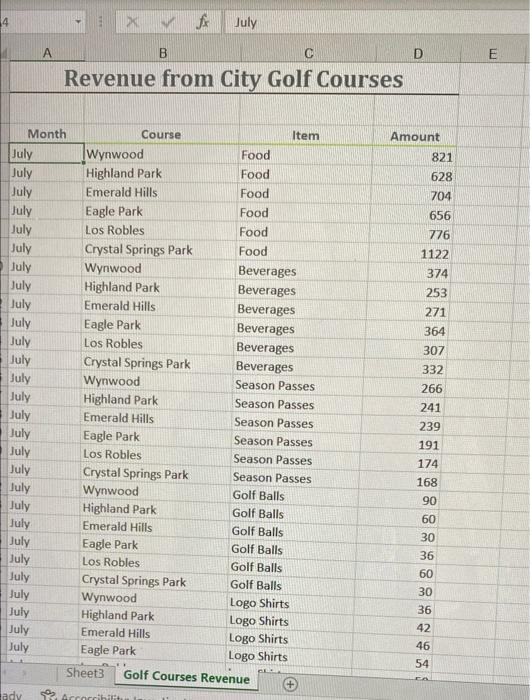
4 July A B C E D Revenue from City Golf Courses Month July July July July July July July July July July July July July July July Course Item Wynwood Food Highland Park Food Emerald Hills Food Eagle Park Food Los Robles Food Crystal Springs Park Food Wynwood Beverages Highland Park Beverages Emerald Hills Beverages Eagle Park Beverages Los Robles Beverages Crystal Springs Park Beverages Wynwood Season Passes Highland Park Season Passes Emerald Hills Season Passes Eagle Park Season Passes Los Robles Season Passes Crystal Springs Park Season Passes Wynwood Golf Balls Highland Park Golf Balls Emerald Hills Golf Balls Eagle Park Golf Balls Los Robles Golf Balls Crystal Springs Park Golf Balls Wynwood Logo Shirts Highland Park Logo Shirts Emerald Hills Logo Shirts Eagle Park Logo Shirts Sheets Golf Courses Revenue Amount 821 628 704 656 776 1122 374 253 271 364 307 332 266 241 239 191 July 174 168 90 60 July July July July July July July July July July July July 30 36 60 30 36 42 46 54 ca ady Arcorribilis
Step by Step Solution
There are 3 Steps involved in it

Get step-by-step solutions from verified subject matter experts