







Question: W & C Add information to the README.txt note in upper left-hand corner - Create a New Class... named Month Use Javadoc documentation standards (comments
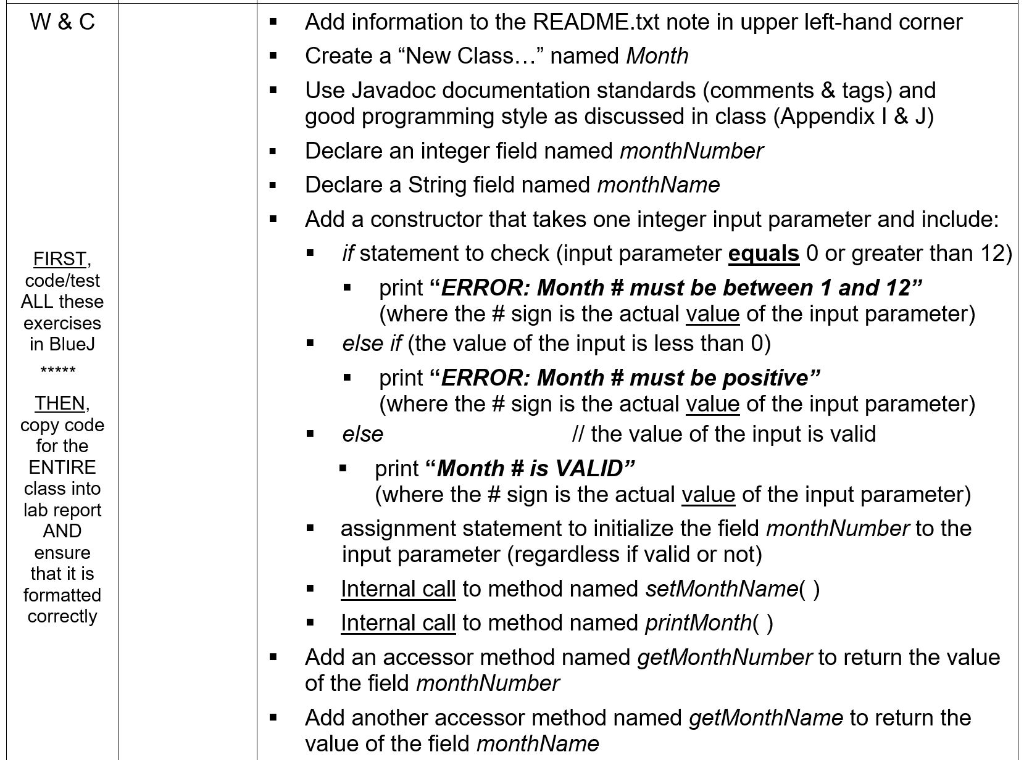
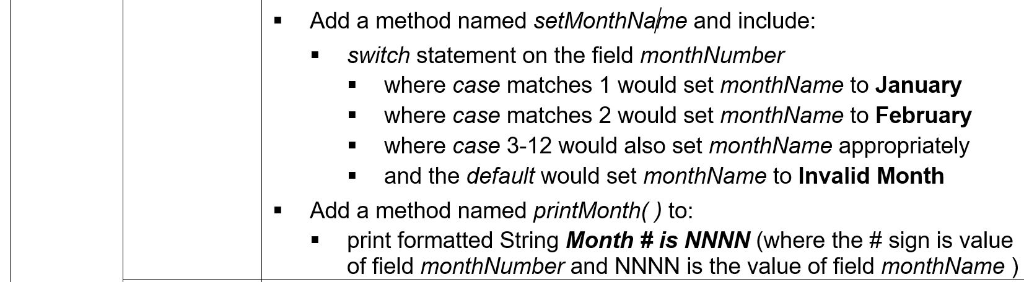
W & C Add information to the README.txt note in upper left-hand corner - Create a "New Class..." named Month Use Javadoc documentation standards (comments & tags) and good programming style as discussed in class (Appendix I & J) Declare an integer field named monthNumber Declare a String field named monthName Add a constructor that takes one integer input parameter and include - " - - If statement to check (input parameter equals 0 or greater than 12) FIRST. code/test ALL these exercises in BlueJ print'' ERROR: Month # must be between 1 and 12" (where the # sign is the actual value of the input parameter) " else if (the value of the input is less than 0) prit "ERROR: Month # must be positive" (where the # sign is the actual value of the input parameter) THEN copy code for the ENTIRE class into lab report AND ensure that it is formatted correctly else // the value of the input is valid print Month # is VALID', (where the # sign is the actual value of the input parameter) assignment statement to initialize the field monthNumber to the - input parameter (regardless if valid or not) . Internal call to method named setMonthName . Internal call to method named printMonth " Add an accessor method named getMonthNumber to return the value of the field monthNumber Add another accessor method named getMonthName to return the value of the field monthName - -Add a method named setMonthName and include: - switch statement on the field monthNumber where case matches 1 would set monthName to January where case matches 2 would set monthName to February where case 3-12 would also set monthName appropriately and the default would set monthName to Invalid Month " " -Add a method named printMonth() to: print formatted String Month # is NNNN (where the # sign is value of field monthNumber and NNNN is the value of field monthName)
Step by Step Solution
There are 3 Steps involved in it

Get step-by-step solutions from verified subject matter experts
 Study Help