







Question: W OL 2. What feature in Word lets you insert properties, fields, and building blocks into a document? a. Insert b. Page Layout c. Quick
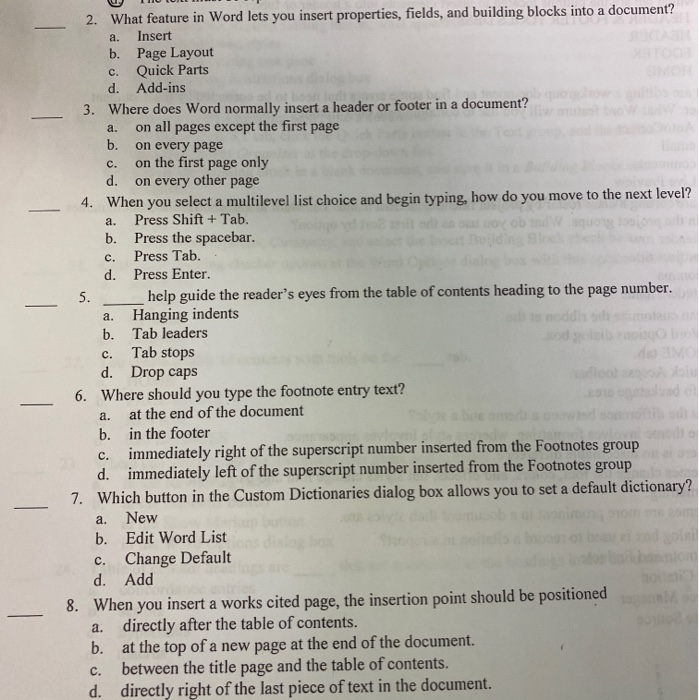
W OL 2. What feature in Word lets you insert properties, fields, and building blocks into a document? a. Insert b. Page Layout c. Quick Parts d. Add-ins 3. Where does Word normally insert a header or footer in a document? a. on all pages except the first page b. on every page c. on the first page only d. on every other page 4. When you select a multilevel list choice and begin typing, how do you move to the next level? a. Press Shift + Tab. b. Press the spacebar. c. Press Tab.. d. Press Enter. help guide the reader's eyes from the table of contents heading to the page number. a. Hanging indents b. Tab leaders c. Tab stops d. Drop caps Where should you type the footnote entry text? a. at the end of the document b. in the footer c. immediately right of the superscript number inserted from the Footnotes group d. immediately left of the superscript number inserted from the Footnotes group 7. Which button in the Custom Dictionaries dialog box allows you to set a default dictionary? a. New b. Edit Word List botol b adplei c. Change Default kolo d. Add 8. When you insert a works cited page, the insertion point should be positioned a. directly after the table of contents. b. at the top of a new page at the end of the document. C. between the title page and the table of contents. d. directly right of the last piece of text in the document
Step by Step Solution
There are 3 Steps involved in it

Get step-by-step solutions from verified subject matter experts
 Study Help