







Question: W vertex shader example void main() { gl.Position gl-Projection Matrix + gl_ModelView Matrix * gl.Vertex; gl.Front Color = vec4(0, 1, 0, 1); } W fragment
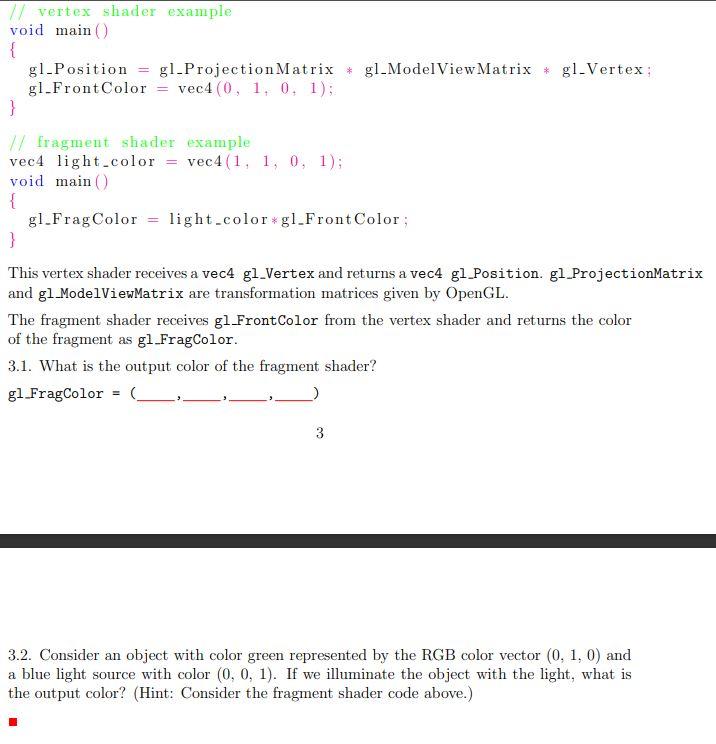
W vertex shader example void main() { gl.Position gl-Projection Matrix + gl_ModelView Matrix * gl.Vertex; gl.Front Color = vec4(0, 1, 0, 1); } W fragment shader example vec4 light.color = vec 4(1, 1, 0, 1); void main() { gl_Frag Color = light_color*gl_Front Color ; } This vertex shader receives a vec4 gl_Vertex and returns a vec4 gi_Position. gl ProjectionMatrix and gl_ModelViewMatrix are transformation matrices given by OpenGL. The fragment shader receives gl.FrontColor from the vertex shader and returns the color of the fragment as gl_FragColor. 3.1. What is the output color of the fragment shader? gl FragColor 3 3.2. Consider an object with color green represented by the RGB color vector (0, 1, 0) and a blue light source with color (0, 0, 1). If we illuminate the object with the light, what is the output color? (Hint: Consider the fragment shader code above.) W vertex shader example void main() { gl.Position gl-Projection Matrix + gl_ModelView Matrix * gl.Vertex; gl.Front Color = vec4(0, 1, 0, 1); } W fragment shader example vec4 light.color = vec 4(1, 1, 0, 1); void main() { gl_Frag Color = light_color*gl_Front Color ; } This vertex shader receives a vec4 gl_Vertex and returns a vec4 gi_Position. gl ProjectionMatrix and gl_ModelViewMatrix are transformation matrices given by OpenGL. The fragment shader receives gl.FrontColor from the vertex shader and returns the color of the fragment as gl_FragColor. 3.1. What is the output color of the fragment shader? gl FragColor 3 3.2. Consider an object with color green represented by the RGB color vector (0, 1, 0) and a blue light source with color (0, 0, 1). If we illuminate the object with the light, what is the output color? (Hint: Consider the fragment shader code above.)
Step by Step Solution
There are 3 Steps involved in it

Get step-by-step solutions from verified subject matter experts
 Study Help