







Question: # wavefns.py Simple periodic waveform functions. A standard wave function (such as sin) is a periodic function with period equal to 2*pi (also known as
# wavefns.py """Simple periodic waveform functions. A "standard" wave function (such as sin) is a periodic function with period equal to 2*pi (also known as tau) and a amplitude of 1. """ import math def sinewave(t): """ Standard periodic sine wave generator pre: t >= 0 post returns value of standard sine wave at time t (0 at t=0, 1 at t= pi/2, 0 at pi, -1 at 1.5*pi, 0 at 2*pi) """ return math.sin(t) def squarewave(t): """ Standard periodic square wave generator. pre: t >= 0 post: returns value of standard square wave at time t. (1.0 for 0 = 0 post: returns value of standard triangle wave at time t. (0.0 at t=0, 1.0 at t=pi/2, 0.0 at t=pi, -1.0 at t=1.5*pi) """ def sawtoothwave(t): """ Standard periodic sawtooth wave generator. pre: t >= 0 post: returns value of standard sawtooth wave at time t. (0.0 at t=0, rising to 1 near t=pi, -1.0 at t=pi, rising to 0.0 at t=pi) """ def whitenoise(t): """ White noise "wave" generator post: returns random float value in range -1 to 1 """ ###################################################################### # The rest of this is for testing purposes. No changes needed. # Requires: graphics needed to visualize the wave forms def _plot(wavefn): # test function plots 2 cycles of wavefunction win = GraphWin(wavefn.__name__, 600, 200) win.setCoords(0, -1, 2*math.tau, 1) Line(Point(0, 0), Point(2*math.tau, 0)).draw(win) npoints = 300 dt = 2*math.taupoints t = 0 last = Point(t, wavefn(t)) for i in range(npoints): t += dt p = Point(t, wavefn(t)) segment = Line(last, p).draw(win) segment.setFill("red") segment.setWidth(2) last = p win.getMouse() win.close() if __name__ == "__main__": from graphics import * for wf in [sinewave, squarewave, trianglewave, sawtoothwave, whitenoise]: _plot(wf)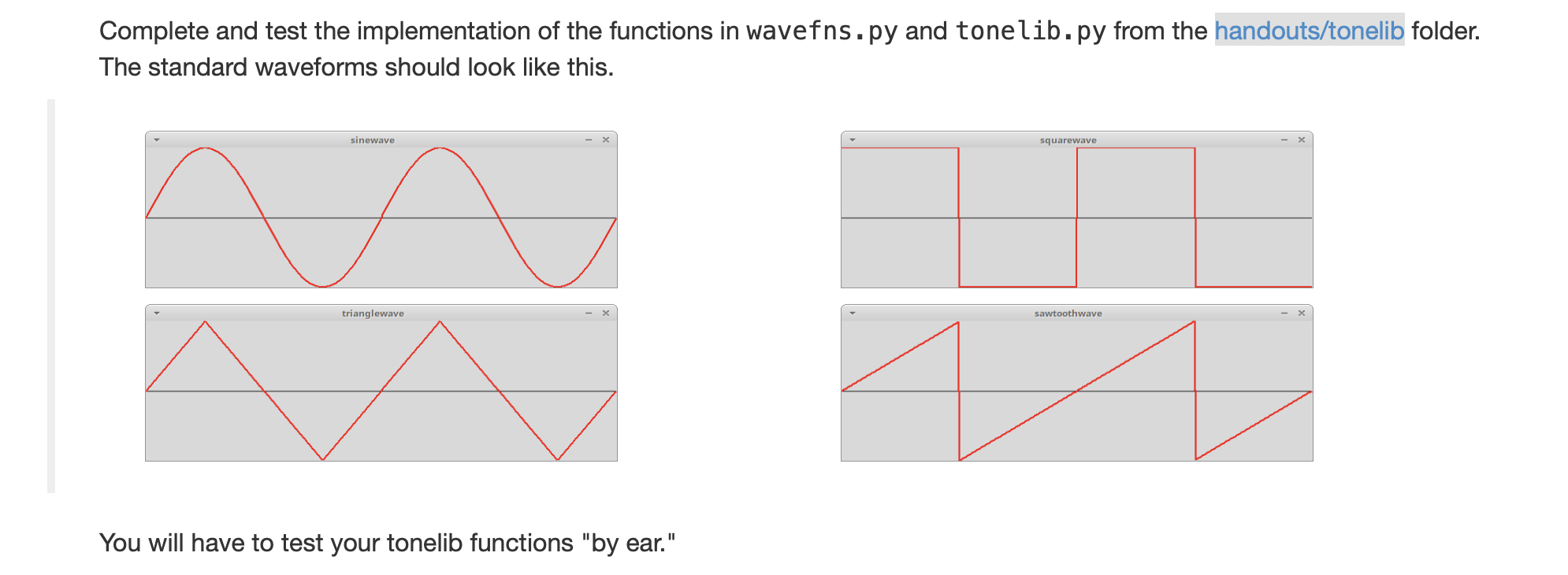
# tonelib.py """Simple tone generation library for creating, playing, and saving audio tones. A tone is represented as a list of "samples" of the waveform where each sample is a floating point number in the range -1 to 1 inclusive. Sampling is done at the standard CD rate of 44100 hz. The generate_tone function produces a list of samples representing a tone of a given frequency, duration, and amplitude produced from a standard wave function. Filter functions modify a list of samples, for example, by making a tone "fade-out" or adjusting the overall volume. write_wavefile writes a list of samples to an uncompressed wav file. play_sound is a simple function for playing tones. Intended for testing purposes only. """ import math import wave import struct import subprocess import random import sys import os from wavefns import * SAMPLERATE = 44100 # samples per second def generate_tone(wavefn=sinewave, freq=440, duration=1, amp=1): """Create a tone with given characteristics. params: wavefn is a standard wave function (see wavefns.py), frequency is in hz, duration is in seconds, amplitude is a float in range 0..1. returns a list of floats representing sequential samples of a tone with the given waveform, frequency, duration, and amplitude. """ def volumefilter(samples, factor=.75): """ Adjust the amplitude of entire sample uniformly. pre: factor > 0 post: Every sample in samples has been multiplied by factor. note: factor > 1.0 amplifies while factor 0 post: Values in samples have been decreased with increasing damping from the begining to end. The rate of damping is determined by decaytime, which is the half-life of the amplitude. So the sample at decaytime is reduced by .5, the sample at 2*decaytime is reduced by .25, etc. """ ###################################################################### # The below functions are done def write_wavefile(samples, fname, SAMPLERATE=44100): """ Write sampled wave to a wav format sound file pre: samples is a list representing a valid sound sample. post: The sound information has been written to the file fname in wav audio file format. Note: This function wipes out any previous contents of file, fname. """ wfile = wave.open(fname, 'w') nframes = len(samples) wfile.setparams((1, 4, SAMPLERATE, nframes, 'NONE', 'not compressed')) for b in _bytestream(samples): wfile.writeframesraw(b) wfile.close() def _bytestream(samples): max_amplitude = 2.0**31 - 1.0 for sample in samples: sample = max(-1, min(sample, 1)) # clamp to -1..1 value = int(max_amplitude*sample) binary = struct.pack('i', value) yield binary # playing sounds varies by platform. play_sound is set to the # appropriate function so that calling play_sound(tone_samples) should # work on most machines. # WARNING: on Windows and MacOs play_sound creates (and then DELETES) # a file called "temp.wav" def _play_sound_linux(samples): """Play sound on Linux system pre: samples is a list representing a valid sound sample. post: The sound has been piped to an external process for playback. Note: This should work on any Linux system using ALSA. """ pipes = subprocess.Popen(["aplay", "-fS32_LE", "-c1", "-r{:d}".format(SAMPLERATE), "-q", "-"], stdin=subprocess.PIPE) wfile = pipes.stdin for binary in _bytestream(samples): wfile.write(binary) wfile.close() def _play_sound_mac(samples): """ play sound on a mac This is a bit of a hack: write to a temp file and call the MacOs command to play the file. """ write_wavefile(samples, "temp.wav") subprocess.call(["afplay", "temp.wav"]) os.remove("temp.wav") def _play_sound_windows(samples): write_wavefile(samples, "temp.wav") winsound.PlaySound("temp.wav", winsound.SND_FILENAME & winsound.SND_ASYNC) os.remove("temp.wav") # define play_sound to be the platform appropriate function if sys.platform == "win32": import winsound play_sound = _play_sound_windows elif sys.platform == "linux": play_sound = _play_sound_linux elif sys.platform == "darwin": play_sound = _play_sound_mac def test(): while True: freq = int(input("frequency: ")) if freq == 0: break play_sound(generate_tone(freq=freq)) if __name__ == "__main__": test()Complete and test the implementation of the functions in wavefns.py and tonelib.py from the handouts/tonelib folder. The standard waveforms should look like this. sinewave squarewave trianglewave sawtoothwave You will have to test your tonelib functions "by ear." Complete and test the implementation of the functions in wavefns.py and tonelib.py from the handouts/tonelib folder. The standard waveforms should look like this. sinewave squarewave trianglewave sawtoothwave You will have to test your tonelib functions "by ear
Step by Step Solution
There are 3 Steps involved in it
1 Expert Approved Answer
Step: 1 Unlock

Question Has Been Solved by an Expert!
Get step-by-step solutions from verified subject matter experts
Step: 2 Unlock
Step: 3 Unlock
 Study Help