







Question: We are using MC9S08QG8 and Assembly. Please help with part 3. Read section 6.4 and page 90 in the MC9S08QG8 datasheet. Then take the D2L
We are using MC9S08QG8 and Assembly.
Please help with part 3.
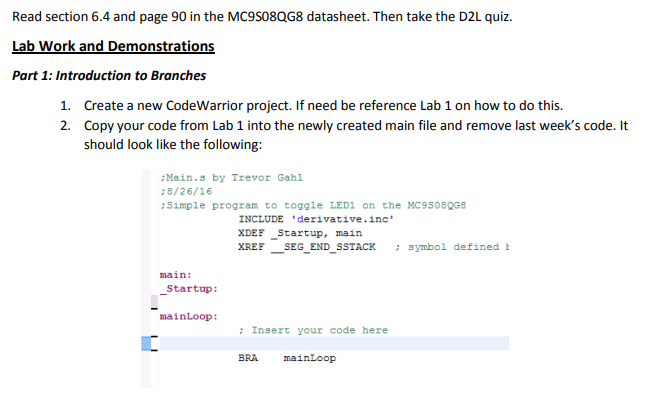
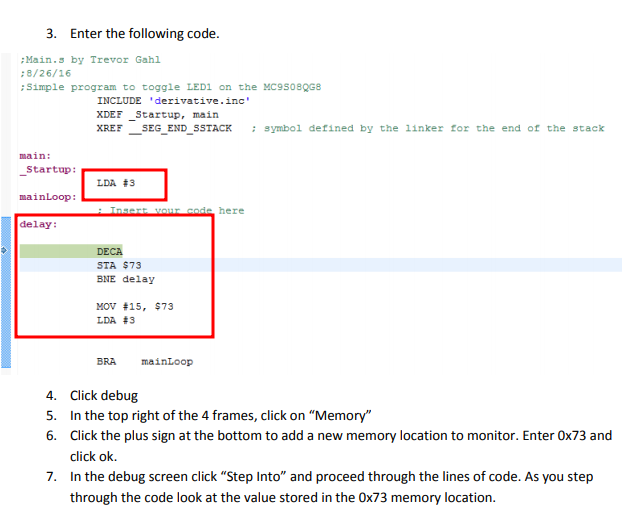

Read section 6.4 and page 90 in the MC9S08QG8 datasheet. Then take the D2L quiz. Lab Work and Demonstrations Part 1: Introduction to Branches 1. 2. Create a new CodeWarrior project. If need be reference Lab 1 on how to do this. Copy your code from Lab 1 into the newly created main file and remove last week's code. It should look like the following: Main.s by Trevor Gahl :8/26/16 Simple program to toggle LED1 on the MC9508QG8 INCLUDE "derivative.inc XDEF Startup, main XREF SEG END SSTACK symbol defined main: Startup: mainLoop: Insert your code here BRA mainLoop Read section 6.4 and page 90 in the MC9S08QG8 datasheet. Then take the D2L quiz. Lab Work and Demonstrations Part 1: Introduction to Branches 1. 2. Create a new CodeWarrior project. If need be reference Lab 1 on how to do this. Copy your code from Lab 1 into the newly created main file and remove last week's code. It should look like the following: Main.s by Trevor Gahl :8/26/16 Simple program to toggle LED1 on the MC9508QG8 INCLUDE "derivative.inc XDEF Startup, main XREF SEG END SSTACK symbol defined main: Startup: mainLoop: Insert your code here BRA mainLoop
Step by Step Solution
There are 3 Steps involved in it

Get step-by-step solutions from verified subject matter experts
 Study Help