







Question: We are using python program secretMessage1: secretMessage2: When provided with a valid text file name, you can assume that the file will contain exactly two
We are using python program
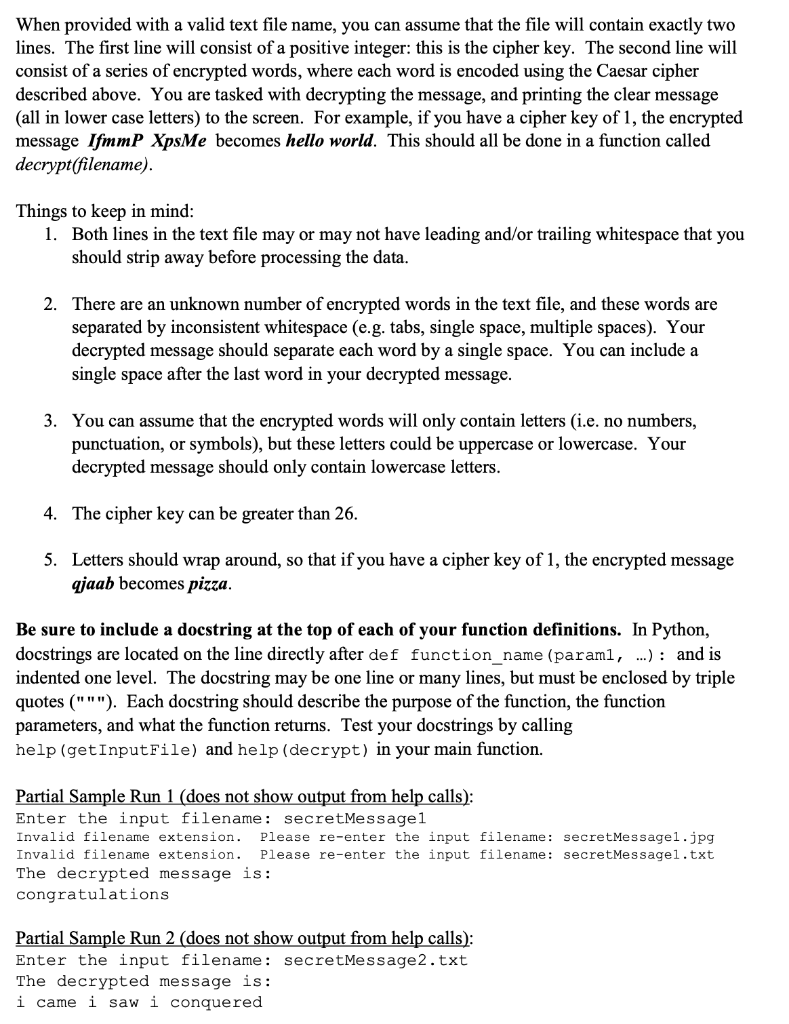
secretMessage1:
secretMessage2:

When provided with a valid text file name, you can assume that the file will contain exactly two lines. The first line will consist of a positive integer: this is the cipher key. The second line will consist of a series of encrypted words, where each word is encoded using the Caesar cipher described above. You are tasked with decrypting the message, and printing the clear message (all in lower case letters) to the screen. For example, if you have a cipher key of 1, the encrypted message IfmmP XpsMe becomes hello world. This should all be done in a function called decrypt(filename). Things to keep in mind: 1. Both lines in the text file may or may not have leading and/or trailing whitespace that you should strip away before processing the data. 2. There are an unknown number of encrypted words in the text file, and these words are separated by inconsistent whitespace (e.g. tabs, single space, multiple spaces). Your decrypted message should separate each word by a single space. You can include a single space after the last word in your decrypted message. 3. You can assume that the encrypted words will only contain letters (i.e. no numbers, punctuation, or symbols), but these letters could be uppercase or lowercase. Your decrypted message should only contain lowercase letters. 4. The cipher key can be greater than 26. 5. Letters should wrap around, so that if you have a cipher key of 1, the encrypted message qjaab becomes pizza. Be sure to include a docstring at the top of each of your function definitions. In Python, docstrings are located on the line directly after def function_name (paraml, ...): and is indented one level. The docstring may be one line or many lines, but must be enclosed by triple quotes ("""). Each docstring should describe the purpose of the function, the function parameters, and what the function returns. Test your docstrings by calling help (getInput File) and help (decrypt) in your main function. Partial Sample Run 1 (does not show output from help calls): Enter the input filename: secretMessage1 Invalid filename extension. Please re-enter the input filename: secretMessage1.jpg Invalid filename extension. Please re-enter the input filename: secretMessagel.txt The decrypted message is: congratulations Partial Sample Run 2 (does not show output from help calls): Enter the input filename: secretMessage2.txt The decrypted message is: i came i saw i conquered 1 18 2 UgFYjSLMDSLAGFK 1 6 2 O IGSK O YGCO IUTWAKXKJ
Step by Step Solution
There are 3 Steps involved in it

Get step-by-step solutions from verified subject matter experts
 Study Help