







Question: we are using this data from NYC open data https://data.cityofnewyork.us/Environment/Current-Reservoir-Levels/zkky-n5j3 TUSKU. Community Write a program compare.cpp that asks the user to input two dates (the
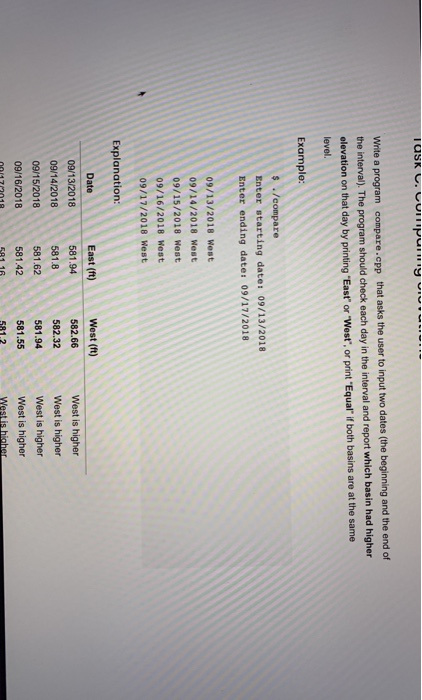
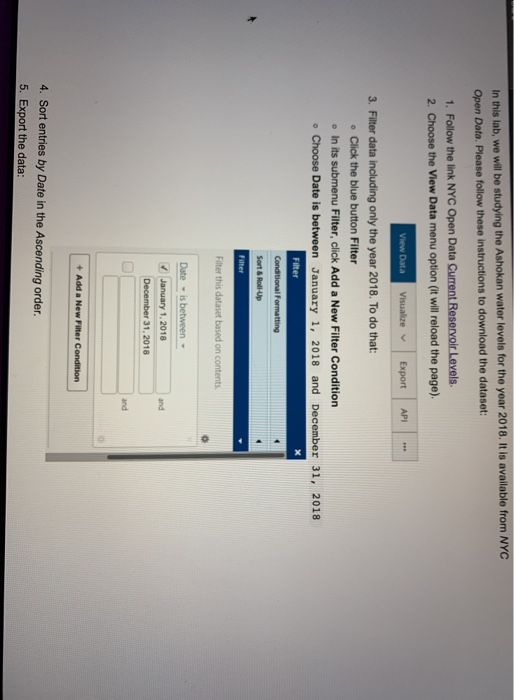
TUSKU. Community Write a program compare.cpp that asks the user to input two dates (the beginning and the end of the interval). The program should check each day in the interval and report which basin had higher elevation on that day by printing "East" or "West", or print "Equal" if both basins are at the same level. Example: $ ./compare Enter starting date: 09/13/2018 Enter ending date: 09/17/2018 09/13/2018 West 09/14/2018 West 09/15/2018 West 09/16/2018 West 09/17/2018 West Explanation: East (ft) Date 09/13/2018 09/14/2018 09/15/2018 09/16/2018 West (ft) 582.66 582.32 581.94 West is higher West is higher West is higher West is higher West is higher 581.55 117/2018 In this lab, we will be studying the Ashokan water levels for the year 2018. It is available from NYC Open Data. Please follow these instructions to download the dataset: 1. Follow the link NYC Open Data Current Reservoir Levels 2. Choose the View Data menu option (it will reload the page). View Data Visualize Export API 3. Filter data including only the year 2018. To do that: Click the blue button Filter . In its submenu Filter, click Add a New Filter Condition . Choose Date is between January 1, 2018 and December 31, 2018 Filter Conditional Formatting Sort & Roll-Up Filter Filter this dataset based on contents Date is between January 1, 2018 December 31, 2018 + Add a New Filter Condition 4. Sort entries by Date in the Ascending order. 5. Export the data
Step by Step Solution
There are 3 Steps involved in it

Get step-by-step solutions from verified subject matter experts
 Study Help