







Question: We created a DSS for a work machine spare part reseller company. We have to create an excel module randomly for the company. We wrote
We created a DSS for a work machine spare part reseller company. We have to create an excel module randomly for the company. We wrote a code but why does the code give an error? Can you make the correction for me? 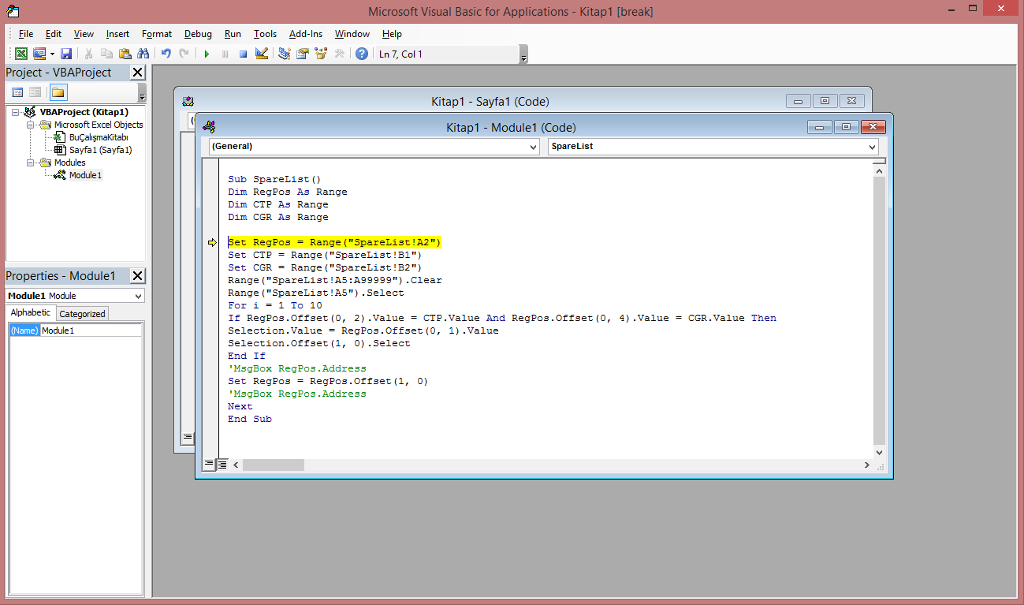
Microsoft Visual Basic for Applications - Kitap1 [break File Edit View Insert Format Debug Run Tools Add-lns Winow Help Project- VBAProject X Kitap1- Sayfa1 (Code) VBAProject (Kitap1) Microsoft Excel Objects Kitap1 - Module1 (Code) sayfal (Sayfa 1) (General) v SpareList Modules : Module 1 Sub SpareList (O Dim RegPos As Range Dim CTP As Range Dim CGR As Range Set RegPos Range("SpareList !A2) Set CTP = Range( "SpareL13t! B1") Set CGR-Range ("SpareList!B2") Range (" SpareList!A5 :A99999) .clear Range ("SpareList!AS") .Select For i-1 To 10 If Regp03.Offset (0, 2) .Value = CTP . Value And Regpos . Offset(0, 4) .Value Selection.Value RegPos.Offset (0, 1) .Value Selection.offset (, 0) Select End If MsgBox RegPos.Address Set RegPos = RegP08.0tt set (1, 0) MsgBox RegPos.Address Next End Sub Properties-Module Modulel Module Alphabetic Categonized Namc CGR . Value Then Module1 Microsoft Visual Basic for Applications - Kitap1 [break File Edit View Insert Format Debug Run Tools Add-lns Winow Help Project- VBAProject X Kitap1- Sayfa1 (Code) VBAProject (Kitap1) Microsoft Excel Objects Kitap1 - Module1 (Code) sayfal (Sayfa 1) (General) v SpareList Modules : Module 1 Sub SpareList (O Dim RegPos As Range Dim CTP As Range Dim CGR As Range Set RegPos Range("SpareList !A2) Set CTP = Range( "SpareL13t! B1") Set CGR-Range ("SpareList!B2") Range (" SpareList!A5 :A99999) .clear Range ("SpareList!AS") .Select For i-1 To 10 If Regp03.Offset (0, 2) .Value = CTP . Value And Regpos . Offset(0, 4) .Value Selection.Value RegPos.Offset (0, 1) .Value Selection.offset (, 0) Select End If MsgBox RegPos.Address Set RegPos = RegP08.0tt set (1, 0) MsgBox RegPos.Address Next End Sub Properties-Module Modulel Module Alphabetic Categonized Namc CGR . Value Then Module1
Step by Step Solution
There are 3 Steps involved in it

Get step-by-step solutions from verified subject matter experts
 Study Help