





Question: we did that, now do this: Part 2: Set Up Filter Mext, let's set up our convolutional filter. 1. Create filter: Create a numpy array

we did that, now do this:
we did that, now do this: Part 2: Set Up Filter
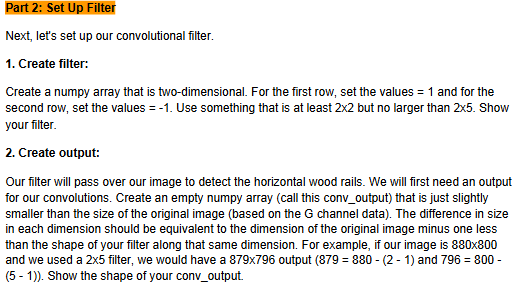
Part 2: Set Up Filter Mext, let's set up our convolutional filter. 1. Create filter: Create a numpy array that is two-dimensional. For the first row, set the values = 1 and for the second row, set the values = -1. Use something that is at least 2x2 but no larger than 2x5. Show your filter. 2. Create output: Cwr filter will pass over our image to detect the horizontal wood rails. We will first need an output for our convolutions. Create an empty numpy array (call this conv_output) that is just slightly smaller than the size of the original image (based on the G channel data). The difference in size in each dimension should be equivalent to the dimension of the original image minus one less than the shape of your filter along that same dimension. For example, if our image is 830300 and we used a 2x5 filter, we would have a 879x796 output (879 =880 - (2 - 1) and 796 = 300 - 5 -1)). Show the shape of your conv_output

Step by Step Solution

There are 3 Steps involved in it

1 Expert Approved Answer
Step: 1 Unlock blur-text-image

Question Has Been Solved by an Expert!

Get step-by-step solutions from verified subject matter experts

Step: 2 Unlock
Step: 3 Unlock

Students Have Also Explored These Related Business Writing Questions!