





Question: We want to create a Dropdown button on cell D1 of the following excel file (see screenshot). Now, open an empty file and follow Step
We want to create a Dropdown button on cell D1 of

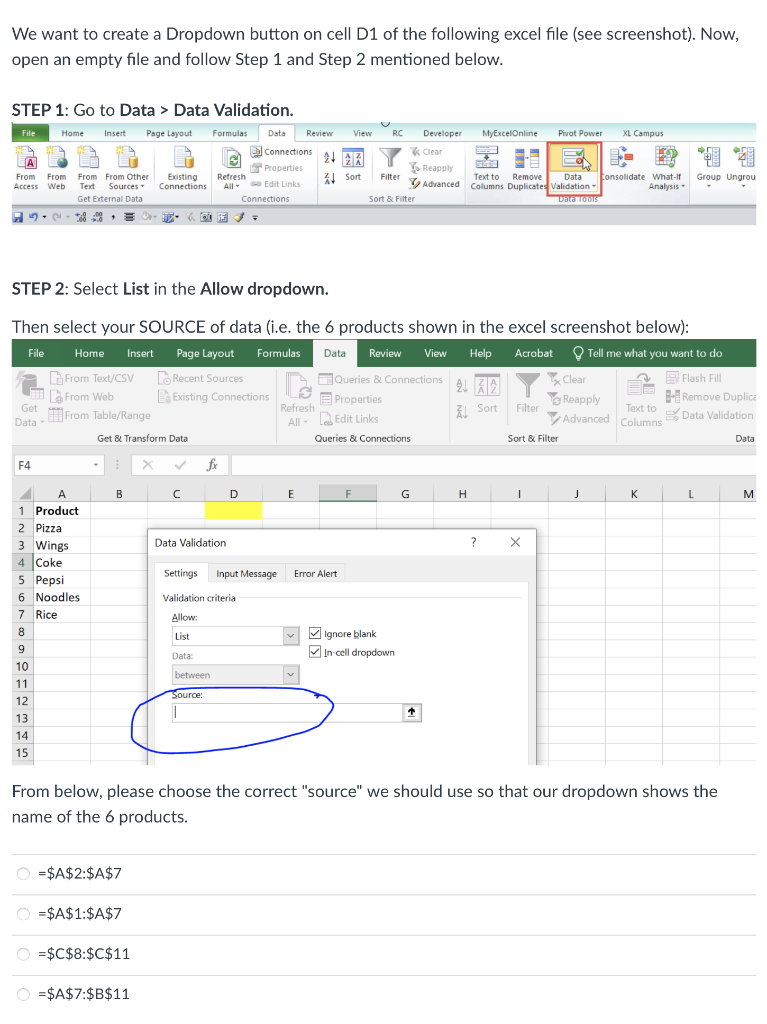
We want to create a Dropdown button on cell D1 of the following excel file (see screenshot). Now, open an empty file and follow Step 1 and Step 2 mentioned below. STEP 1: Go to Data > Data Validation. File Home Insert Page Layout MyExcelOnline Pivot Power XL Campus Formulas Data Review View RC Developer Connections ALAZ * Clear 2 7 Properties Reapply Refresh Filter All- Edit Links Advanced Connections Sort & Filter A From From From From Other Access Web Text Sources Get External Data ... Existing Connections 41 Sort Group Ungrou Text to Remove Data Consolidate What If Columns Duplicates Validation Analysis - Daca 10015 STEP 2: Select List in the Allow dropdown. Then select your SOURCE of data (i.e. the 6 products shown in the excel screenshot below): File Home Insert Page Layout Formulas Data Review View Help Acrobat Tell me what you want to do From Text/CSV Recent Sources Queries & Connections 21 22 Clear Flash File From Web Existing Connections 2 Properties YS Reapply B-Remove Duplica Get Refresh Filter Text to From Table/Range Data Validation Data Get & Transform Data Queries & Connections Sort All Do Edit Links Advanced Columns Sort & Filter Data F4 B D E F G H 1 J K L M Data Validation ? X Settings Input Message Error Alert Validation criteria A 1 Product 2 Pizza 3 Wings 4 Coke 5 Pepsi 6 Noodles 7 Rice 8 9 10 11 12 13 14 15 Allow List v Ignore blank In cell dropdown Data: between Source: From below, please choose the correct "source" we should use so that our dropdown shows the name of the 6 products. =$A$2:$A$7 O = $A$1:$A$7 = $C$8:$C$11 =$A$7:$B$11

Step by Step Solution

There are 3 Steps involved in it

1 Expert Approved Answer
Step: 1 Unlock blur-text-image

Question Has Been Solved by an Expert!

Get step-by-step solutions from verified subject matter experts

Step: 2 Unlock
Step: 3 Unlock

Students Have Also Explored These Related General Management Questions!