







Question: We want to create a query that will let us see a new price list for the books written by the same author. We do
We want to create a query that will let us see a new price list for the books written by the same author.
We do not want to "key in" the entire name, just the first 4 letters of the last name and the first 2 letters of the first name. We want to calculate the new discounted price based on the current retail price minus 7%. For testing, discount the price of James Patterson books.
We want to pass the whole name but use the character manipulation function to "extract" parts of first and last names. Also, pay special attention to case used in data string. Oracle data is case-sensitive, use appropriate case conversion functions on both sides of the = sign to make sure all names are catched: uppercase, lowercase, mixed.
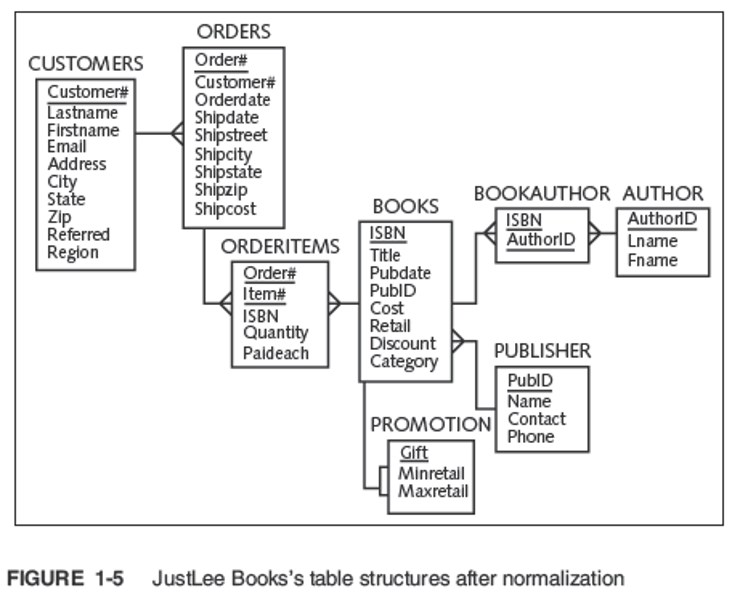
CUSTOMERS Customer Lastname Firstname Email Address City State Zip Referred Region ORDERS Order# Customer Orderdate Shipdate Shipstreet Shipcity Shipstate Shipzip Shipcost ORDERITEMS Order# Item# ISBN Quantity Paideach BOOKAUTHOR AUTHOR BOOKS ISBN Authord ISBN AuthorID Lname Title Fname Pubdate PubID Cost Retail Discount PUBLISHER Category PublD Name PROMOTION Contact Phone Gift Minretall Maxretail FIGURE 1-5 JustLee Books's table structures after normalization CUSTOMERS Customer Lastname Firstname Email Address City State Zip Referred Region ORDERS Order# Customer Orderdate Shipdate Shipstreet Shipcity Shipstate Shipzip Shipcost ORDERITEMS Order# Item# ISBN Quantity Paideach BOOKAUTHOR AUTHOR BOOKS ISBN Authord ISBN AuthorID Lname Title Fname Pubdate PubID Cost Retail Discount PUBLISHER Category PublD Name PROMOTION Contact Phone Gift Minretall Maxretail FIGURE 1-5 JustLee Books's table structures after normalization
Step by Step Solution
There are 3 Steps involved in it

Get step-by-step solutions from verified subject matter experts
 Study Help