







Question: web development please solve asap Part B - Simple Calculator Create a simple calculator that allows users to perform basic Arithmetic operations such as addition,
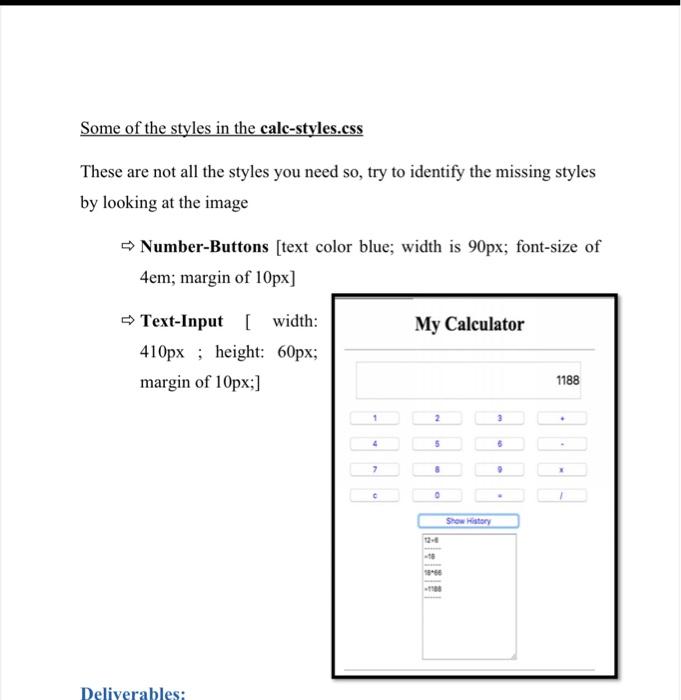
Part B - Simple Calculator Create a simple calculator that allows users to perform basic Arithmetic operations such as addition, subtraction, multiplication and division. Also the calculator page shows the history of all the previous calculations made by the user. This happens when the user clicks on the Show History Button shown in figure 1. Note: You have to create the following three files and add the necessary code. calculator.html: that displays the calculator to the user. calc-styles.css: a file that holds all the styling of the calculator page. calc-script.js: that implements the different functionality of the calculator page (+,- ,x and /). 3 Some of the styles in the calc-styles.css These are not all the styles you need so, try to identify the missing styles by looking at the image -> Number-Buttons [text color blue; width is 90px; font-size of 4em; margin of 10px] My Calculator Text-Input [width: 410px; height: 60px; margin of 10px;] 1188 2 4 8 Show History Deliverables
Step by Step Solution
There are 3 Steps involved in it

Get step-by-step solutions from verified subject matter experts
 Study Help