







Question: WhackAShape In whackashape, we implement the methods bottom up. If method A depends on methods B and C, then methods B and C will be
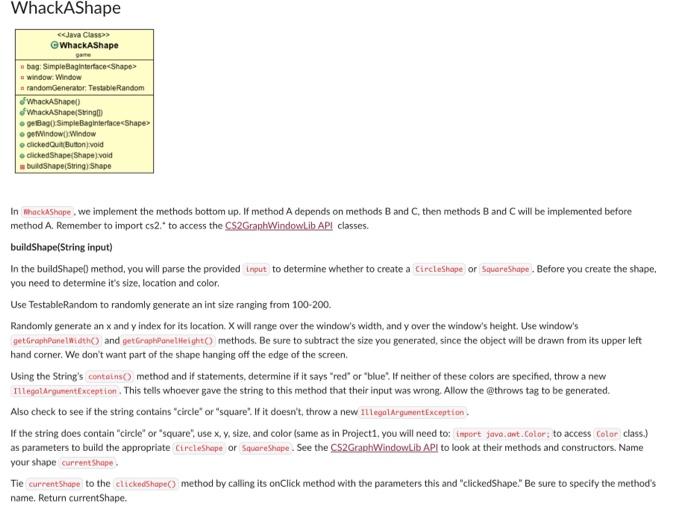
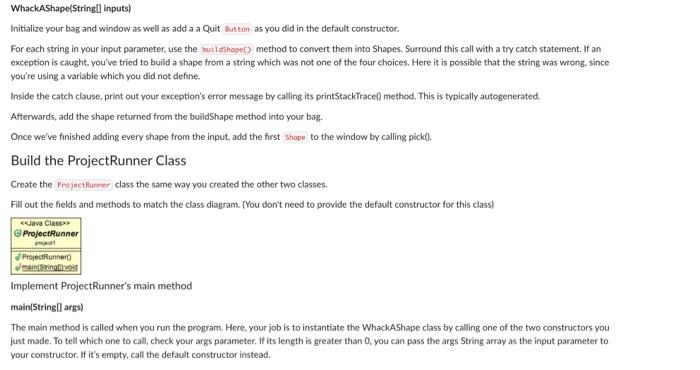
WhackAShape In whackashape, we implement the methods bottom up. If method A depends on methods B and C, then methods B and C will be implemented before method A. Remember to import cs 2." to access the CS2GraphWindowLib APl classes. buildShape(String input) In the bulldShapel) method, you will parse the provided to determine whether to create a or you create the shape. you need to determine it's size, location and color. Use TestableRandom to randomly generate an int size ranging from 100200. Randomly generate an x and y index for its location. X will range over the window's width, and y over the window's height. Use window's and methods. Be sure to subtract the size you generated, since the object will be drawn from its upper left hand corner. We don't want part of the shape hanging off the edge of the screen. Using the String's method and if statements, determine if it says "red" or "blue:" If neither of these colors are specifed, throw a new Illegalargunent Exception. This tells whoever gave the string to this method that their input was wrong. Allow the @throws tag to be generated. Also check to see if the string contains "circle" or "square". If it doesn't, throw a new Ill egolargueent Exception. If the string does contain "circle" or "square", use x, y, size, and color (same as in Project1, you will need to: as parameters to build the appropriate or See the CS2GraphWindowtilb API to look at their methods and constructors. Name your shape Tie to the method by calling its onclick method with the parameters this and "clickedShape." Be sure to specify the method's name. Return currentShape. If the user has clicked the displayed shape, this should call the method. Here, we know the user has selected the shope given as the Shape parameter, We now need to remove this from the window, by calling the window's method, and from the bag. by calling the bag's method. Once the clicked shape is removed, the next needs to be displayed. Pick a new one from the bag using bag's method, and name it . Check to see it is null. If it is, it means that the bag is empty, and the game is over. Display a new Textshepe saying "You Wint" in the center of the screen. To get the x and y location of the center of the screen, use getorophponetmith() and getGrophpanetheipht) on your mindow. Otherwise, add to the window using the window's method. clickedQuit(Button button) Call with a zero for its parameter. This means there was no errors. getWindow0 \&\& getBag0) Implement these yourself. Whackashaped In the default constructor, you will initialize your bag with sinpliteruyleg or sinelelinkedsog , your choice. (Feel free to try both! It won't affect your code.) Initialize your window, and add a Quit zut ton to your Window's East side. Now you will fill up your bag with some of "red clrele", "blue circle", "red square", and "blue square." Save these strings in a String array, Generate a number from 6 to 14 (inclusive) which will determine your bag's size. Save that size in a variable. Randomly select one of the strings of the above array, call on that string and add that to your bag. Keep adding until your bagg is of the generated size. Add the first to the by calling bick(?) Initialize your bag and window as well as add a a Quit as you did in the default constructor. For each string in your input parameter. use the. method to convert them into Shapes. Surround this call with a try catch statement. If an exception is caught, you've tried to build a shape from a string which was not one of the four choices. Here it is possible that the string was wrong. since you're using a variable which you did not define- Inside the catch clause, print out your exception's error message by calling its printstackTrace() method. This is typically autogenerated. Afterwards, add the shape returned from the buildshape method into your bag. Once we've finished adding every shape from the input, add the first to the window by calling pick(0. Build the ProjectRunner Class Create the class the same way you created the other two classes. Fill out the fields and methods to match the class diagram. (You don't need to provide the default constructor for this class) Implement ProjectRunner's main method main(String[] args) The main method is called when you run the program. Here. your job is to instantiate the WhackAShape class by calling one of the two constructors you just made. To tell which one to call, check your args parameter. If its length is greater than 0 , you can pass the args String array as the input parameter to your constructor. If it's empty, call the default constructor instead
Step by Step Solution
There are 3 Steps involved in it

Get step-by-step solutions from verified subject matter experts
 Study Help