







Question: What am I doing wrong in this code for a Contact class? Yes we can use array list but I had already started doing it
What am I doing wrong in this code for a Contact class? Yes we can use array list but I had already started doing it this way
Specifically need help with DeepCopy, Compare and Update.
Then I also have a driver class just calling/using every method and I just need my contact class to be at 100% before I can move onto my next assignment with it
If you see any errors or anything I can be doing better in the other methods please let me know
here is a picture of my code
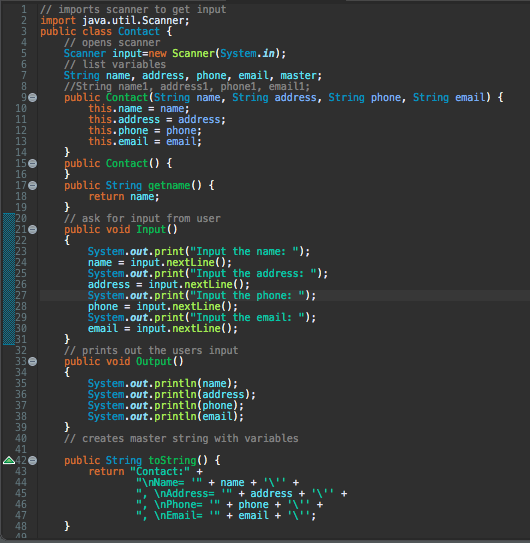
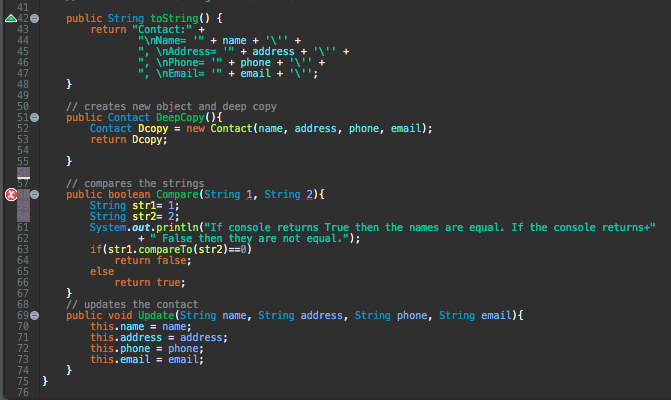
and here is my code if you want the text:
import java.util.Scanner;
public class Contact {
// opens scanner
Scanner input=new Scanner(System.in);
// list variables
String name, address, phone, email, master;
//String name1, address1, phone1, email1;
public Contact(String name, String address, String phone, String email) {
this.name = name;
this.address = address;
this.phone = phone;
this.email = email;
}
public Contact() {
}
public String getname() {
return name;
}
// ask for input from user
public void Input()
{
System.out.print("Input the name: ");
name = input.nextLine();
System.out.print("Input the address: ");
address = input.nextLine();
System.out.print("Input the phone: ");
phone = input.nextLine();
System.out.print("Input the email: ");
email = input.nextLine();
}
// prints out the users input
public void Output()
{
System.out.println(name);
System.out.println(address);
System.out.println(phone);
System.out.println(email);
}
// creates master string with variables
public String toString() {
return "Contact:" +
" Name= '" + name + '\'' +
", Address= '" + address + '\'' +
", Phone= '" + phone + '\'' +
", Email= '" + email + '\'';
}
// creates new object and deep copy
public Contact DeepCopy(){
Contact Dcopy = new Contact(name, address, phone, email);
return Dcopy;
}
// compares the strings
public boolean Compare(String 1, String 2){
String str1= 1;
String str2= 2;
System.out.println("If console returns True then the names are equal. If the console returns+"
+ " False then they are not equal.");
if(str1.compareTo(str2)==0)
return false;
else
return true;
}
// updates the contact
public void Update(String name, String address, String phone, String email){
this.name = name;
this.address = address;
this.phone = phone;
this.email = email;
}
}
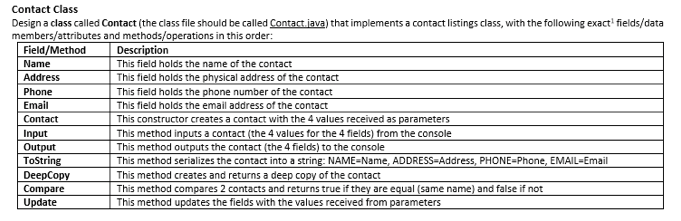
Contact Class Design a class called Contact (the class file should be called Contact.java) that implements a contact listings class, with the following exact. fields/data members/attributes and methods/operations in this order: Field/Method Description Name This field holds the name of the contact Address This field holds the physical address of the contact Phone This field holds the phone number of the contact Email This field holds the email address of the contact Contact This constructor creates a contact with the 4 values received as parameters Input This method inputs a contact (the 4 values for the 4 fields) from the console Output This method outputs the contact (the 4 fields) to the console ToString This method serializes the contact into a string: NAME=Name, ADDRESS-Address, PHONE-Phone, EMAIL=Email DeepCopy This method creates and returns a deep copy of the contact Compare This method compares 2 contacts and returns true if they are equal (same name) and false if not Update This method updates the fields with the values received from parameters 1 // imports scanner to get input 2 import java.util.Scanner; 3 public class Contact { // opens scanner Scanner input=new Scanner(System.in); // list variables String name, address, phone, email, master; //String name, addressi, phone1, emaill; 99 public Contact(String name, String address, String phone, String email) { 10 this.name = name; this.address = address; this.phone = phone; this.email = email; public Contact() { public String getname() { return name; 11 ask for input from user public void Input() System.out.print("Input the name: "); name = input.nextLine(); System.out.print("Input the address: "); address = input.nextLine(); System.out.print("Input the phone: "); phone = input.nextLine(); System.out.print("Input the email: "); email = input.nextLine(); // prints out the users input public void Output() System.out.println(name); System.out.println(address); System.out.println(phone); System.out.println(email); // creates master string with variables public String toString() { return "Contact:" + " Name= "" + name + " + ", Address= " + address + " InPhone= " + phone + + " Email= " + email + ''; + public String toString() { return "Contact:" + " Name= " + name + " + ", Address= " + address + " Phone= "" + phone + " + " InEmail= " + email + ''; + 47 510 // creates new object and deep copy public Contact DeepCopy(){ Contact Dcopy = new Contact(name, address, phone, email), return Dcopy; Lu // compares the strings public boolean Compare(String 1, String 2) { String str1= 1; String str2= 2; System.out.println("If console returns True then the names are equal. If the console returns+" + "'False then they are not equal."); if(str1.compareTo(str2)==0) return false; else return true; // updates the contact public void Update(String name, String address, String phone, String email) { this.name = name; this.address = address; this.phone = phone; this.email = email; } 75 76
Step by Step Solution
There are 3 Steps involved in it

Get step-by-step solutions from verified subject matter experts
 Study Help