







Question: What did I miss? My code is below. Code4-1.html Coding Challenge 4-1 Sonnet 116 by William Shakespeare Let me not to the marriage of true
What did I miss? My code is below.
Code4-1.html
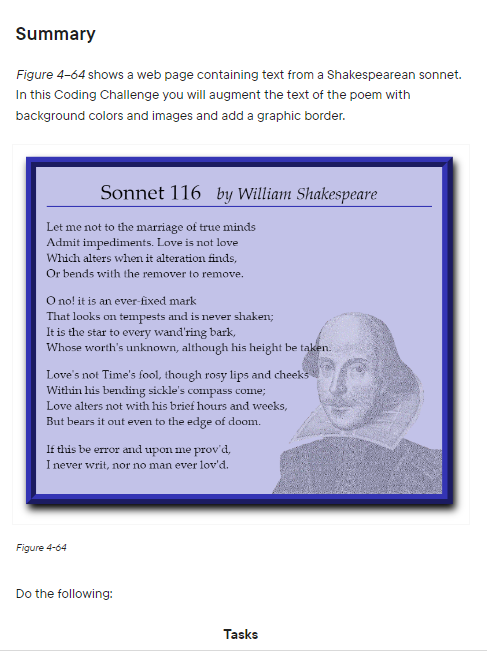
Let me not to the marriage of true minds
Admit impediments. Love is not love
Which alters when it alteration finds,
Or bends with the remover to remove.
O no! it is an ever-fixed mark
That looks on tempests and is never shaken;
It is the star to every wand'ring bark,
Whose worth's unknown, although his height be taken.
Love's not Time's fool, though rosy lips and cheeks
Within his bending sickle's compass come;
Love alters not with his brief hours and weeks,
But bears it out even to the edge of doom.
If this be error and upon me prov'd,
I never writ, nor no man ever lov'd.
Code4-1_back.css
code4-1_back.css:
@charset "utf-8";
/*
New Perspectives on HTML5 and CSS3, 8th Edition
Tutorial 4
Coding Challenge 1
Author: Nick
Date: 2/4/2023
Filename: code4-1_back.css
*/
//Apply style to figure
figure {
padding: 20px;
border: 20px;
border-style: ridge;
border-color: rgb(52, 52, 180);
background-color: rgba(52, 52, 180, 0.3);
box-shadow: 5px 10px 15px black;
}
//Style for figcaption
figcaption {
font-size: 1.8em;
align-items: center;
border-bottom: 2px solid;
border-color: rgb(52, 52, 180);
margin-left: 80px;
}
//Select image tag and applying style
img {
width: 45%;
margin-left: 55%;
} Code4-1.cs
Code4-1.cs
@charset "utf-8";
/*
New Perspectives on HTML5 and CSS3, 8th Edition
Tutorial 4
Coding Challenge 1
Author: Nick
Date: 2/4/2023
Filename: code4-1.css
*/
body {
width: 900px;
margin: 20px auto;
font-family: Baskerville, "Palatino Linotype", Palatino,
"Century Schoolbook L", "Times New Roman", "serif";
font-size: 1.4em;
padding-bottom: 30px;
}
cite {
font-size: 0.8em;
display: inline-block;
margin-left: 20px;
}
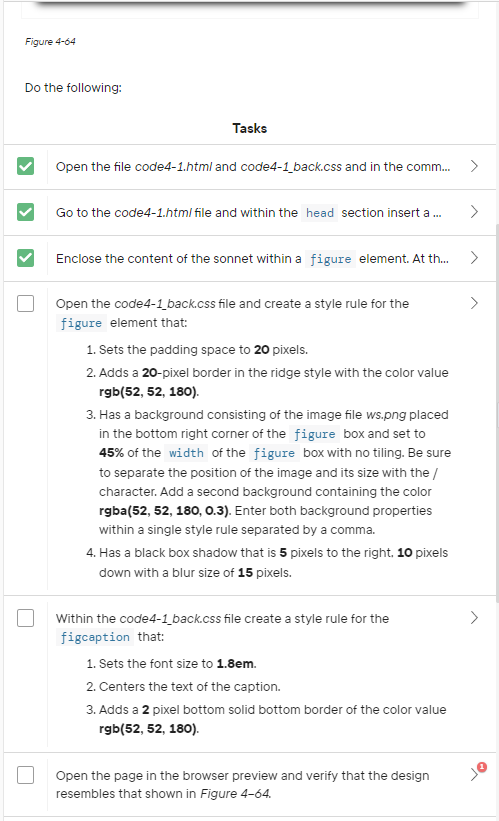
Summary Figure 4-64 shows a web page containing text from a Shakespearean sonnet. In this Coding Challenge you will augment the text of the poem with background colors and images and add a graphic border. Figure 4-64 Do the following: Open the code4-1_back.css file and create a style rule for the figure element that: 1. Sets the padding space to 20 pixels. 2. Adds a 20-pixel border in the ridge style with the color value rgb(52,52,180). 3. Has a background consisting of the image file ws.png placed in the bottom right corner of the figure box and set to 45% of the width of the figure box with no tiling. Be sure to separate the position of the image and its size with the / character. Add a second background containing the color rgba(52, 52, 180, 0.3). Enter both background properties within a single style rule separated by a comma. 4. Has a black box shadow that is 5 pixels to the right, 10 pixels down with a blur size of 15 pixels. Within the code4-1_back.css file create a style rule for the figcaption that: 1. Sets the font size to 1.8em. 2. Centers the text of the caption. 3. Adds a 2 pixel bottom solid bottom border of the color value rgb(52,52,180). Open the page in the browser preview and verify that the design resembles that shown in Figure 4-64Step by Step Solution
There are 3 Steps involved in it

Get step-by-step solutions from verified subject matter experts
 Study Help