







Question: What I need help with is figuring out what formula/function I need to put in the Answer box so that it will give an answer
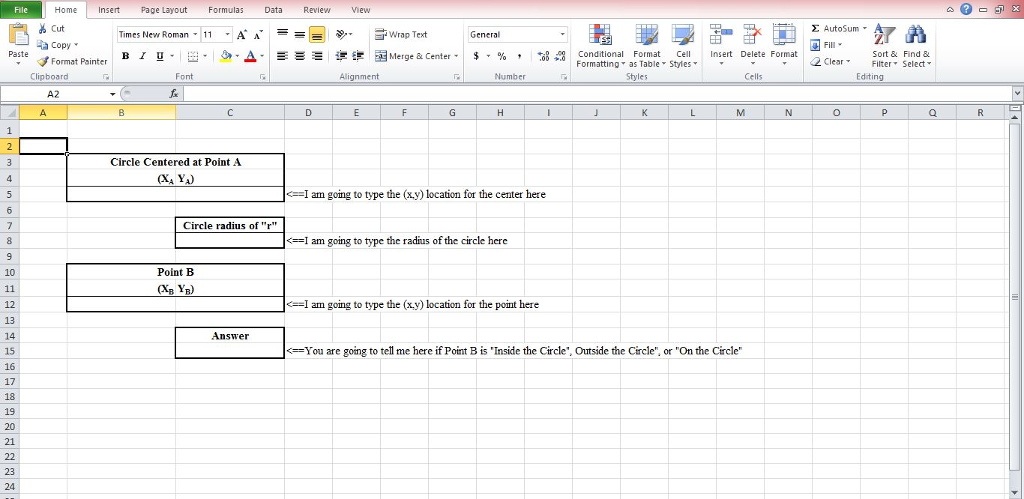
What I need help with is figuring out what formula/function I need to put in the Answer box so that it will give an answer of "inside", "outside", or "On the Circle". I was given the following information:
You are going to prepare a solution to answer the following problem using Microsoft Excel:
-- A circle is centered at point A (XA, YA) {you don't know in advance where this is}
-- It has a radius of r {you don't know in advance what the value is}
-- A second point is located at B (XB, YB){you don't know in advance where this is}
-- Is Point B inside, outside, or on the circle?
Stop here for a moment and re-read this and consider a simple example (sketching this out might help). If Point A is at the origin (0,0) and the radius r=3, then clearly if point B is (1,1) it is inside the circle; if point B is (5,5) it is outside the circle; and if point B is (0,3) or (3,0) it would be on the circle.
You may also need some additional guidance on how to approach this problem. Some helpful hints:
-- How do you measure distance between points A and B? Consider using the distance formula. Consider this function: =SQRT
-- How do you know if this distance is shorter, longer, or the same? Consider this function: =IF
-- Test your solution as you work through this with cases you know the answer to. For example, pick two points that you know (or can calculate) the distance between Point A and Point B.
A few ground rules so you do not need to test for certain errors:
-- I will type numbers for Point A, radius r, and Point B in the locations shown provided in the template
-- You may use any other space on the spreadsheet to perform calculations
-- You will tell me if the answer is Inside, Outside, or On the circle in the location provided in the template
Homeert Page Layout Formulas Data Review ew Cut AutoSum , Times New Roman-11 A | Wrap Text , a Copy B 1 . a. a-.-- aEs Merge & Center. $, % , , Paste Conditional Format Cel Insert Delete Format Formatting as Table Styles Sort & Find & Format Painter 2 ClearFil Select Editing Clipboard Alignment Cells Circle Centered at Point A
Step by Step Solution
There are 3 Steps involved in it

Get step-by-step solutions from verified subject matter experts
 Study Help