







Question: What inputs do I need to put for the =PV( function on excel to get the Present Value of each of the years? Am trying
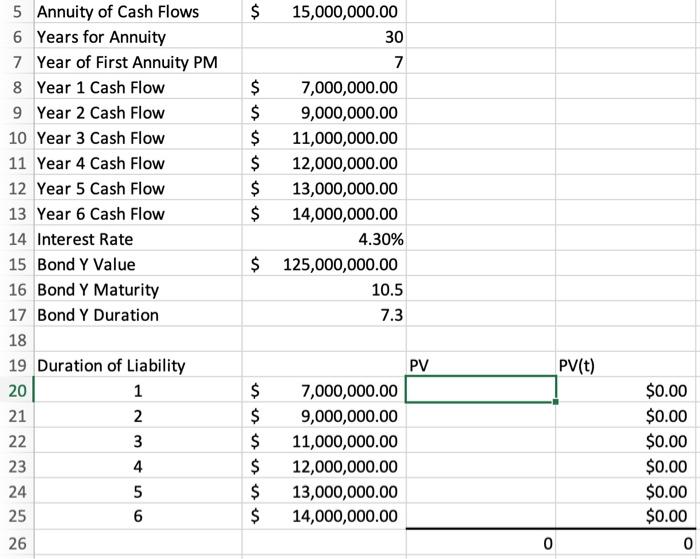
Year 1: $6,711,409.40
Year 2: $8,273,207.04
Year 3: $9,694,820.22
Year 4: $10,140,141.43
Year 5: $10,532,265.79
Year 6: $10,874,822.70
$ 5 Annuity of Cash Flows 6 Years for Annuity 7 Year of First Annuity PM 8 Year 1 Cash Flow 9 Year 2 Cash Flow 10 Year 3 Cash Flow 11 Year 4 Cash Flow 12 Year 5 Cash Flow 13 Year 6 Cash Flow 14 Interest Rate 15 Bond Y Value 16 Bond Y Maturity 17 Bond Y Duration 18 19 Duration of Liability 20 1 21 2 22 3 23 4 24 5 6 26 $ 15,000,000.00 30 7 $ 7,000,000.00 $ 9,000,000.00 $ 11,000,000.00 $ 12,000,000.00 $ 13,000,000.00 $ 14,000,000.00 4.30% $ 125,000,000.00 10.5 7.3 PV PV(t) $ $ $ $ $ $ 7,000,000.00 9,000,000.00 11,000,000.00 12,000,000.00 13,000,000.00 14,000,000.00 $0.00 $0.00 $0.00 $0.00 $0.00 $0.00 0 25 0
Step by Step Solution
There are 3 Steps involved in it

Get step-by-step solutions from verified subject matter experts
 Study Help