



Question: What is the correct VLOOKUP function to calculate the rate of J3 so that I can drag it down for the rest? 4. Create a

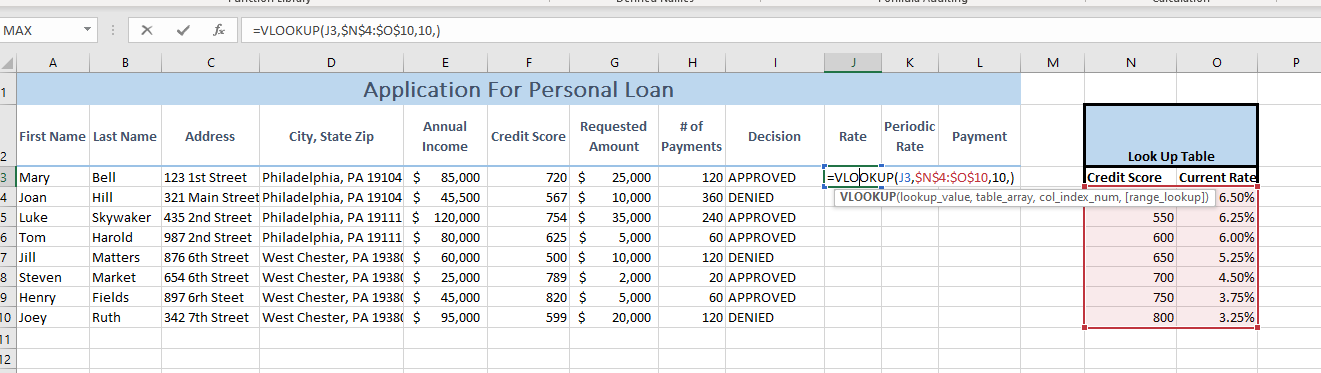
What is the correct VLOOKUP function to calculate the rate of J3 so that I can drag it down for the rest?
4. Create a VLOOKUP function in cell J3 that uses the Credit Score in cell F3 to generate a rate based on the array in cells N4:010. NOTE - Make sure to use the correct cell referencing. MAX =VLOOKUP(13,$N$4:$0$10,10) A B D E G H | L M N o F Application For Personal Loan 1 1 Annual First Name Last Name Address City, State Zip Credit Score Requested #of Amount Payments Decision Income 2 Periodic Rate Payment Rate Look Up Table =VLOOKUP(13,$N$4:$0$10,10,) Credit Score Current Rate VLOOKUP(lookup_value, table_array, col_index_num, (range_lookup]) 6.50% 550 6.25% 600 6.00% Bell 123 1st Street Philadelphia, PA 19104 $ 85,000 Hill 321 Main Street Philadelphia, PA 19104 $ 45,500 Skywaker 435 2nd Street Philadelphia, PA 19111 $ 120,000 Harold 987 2nd Street Philadelphia, PA 19111 $ 80,000 Matters 876 6th Street West Chester, PA 19386 $ 60,000 Market 654 6th Street West Chester, PA 19381 $ 25,000 Fields 897 6rh Steet West Chester, PA 19380 $ 45,000 Ruth 342 7th Street West Chester, PA 19381 $ 95,000 3 Mary 4 Joan 5 Luke 6 Tom 7 Jill 8 Steven 9 Henry 10 Joey 11 12 720 $ 567 $ 754 $ 625 $ 500 $ 789 $ 820 $ 599 $ 25,000 10,000 35,000 5,000 10,000 2,000 5,000 20,000 120 APPROVED 360 DENIED 240 APPROVED 60 APPROVED 120 DENIED 20 APPROVED 60 APPROVED 120 DENIED 650 5.25% 700 750 4.50% 3.75% 3.25% 800
Step by Step Solution
There are 3 Steps involved in it

Get step-by-step solutions from verified subject matter experts