







Question: What is the finished code in Java? The code to start is below----------- package labInterface; public class App { /** * @param args */ public
What is the finished code in Java? The code to start is below-----------
package labInterface;
public class App {
/** * @param args */ public static void main(String[] args) { Plane myPlane = new Plane(4, "Boing 747"); System.out.printf("myPlane: %s%n", myPlane);
Hangglider myHangglider = new Hangglider(true); System.out.printf("myHangglider: %s%n", myHangglider);
Bird myBird = new Bird("Swallow"); System.out.printf("myBird: %s%n", myBird); }
}
package labInterface;
public class Bird { private final String type;
public Bird(String t) { type = t; }
@Override public String toString() { return type; } }
package labInterface;
public class Hangglider { private final boolean isRigidWing;
public Hangglider(boolean rigidWing) { isRigidWing = rigidWing; }
@Override public String toString() { return String.format(isRigidWing ? "Rigid-wing" : "Flex-wing"); } }
package labInterface;
public class Plane { private final int numberOfEngines; private final String model;
public Plane(int engines, String m) { numberOfEngines = engines; model = m; }
@Override public String toString() { return String.format("%s with %d engines", model, numberOfEngines); } }
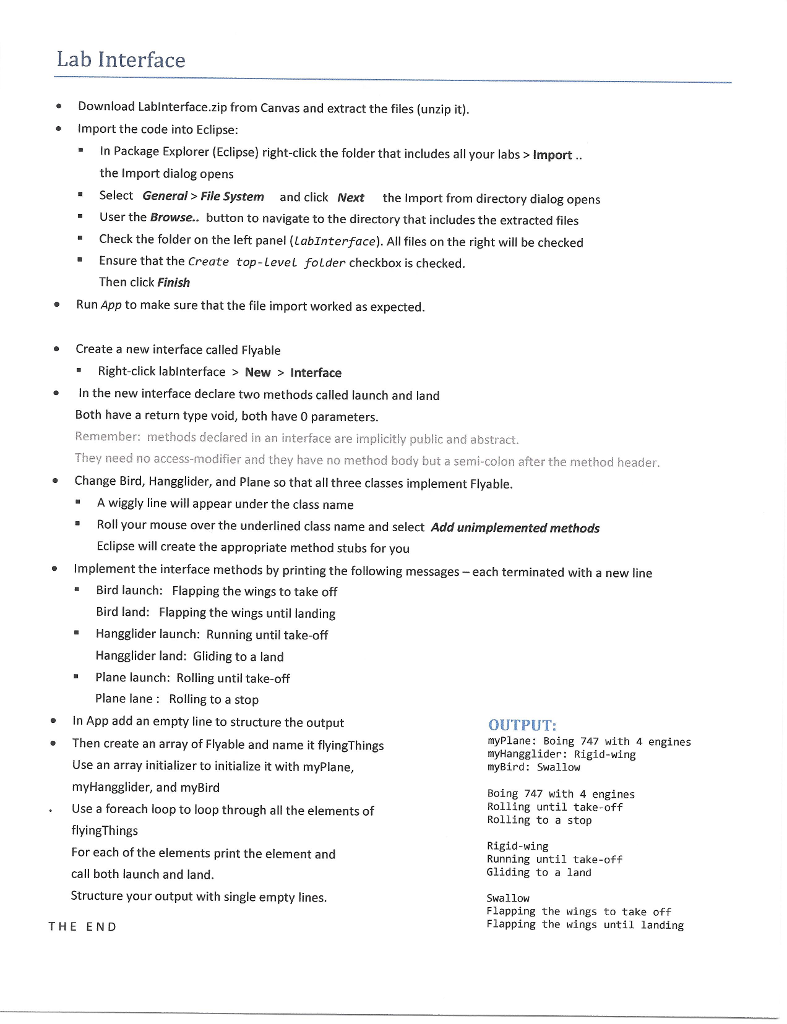
Lab Interface Download Lablnterface.zip from Canvas and extract the files (unzip it) Import the code into Eclipse In Package Explorer (Eclipse) right-click the folder that includes all your labs > Import. the Import dialog opens Select General> File System and click Next the Import from directory dialog opens User the Browse.. button to navigate to the directory that includes the extracted files Check the folder on the left panel (LabInterface). All files on the right will be checked Ensure that the Create top-Level folder checkbox is checked " Then click Finish Run App to make sure that the file import worked as expected Create a new interface called Flyable -Right-click lablnterface > New > Interface In the new interface declare two methods called launch and land Both have a return type void, both have 0 parameters. Remember: methods declared in an interface are implicitly public and abstract. They need no access-modifier and they have no method body but a semi-colon after the method header Change Bird, Hangglider, and Plane so that all three classes implement Flyable. "A wiggly line will appear under the class name Roll your mouse over the underlined class name and select Add unimplemented methods Eclipse will create the appropriate method stubs for you Implement the interface methods by printing the following messages- each terminated with a new line Bird launch: Bird land: Flapping the wings until landing Hangglider launch: Running until take-off Hangglider land: Gliding to a land Flapping the wings to take off " "Plane launch: Rolling until take-off Plane lane Rolling to a stop n App add an empty line to structure the output .Then create an array of Flyable and name it flyingThings OUTPUT: myPlane: Boing 747 with 4 engines myHangglider: Rigid-wing myBird: Swallow Use an array initializer to initialize it with myPlane myHangglider, and myBird Use a foreach loop to loop through all the elements of flyingThingS For each of the elements print the element and call both launch and land Structure your output with single empty lines. Boing 747 with 4 engines Rolling until take-off Rolling to a stop Rigid-wing Running until take-off Gliding to a land Swallow Flapping the wings to take off Flapping the wings until landing THE END
Step by Step Solution
There are 3 Steps involved in it

Get step-by-step solutions from verified subject matter experts
 Study Help