







Question: what should I fill in the code? as the step shows. I will give thumbs up. code is below plz fill the code thx Step
what should I fill in the code? as the step shows. I will give thumbs up.
code is below
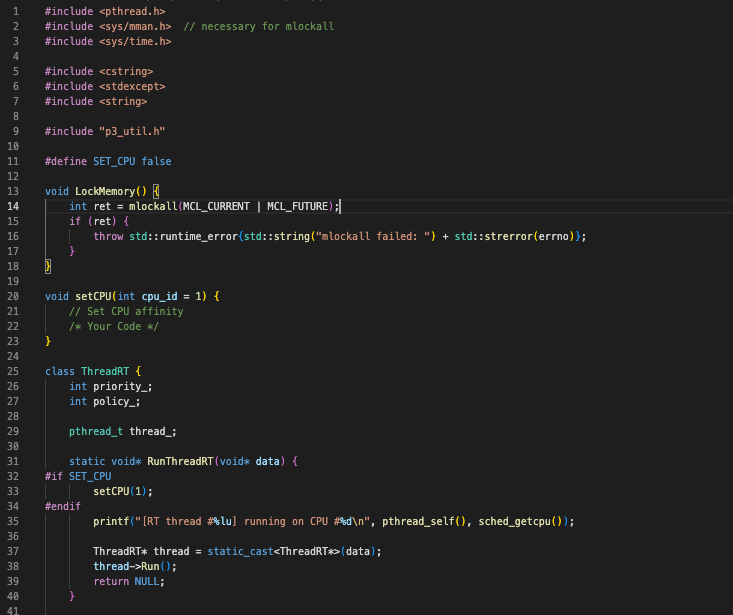
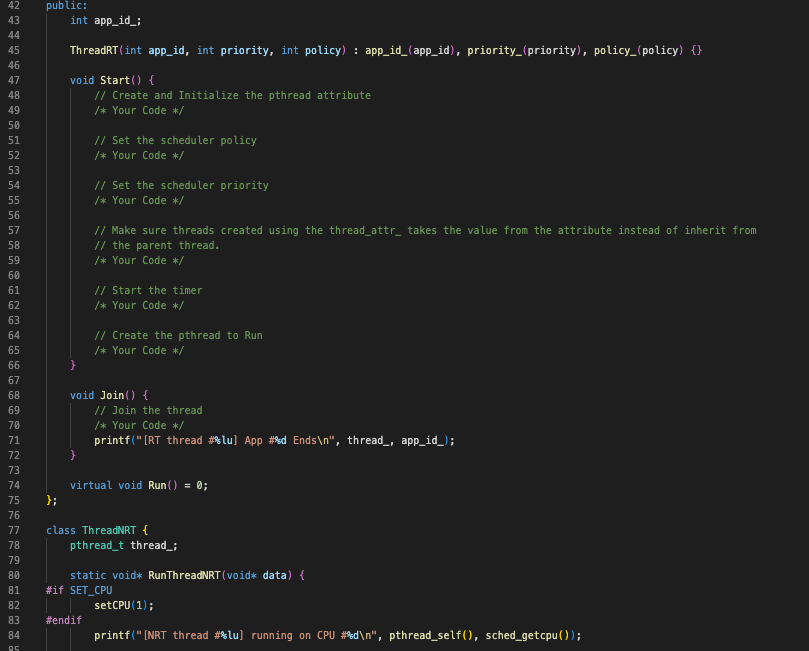
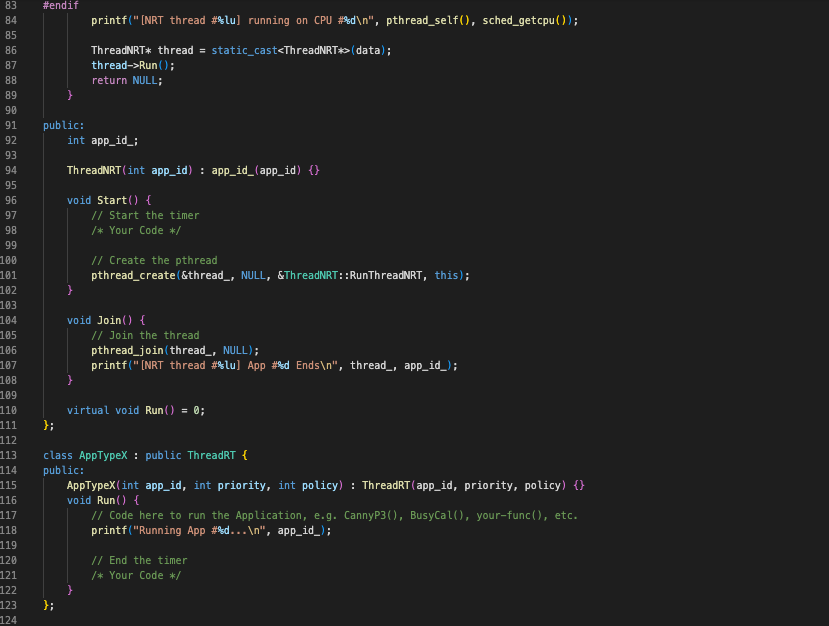
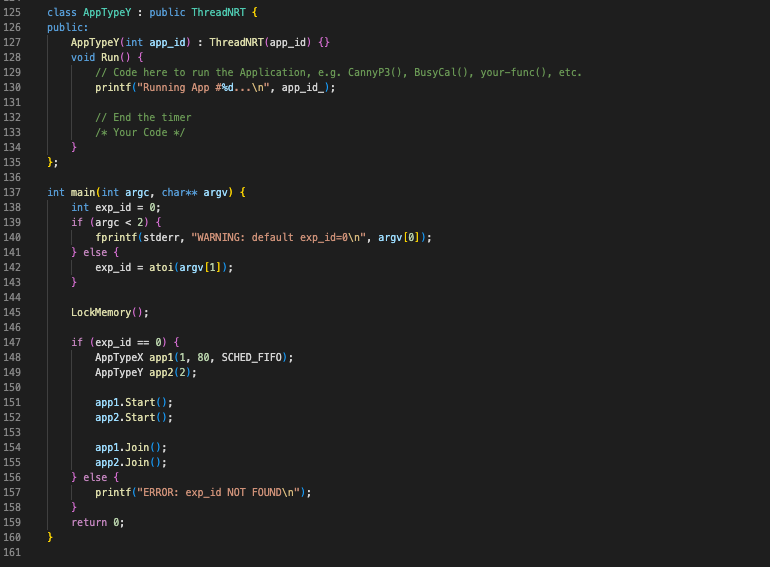
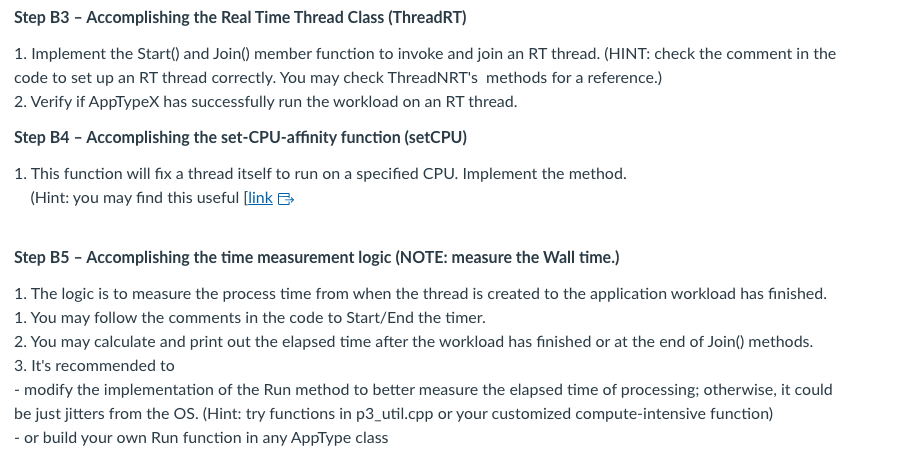
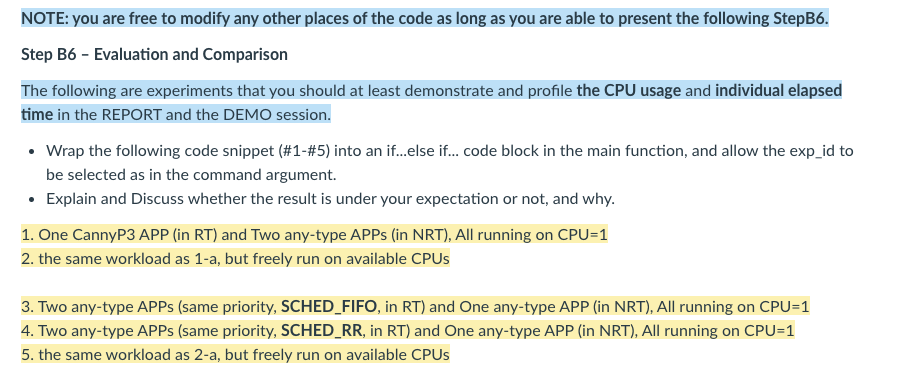
Step B3 - Accomplishing the Real Time Thread Class (ThreadRT) 1. Implement the Start() and Join() member function to invoke and join an RT thread. (HINT: check the comment in the code to set up an RT thread correctly. You may check ThreadNRT's methods for a reference.) 2. Verify if AppTypeX has successfully run the workload on an RT thread. Step B4 - Accomplishing the set-CPU-affinity function (setCPU) 1. This function will fix a thread itself to run on a specified CPU. Implement the method. (Hint: you may find this useful [link Step B5 - Accomplishing the time measurement logic (NOTE: measure the Wall time.) 1. The logic is to measure the process time from when the thread is created to the application workload has finished. 1. You may follow the comments in the code to Start/End the timer. 2. You may calculate and print out the elapsed time after the workload has finished or at the end of Join() methods. 3. It's recommended to - modify the implementation of the Run method to better measure the elapsed time of processing; otherwise, it could be just jitters from the OS. (Hint: try functions in p3_util.cpp or your customized compute-intensive function) - or build your own Run function in any AppType class NOTE: you are free to modify any other places of the code as long as you are able to present the following StepB6. Step B6 - Evaluation and Comparison The following are experiments that you should at least demonstrate and profile the CPU usage and individual elapsed time in the REPORT and the DEMO session. - Wrap the following code snippet (\#1-\#5) into an if...else if... code block in the main function, and allow the exp_id to be selected as in the command argument. - Explain and Discuss whether the result is under your expectation or not, and why. 1. One CannyP3 APP (in RT) and Two any-type APPs (in NRT), All running on CPU=1 2. the same workload as 1-a, but freely run on available CPUs 3. Two any-type APPs (same priority, SCHED_FIFO, in RT) and One any-type APP (in NRT), All running on CPU=1 4. Two any-type APPs (same priority, SCHED_RR, in RT) and One any-type APP (in NRT), All running on CPU=1 5. the same workload as 2a, but freely run on available CPUs Step B3 - Accomplishing the Real Time Thread Class (ThreadRT) 1. Implement the Start() and Join() member function to invoke and join an RT thread. (HINT: check the comment in the code to set up an RT thread correctly. You may check ThreadNRT's methods for a reference.) 2. Verify if AppTypeX has successfully run the workload on an RT thread. Step B4 - Accomplishing the set-CPU-affinity function (setCPU) 1. This function will fix a thread itself to run on a specified CPU. Implement the method. (Hint: you may find this useful [link Step B5 - Accomplishing the time measurement logic (NOTE: measure the Wall time.) 1. The logic is to measure the process time from when the thread is created to the application workload has finished. 1. You may follow the comments in the code to Start/End the timer. 2. You may calculate and print out the elapsed time after the workload has finished or at the end of Join() methods. 3. It's recommended to - modify the implementation of the Run method to better measure the elapsed time of processing; otherwise, it could be just jitters from the OS. (Hint: try functions in p3_util.cpp or your customized compute-intensive function) - or build your own Run function in any AppType class NOTE: you are free to modify any other places of the code as long as you are able to present the following StepB6. Step B6 - Evaluation and Comparison The following are experiments that you should at least demonstrate and profile the CPU usage and individual elapsed time in the REPORT and the DEMO session. - Wrap the following code snippet (\#1-\#5) into an if...else if... code block in the main function, and allow the exp_id to be selected as in the command argument. - Explain and Discuss whether the result is under your expectation or not, and why. 1. One CannyP3 APP (in RT) and Two any-type APPs (in NRT), All running on CPU=1 2. the same workload as 1-a, but freely run on available CPUs 3. Two any-type APPs (same priority, SCHED_FIFO, in RT) and One any-type APP (in NRT), All running on CPU=1 4. Two any-type APPs (same priority, SCHED_RR, in RT) and One any-type APP (in NRT), All running on CPU=1 5. the same workload as 2a, but freely run on available CPUs
Step by Step Solution
There are 3 Steps involved in it

Get step-by-step solutions from verified subject matter experts
 Study Help