







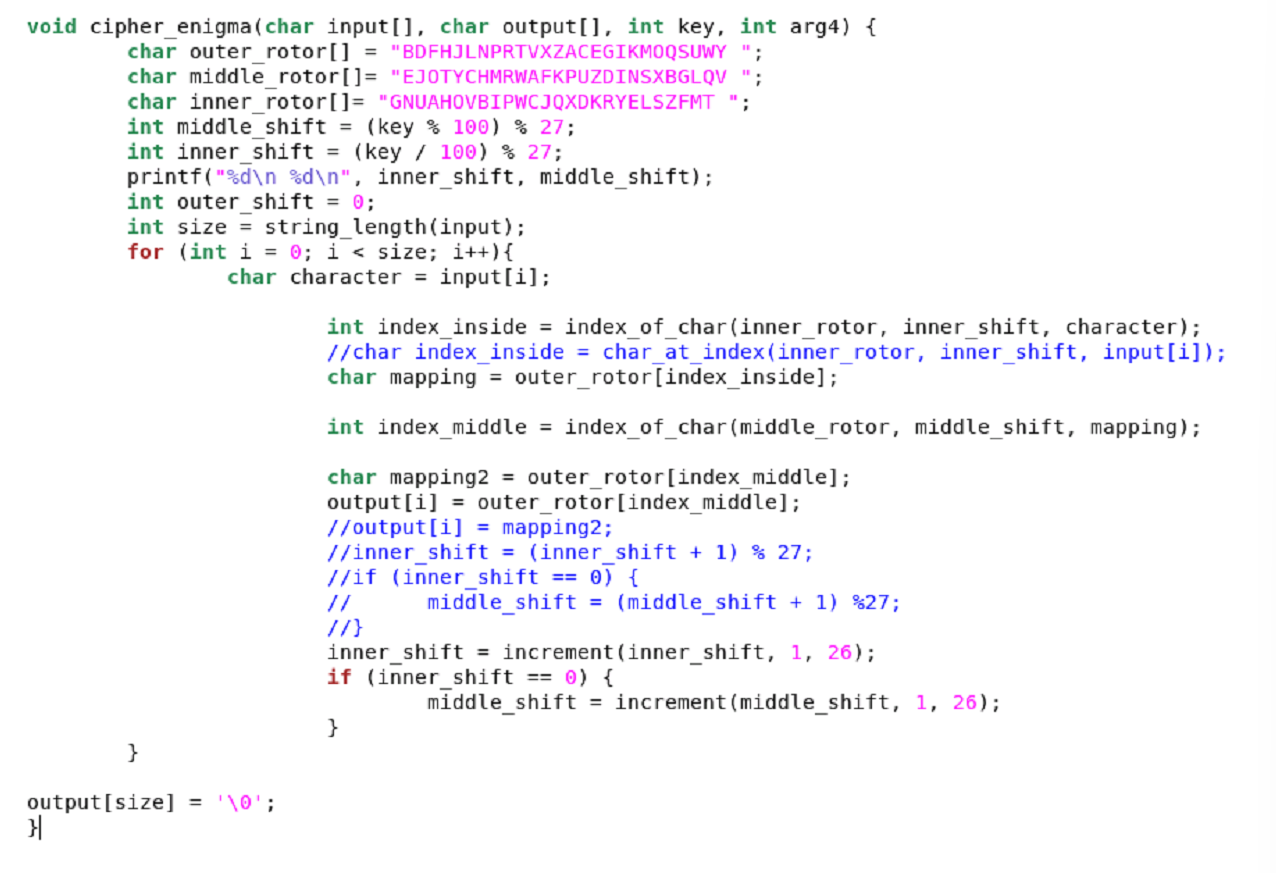
Question: whats wrong with my code its printing CMAPAHNNEYGSMQU when its supposed to print BRIMRTQMCKUTVF U Task 3 - Enigma For this task, you need to
whats wrong with my code its printing CMAPAHNNEYGSMQU when its supposed to print BRIMRTQMCKUTVF U
Task Enigma
For this task, you need to implement a simplified version of the famous Enigma cipher that was used by the axis powers in WWII. The cracking of the Enigma cipher was also a seminal moment in the history of computer science. You can learn a bit more about this in the History section on Enigma.
For a detailed explanation of the workings of this cipher, first read our writeup in the Enigma Operation for this PA section. This will provide you with all the details you need. Make sure you thoroughly understand the Enigma operation before you go on to the coding part. Note that the Enigma treats spaces just like other characters so we are again working with a set of symbols, as with the substitution cipher Again, indexofchar and charatindex will be extremely helpful in implementing your code.
The function you need to implement has the following functionality:
cipherenigmaarg arg arg arg
The first argument, arg is a string containing the data that needs to be encrypted or decrypted. It is not modified by this function.
The second argument, arg is a string that will contain the result of the encryption or decryption.
The third argument, arg is a nonnegative integer number of at most digits specifying the key of the Enigma cipher. The two rightmost decimal digits what are called the least significant digits of this number represent the initial shift to right! of the inner rotor what we called keypart in Enigma Operation for this PA The next two digits give the initial shift to the right of the middle rotor what we called keypart For example, the number means that the initial shift of the inner rotor is positions which is the same as positions, as it wraps around after turns and that of the middle rotor is positions. So the following keys all result in the same starting positions of the rotors: etc.
For the fourth argument, arg which is an integer, we either pass ENCRYPT or DECRYPT, which are the two constants that we defined.
The function returns nothing.
The default positions for all the rotors ie without any initial shift and the organization of the symbols on each of the rotors is as shown in Enigma Operation for this PA This information is also already included in the ciphers.c starter code, so you dont have to copy it from this document. When testing your Enigma, make sure it also works for messages longer than symbols to capture the effects of the rotors moving after encrypting each symbol
For this task, you only need to implement the encryption functionality of the Enigma cipher. This means that you only need to implement what happens when arg is ENCRYPT. Again, you can implement decrypt for extra credit see Task Decryption of the Substitution and Enigma Ciphers
void cipherenigmachar input char output int key, int arg
char outerrotor "BDFHJLNPRTVXZACEGIKMOQSUWY ;
char middlerotor "EJOTYCHMRWAFKPUZDINSXBGLQV ;
char innerrotor "GNUAHOVBIPWCJQXDKRYELSZFMT ;
int middleshift key ;
int innershift key ;
printfoverlined
d
innershift, middleshift;
int outershift ;
int size stringlengthinput;
for int i ; i size; i
char character inputi;
int indexinside indexofcharinnerrotor, innershift, character;
char indexinside chratindexinnerrotor, innershift, inputi;
char mapping outerrotorindexinside;
int indexmiddle indexofcharmiddlerotor, middleshift, mapping;
char mapping outerrotorindexmiddle;
outputi outerrotorindexmiddle;
outputi mapping;
innershift innershift ;
if inershift
middleshift middleshift ;
innershift incrementinnershift, ;
if innershift
miiddleshift incrementmiddleshift, ;
outputsize;
Step by Step Solution
There are 3 Steps involved in it
1 Expert Approved Answer
Step: 1 Unlock

Question Has Been Solved by an Expert!
Get step-by-step solutions from verified subject matter experts
Step: 2 Unlock
Step: 3 Unlock
 Study Help