



Question: When configuring Solver, please keep the following instructions in mind: File Preview :tive variable is the Payroll for the Week The objective variable needs to
When configuring Solver, please keep the following instructions in mind:
File Preview :tive variable is the Payroll for the Week
The objective variable needs to be minimized
The changing variable cells are the Number of Lifeguards on Each Schedule Schedules AG
The Number of Lifeguards on Each Schedule must be greater than or equal to zero
The Number of Lifeguards on Each Schedule must be an Integer
For each day of the week, the Schedule Total must be greater than or equal to the Actual Demand for that day
Use GRG NonLinear as the Solving Method
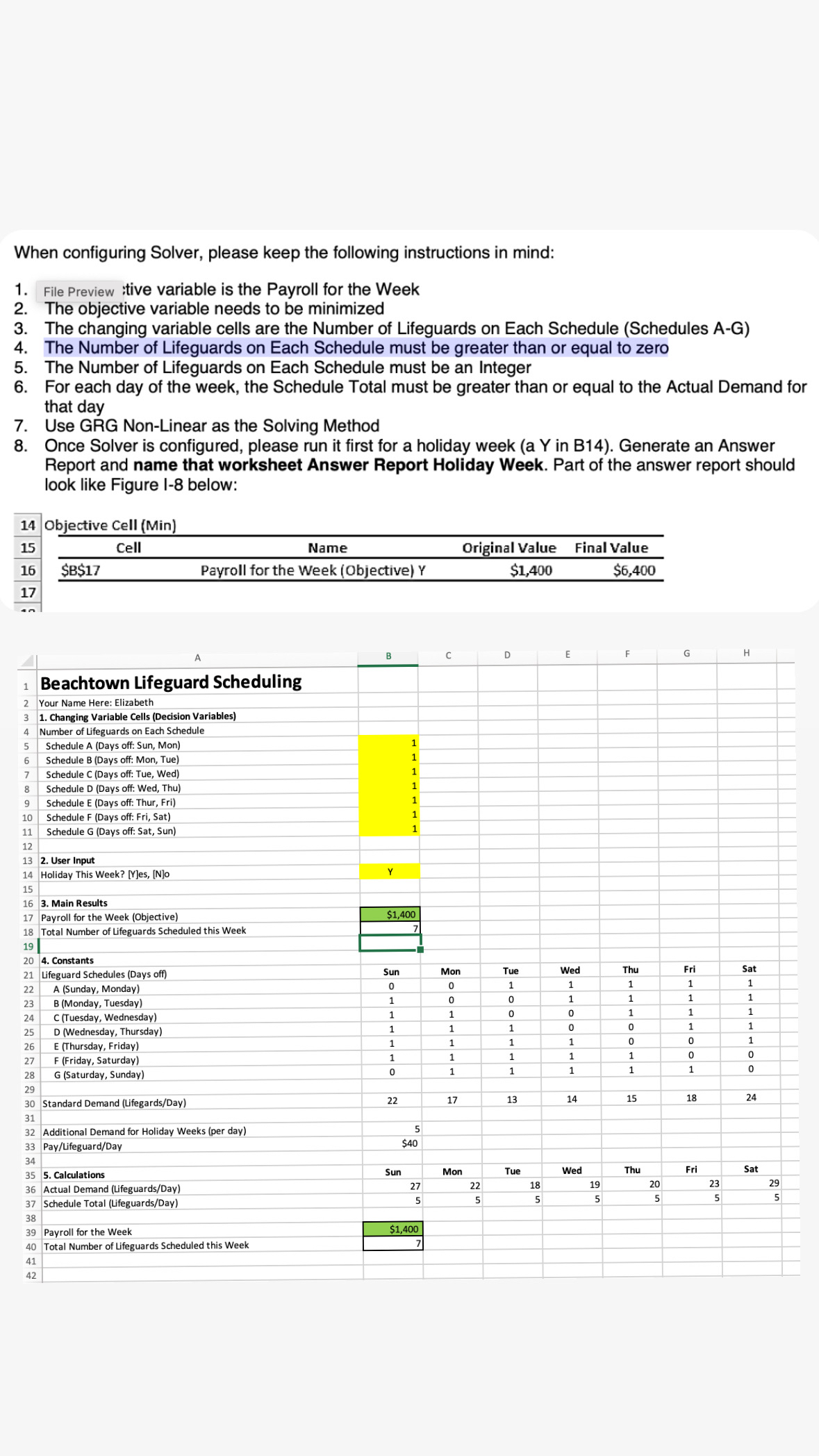
Once Solver is configured, please run it first for a holiday week a Y in B Generate an Answer Report and name that worksheet Answer Report Holiday Week. Part of the answer report should look like Figure I below:
Objective Cell Min
tableCellName,Original value,Final Value$B$Payroll for the Week
Beachtown Lifeguard Scheduling
Your Name Here: Elizabeth
Changing Variable Cells Decision Variables
Number of Lifeguards on Each Schedule
Schedule A Days off: Sun, Mon
Schedule B Days off: Mon, Tue
Schedule C Days off: Tue, Wed
Schedule D Days off: Wed, Thu
Schedule E Days off: Thur, Fri
Schedule F Days off: Fri, Sat
Schedule G Days off: Sat, Sun
User Input
Holiday This Week? YesNo
Main Results
Payroll for the Week Objective
Total Number of Lifeguards Scheduled this Week
Constants
Lifeguard Schedules Days off
A Sunday Monday
B Monday Tuesday
C Tuesday Wednesday
D Wednesday Thursday
E Thursday Friday
Friday Saturday
G Saturday Sunday
tableB
C
D
G
E
H
A
When configuring Solver, please keep the following instructions in mind:
File Preview :tive variable is the Payroll for the Week
The objective variable needs to be minimized
The changing variable cells are the Number of Lifeguards on Each Schedule Schedules AG
The Number of Lifeguards on Each Schedule must be greater than or equal to zero
The Number of Lifeguards on Each Schedule must be an Integer
For each day of the week, the Schedule Total must be greater than or equal to the Actual Demand for that day
Use GRG NonLinear as the Solving Method
Once Solver is configured, please run it first for a holiday week a Y in B Generate an Answer Report and name that worksheet Answer Report Holiday Week. Part of the answer report should look like Figure I below:
Objective Cell Min
tableName,Original Value,Final Value$ B $Payroll for the Week Objective$$objective$$
Step by Step Solution
There are 3 Steps involved in it
1 Expert Approved Answer
Step: 1 Unlock

Question Has Been Solved by an Expert!
Get step-by-step solutions from verified subject matter experts
Step: 2 Unlock
Step: 3 Unlock