







Question: when i compile they the 0 behind is an error how to move it please this is the program On a rt With A Buick
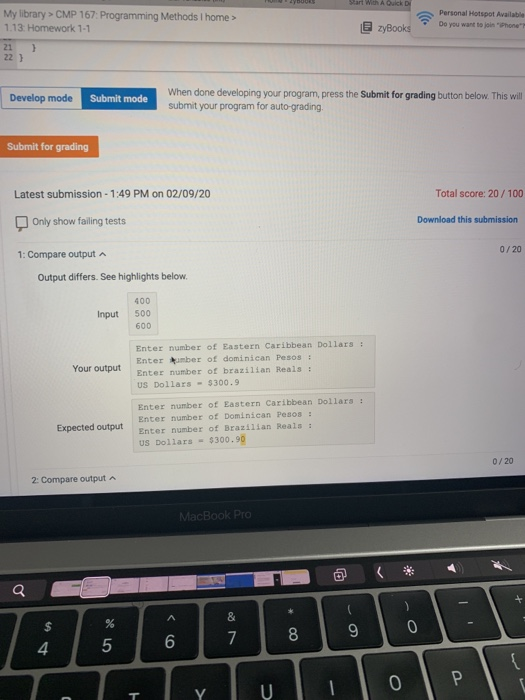 when i compile they the 0 behind is an error how to move it please
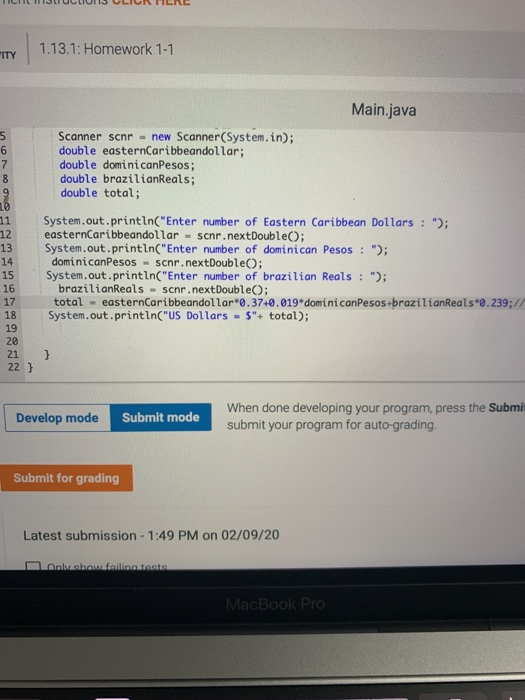 this is the program
On a rt With A Buick zyBooks . Personal Hotspot Available Do you want to join "Phone My library > CMP 167: Programming Methods i home > 1.13. Homework 1-1 21 ) 22 Develop mode Submit mode When done developing your program, press the Submit for grading button below. This will submit your program for auto-grading Submit for grading Latest submission - 1:49 PM on 02/09/20 Total score: 20/100 Only show failing tests Download this submission 1: Compare output 0/20 Output differs. See highlights below. Input 400 500 600 Your output Enter number of Eastern Caribbean Dollars : Enter amber of dominican Pesos : Enter number of brazilian Reals : US Dollars - 5300.9 Expected output Enter number of Eastern Caribbean Dollars Enter number of Dominican Pesos : Enter number of Brazilian Reals : US Dollars - $300.90 0/20 2: Compare output A MacBook Pro TICIILLUCLIUI15 CLICK HERE CITY 1.13.1: Homework 1-1 Main.java His O 0 1 0 0 Scanner scnr = new Scanner(System.in); double easternCaribbeandollar; double dominican Pesos; double brazilianReals; double total; 13 System.out.println("Enter number of Eastern Caribbean Dollars : "); easternCaribbeandollar - scnr.nextDouble; System.out.println("Enter number of dominican Pesos : "); dominicanPesos - scnr.nextDouble; System.out.println("Enter number of brazilian Reals : "); brazilianReals - scnr.nextDouble; total - easternCaribbeandollar 0.37+0.019 dominicanPesos+brazilianReals 0.239:// System.out.println("US Dollars = $"+ total); 17 22 } Develop mode Submit mode When done developing your program, press the Submit submit your program for auto-grading. Submit for grading Latest submission - 1:49 PM on 02/09/20 olvashofiline tests MacBook Pro
Step by Step Solution
There are 3 Steps involved in it

Get step-by-step solutions from verified subject matter experts
 Study Help